C++ Structures: Complete Struct Guide with Examples
What Are Structures?
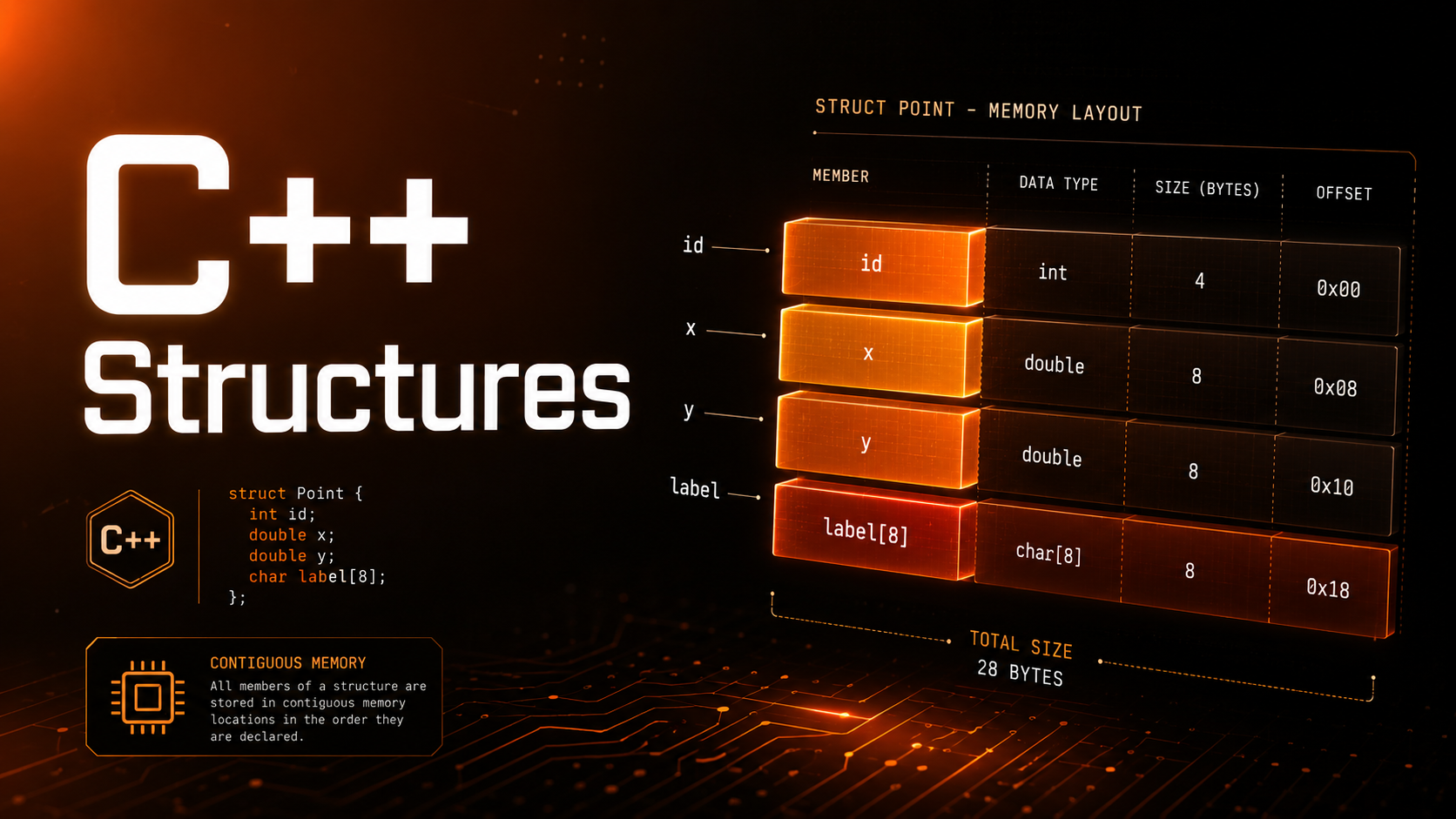
A structure (struct) groups related variables of different types under a single name. Instead of managing separate variables for a point’s x and y coordinates, you bundle them into one Point struct. This is the first step toward custom data types — the foundation of object-oriented programming in C++.
Structs in C++ are far more powerful than in C. They can have member functions, constructors, access specifiers, and even inheritance. In fact, in C++ a struct is technically the same as a class with one difference: struct members are public by default.
Defining a Struct
#include <iostream>
#include <string>
using namespace std;

// Define a struct
struct Point {
    double x;
    double y;
};

struct Student {
    string name;
    int age;
    double gpa;
    bool is_active;
};

struct Color {
    int r, g, b;     // Red, Green, Blue (0-255)
    float alpha;     // Transparency (0.0-1.0)
};

int main() {
    Point p;
    p.x = 3.0;
    p.y = 4.0;
    cout << "Point: (" << p.x << ", " << p.y << ")" << endl;

    Student s;
    s.name = "Alice";
    s.age = 20;
    s.gpa = 3.85;
    s.is_active = true;
    cout << s.name << " | GPA: " << s.gpa << endl;

    return 0;
}
Creating and Using Struct Instances
#include <iostream>
#include <string>
using namespace std;

struct Rectangle {
    double width;
    double height;
};

int main() {
    // Method 1: Declare then assign
    Rectangle r1;
    r1.width = 10.0;
    r1.height = 5.0;

    // Method 2: Aggregate initialization
    Rectangle r2 = {20.0, 8.0};

    // Method 3: Designated initializers (C++20)
    // Rectangle r3 = {.width = 15.0, .height = 6.0};

    // Method 4: Uniform initialization
    Rectangle r4{12.0, 4.0};

    // Copy
    Rectangle r5 = r1;  // Copies all fields

    // Access
    double area = r2.width * r2.height;
    cout << "Area: " << area << endl;  // 160

    // Modify
    r1.width = 25.0;
    cout << "r1 width: " << r1.width << endl;
    cout << "r5 width: " << r5.width << endl;  // 10 — copy is independent

    return 0;
}
Initialization Methods
#include <iostream>
#include <string>
using namespace std;

struct Config {
    string host = "localhost";    // Default member initializer (C++11)
    int port = 8080;
    bool ssl = false;
    int timeout = 5000;
};

int main() {
    Config c1;  // Uses all defaults
    cout << c1.host << ":" << c1.port << endl;  // localhost:8080

    Config c2{"api.example.com", 443, true};  // Override first 3, timeout=5000
    cout << c2.host << ":" << c2.port
         << (c2.ssl ? " (SSL)" : "") << endl;

    // Partial override keeps defaults for remaining fields
    Config c3 = {"db.local", 5432};  // ssl=false, timeout=5000

    return 0;
}
Structs and Functions
#include <iostream>
#include <cmath>
using namespace std;

struct Point {
    double x, y;
};

// Pass by value (copy)
void print_point(Point p) {
    cout << "(" << p.x << ", " << p.y << ")" << endl;
}

// Pass by const reference (efficient, read-only)
double distance(const Point& a, const Point& b) {
    return sqrt(pow(b.x - a.x, 2) + pow(b.y - a.y, 2));
}

// Pass by reference (modify)
void translate(Point& p, double dx, double dy) {
    p.x += dx;
    p.y += dy;
}

// Return a struct
Point midpoint(const Point& a, const Point& b) {
    return {(a.x + b.x) / 2, (a.y + b.y) / 2};
}

int main() {
    Point a{0, 0}, b{3, 4};
    print_point(a);
    cout << "Distance: " << distance(a, b) << endl;  // 5

    translate(a, 1, 1);
    print_point(a);  // (1, 1)

    Point m = midpoint(a, b);
    print_point(m);  // (2, 2.5)
    return 0;
}
Member Functions
C++ structs can have functions inside them — these are called member functions or methods.
#include <iostream>
#include <cmath>
using namespace std;

struct Circle {
    double radius;

    double area() const {
        return 3.14159265 * radius * radius;
    }

    double circumference() const {
        return 2 * 3.14159265 * radius;
    }

    void scale(double factor) {
        radius *= factor;
    }

    void print() const {
        cout << "Circle(r=" << radius
             << ", area=" << area()
             << ", circ=" << circumference() << ")" << endl;
    }
};

int main() {
    Circle c{5.0};
    c.print();      // Circle(r=5, area=78.5398, circ=31.4159)
    c.scale(2.0);
    c.print();      // Circle(r=10, area=314.159, circ=62.8319)
    return 0;
}
The const after the function signature means the function does not modify the struct. Always mark read-only member functions as const.
Constructors
#include <iostream>
#include <string>
using namespace std;

struct Employee {
    string name;
    string department;
    double salary;

    // Default constructor
    Employee() : name("Unknown"), department("Unassigned"), salary(0) {}

    // Parameterized constructor
    Employee(string n, string d, double s)
        : name(n), department(d), salary(s) {}

    // Constructor with defaults
    Employee(string n, double s)
        : name(n), department("Engineering"), salary(s) {}

    void print() const {
        cout << name << " | " << department
             << " | $" << salary << endl;
    }
};

int main() {
    Employee e1;
    Employee e2("Alice", "Marketing", 85000);
    Employee e3("Bob", 95000);

    e1.print();  // Unknown | Unassigned | $0
    e2.print();  // Alice | Marketing | $85000
    e3.print();  // Bob | Engineering | $95000
    return 0;
}
Nested Structs
#include <iostream>
#include <string>
using namespace std;

struct Address {
    string street;
    string city;
    string state;
    string zip;
};

struct Person {
    string name;
    int age;
    Address home;
    Address work;
};

int main() {
    Person p = {
        "Alice", 30,
        {"123 Main St", "Springfield", "IL", "62701"},
        {"456 Corp Blvd", "Chicago", "IL", "60601"}
    };

    cout << p.name << " lives at " << p.home.street
         << ", " << p.home.city << endl;
    cout << "Works at " << p.work.street
         << ", " << p.work.city << endl;
    return 0;
}
Structs in Arrays and Vectors
#include <iostream>
#include <vector>
#include <string>
#include <algorithm>
using namespace std;

struct Product {
    string name;
    double price;
    int stock;
};

int main() {
    vector<Product> inventory = {
        {"Laptop", 999.99, 15},
        {"Mouse", 29.99, 200},
        {"Keyboard", 79.99, 85},
        {"Monitor", 449.99, 30}
    };

    // Sort by price
    sort(inventory.begin(), inventory.end(),
        [](const Product& a, const Product& b) {
            return a.price < b.price;
        });

    cout << "Products by price:" << endl;
    for (const auto& p : inventory) {
        cout << "  " << p.name << ": $" << p.price
             << " (" << p.stock << " in stock)" << endl;
    }

    // Find a product
    auto it = find_if(inventory.begin(), inventory.end(),
        [](const Product& p) { return p.name == "Laptop"; });
    if (it != inventory.end()) {
        cout << "Found: " << it->name << " $" << it->price << endl;
    }

    return 0;
}
Comparison Operators
#include <iostream>
using namespace std;

struct Point {
    double x, y;

    // C++20: spaceship operator generates all comparisons
    // auto operator<=>(const Point&) const = default;

    // Pre-C++20: define manually
    bool operator==(const Point& other) const {
        return x == other.x && y == other.y;
    }

    bool operator!=(const Point& other) const {
        return !(*this == other);
    }

    bool operator<(const Point& other) const {
        if (x != other.x) return x < other.x;
        return y < other.y;
    }
};

int main() {
    Point a{1, 2}, b{1, 2}, c{3, 4};
    cout << (a == b) << endl;  // 1
    cout << (a != c) << endl;  // 1
    cout << (a < c) << endl;   // 1
    return 0;
}
C++17 Structured Bindings
#include <iostream>
#include <string>
using namespace std;

struct Result {
    bool success;
    string message;
    int code;
};

Result do_something() {
    return {true, "Operation completed", 200};
}

int main() {
    // C++17 structured bindings
    auto [ok, msg, code] = do_something();
    cout << "Success: " << ok << endl;
    cout << "Message: " << msg << endl;
    cout << "Code: " << code << endl;

    // Works with any aggregate type
    struct Point { double x, y, z; };
    Point p{1.0, 2.0, 3.0};
    auto [x, y, z] = p;
    cout << x << ", " << y << ", " << z << endl;

    return 0;
}
Struct vs Class
In C++, the only technical difference between struct and class is the default access level: struct members are public by default, class members are private.
struct MyStruct {
    int x;    // public by default
    void f(); // public by default
};

class MyClass {
    int x;    // private by default
    void f(); // private by default
public:
    int y;    // explicitly public
};

// Convention:
// - Use struct for simple data aggregates (PODs, DTOs)
// - Use class for types with invariants, encapsulation, complex behavior
Real-World Examples
#include <iostream>
#include <string>
#include <vector>
using namespace std;

// HTTP Response
struct HttpResponse {
    int status_code;
    string body;
    vector<pair<string,string>> headers;

    bool is_ok() const { return status_code >= 200 && status_code < 300; }
};

// Configuration
struct DatabaseConfig {
    string host = "localhost";
    int port = 5432;
    string database = "myapp";
    string user = "admin";
    int pool_size = 10;
    bool ssl = false;
};

// Game entity
struct Entity {
    int id;
    string name;
    struct { double x, y; } position;
    struct { double w, h; } hitbox;
    int health = 100;

    bool is_alive() const { return health > 0; }
};

int main() {
    HttpResponse resp{200, "{"status":"ok"}", {{"Content-Type","application/json"}}};
    cout << "OK: " << resp.is_ok() << endl;

    DatabaseConfig db{.host="db.prod.internal", .port=5433, .ssl=true};

    Entity player{1, "Hero", {10.0, 20.0}, {32.0, 64.0}, 100};
    cout << player.name << " at (" << player.position.x
         << ", " << player.position.y << ")" << endl;
    return 0;
}
Practice Exercises
Exercise 1: Create a Date struct with day, month, year fields and a function that prints it in “DD/MM/YYYY” format.
Exercise 2: Create a BankAccount struct with member functions for deposit, withdraw, and get_balance.
Exercise 3: Create a vector<Student>, sort it by GPA descending, and print the top 3 students.
Exercise 4: Implement a Matrix struct that stores a 2D vector and has member functions for addition and transpose.
Summary
Structures let you group related data into a single type, making code more organized and expressive. C++ structs go beyond C — they support member functions, constructors, operator overloading, and default member initializers. Use structs for simple data aggregates and switch to classes when you need encapsulation and invariants. In the next lesson, you will learn classes and objects — the heart of object-oriented programming in C++.