C Variables and Data Types: int, float, char, double Explained 2026
C Variables and Data Types
Every program works with data — numbers, text, measurements, flags. In C, you must tell the compiler exactly what type of data a variable holds before you use it. This is not optional. C is a statically typed language, which means the compiler checks types at compile time and allocates exactly the right amount of memory for each variable.
Understanding C data types is understanding how your computer stores information in memory. Each type occupies a specific number of bytes, can hold a specific range of values, and behaves differently in arithmetic operations. Get this wrong and you get overflow bugs, precision errors, and security vulnerabilities. Get it right and your code is efficient, predictable, and correct.
Declaring Variables
A variable in C is a named region of memory. You declare a variable by specifying its type followed by its name:
int age;          // declares an integer variable
float temperature; // declares a floating-point variable
char grade;        // declares a character variable
You can also initialize variables at the point of declaration:
int age = 25;
float temperature = 98.6f;
char grade = 'A';
double pi = 3.14159265358979;
In C, variable names must start with a letter or underscore, contain only letters, digits, and underscores, and cannot be a reserved keyword. C is case-sensitive — Age, age, and AGE are three different variables.
Uninitialized Variables
If you declare a variable without initializing it, its value is undefined — it contains whatever random data was already in that memory location. This is a critical difference from languages like Python or Java that initialize variables to zero or null automatically.
int x;         // undefined value — could be anything
printf("%d", x); // undefined behavior!
Always initialize your variables. Compiling with -Wall -Wextra will warn you about uninitialized variable usage.
Integer Types
Integers store whole numbers without decimal points. C provides several integer types with different sizes.
int
The int type is the most commonly used integer. On modern 64-bit systems, int is 4 bytes (32 bits) and can hold values from -2,147,483,648 to 2,147,483,647.
int count = 0;
int population = 8000000;
int negative = -42;
short and long
short is at least 2 bytes. long is at least 4 bytes. long long is at least 8 bytes. The exact sizes depend on the platform, which is why the C standard only specifies minimum sizes.
short small = 32000;
long big = 2000000000L;
long long huge = 9000000000000000000LL;
The L and LL suffixes tell the compiler to treat the literal as a long or long long respectively.
unsigned Types
Adding unsigned to an integer type means it can only hold non-negative values, but its maximum value doubles. An unsigned int (4 bytes) ranges from 0 to 4,294,967,295.
unsigned int positive_only = 42;
unsigned short port = 8080;
unsigned long file_size = 1073741824UL; // 1 GB
Use unsigned when negative values make no sense — array indices, sizes, bit masks, and network port numbers.
Fixed-Width Types (stdint.h)
For portable code, use the fixed-width types from <stdint.h>:
#include <stdint.h>

int8_t   tiny    = -128;     // exactly 8 bits, signed
uint8_t  byte    = 255;      // exactly 8 bits, unsigned
int16_t  medium  = -32000;   // exactly 16 bits
uint16_t port    = 443;      // exactly 16 bits, unsigned
int32_t  normal  = -100000;  // exactly 32 bits
uint32_t ipv4    = 3232235777U; // exactly 32 bits
int64_t  big     = -9000000000000000000LL;
uint64_t huge    = 18000000000000000000ULL;
These types guarantee exact sizes regardless of platform, which is critical for network protocols, file formats, and hardware interfaces.
Floating-Point Types
Floating-point types store decimal numbers. C uses the IEEE 754 standard for floating-point representation.
float
float is 4 bytes with approximately 6-7 decimal digits of precision:
float pi = 3.14159f;    // f suffix for float literal
float temp = -40.0f;
float small = 1.5e-10f; // scientific notation
double
double is 8 bytes with approximately 15-16 decimal digits of precision. This is the default floating-point type in C:
double precise_pi = 3.14159265358979;
double avogadro = 6.022e23;
double planck = 6.626e-34;
When you write a decimal literal like 3.14 without a suffix, C treats it as a double, not a float. Use the f suffix for float literals.
long double
long double provides extended precision — typically 80 bits (10 bytes) on x86 systems, giving about 18-19 decimal digits:
long double very_precise = 3.14159265358979323846L;Floating-Point Pitfalls
Floating-point numbers cannot represent all decimal values exactly. This is not a C bug — it is a fundamental limitation of binary representation:
float a = 0.1f;
float b = 0.2f;
printf("%.20f\n", a + b); // 0.30000001192092895508 (not 0.3!)
Never compare floating-point numbers with ==. Instead, check if the difference is within an acceptable tolerance:
if (fabs(a + b - 0.3) < 1e-6) {
    printf("Close enough\n");
}
Character Type
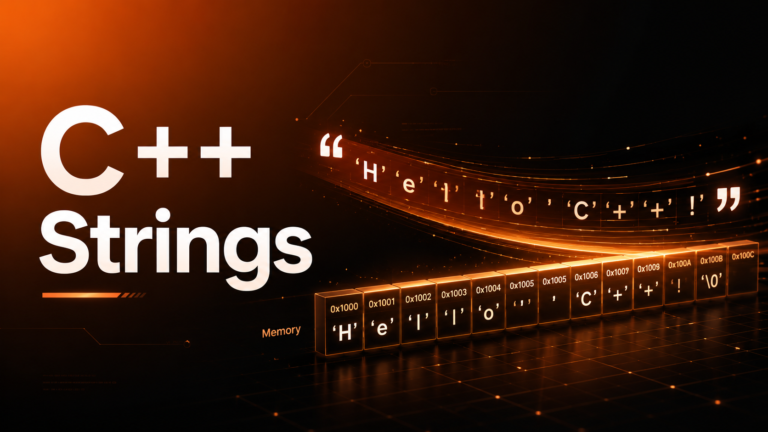
The char type is 1 byte and stores a single character using its ASCII value:
char letter = 'A';      // ASCII value 65
char digit  = '7';      // ASCII value 55
char newline = '\n';    // ASCII value 10
char null_char = '\0';  // ASCII value 0
Characters in C are actually small integers. You can perform arithmetic on them:
char c = 'A';
printf("%c %d\n", c, c);    // A 65
printf("%c\n", c + 1);       // B
printf("%c\n", 'a' - 32);    // A (lowercase to uppercase)
The char type can be signed (-128 to 127) or unsigned (0 to 255) depending on the platform. Use signed char or unsigned char when the signedness matters.
The _Bool Type
C99 introduced _Bool as a boolean type, and <stdbool.h> provides the friendlier bool, true, and false names:
#include <stdbool.h>

bool is_valid = true;
bool has_error = false;

if (is_valid) {
    printf("Valid!\n");
}
Under the hood, bool is just an integer that can hold 0 or 1. In C, zero is false and any non-zero value is true.
The sizeof Operator
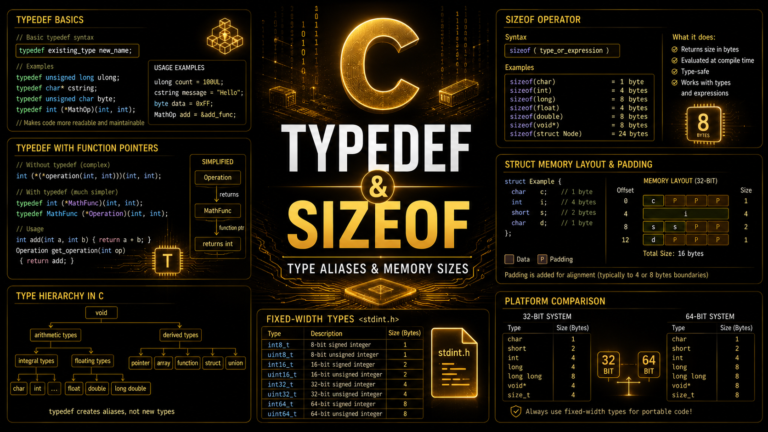
The sizeof operator returns the size of a type or variable in bytes. It is evaluated at compile time, not runtime:
#include <stdio.h>

int main(void) {
    printf("char:        %zu bytes\n", sizeof(char));
    printf("short:       %zu bytes\n", sizeof(short));
    printf("int:         %zu bytes\n", sizeof(int));
    printf("long:        %zu bytes\n", sizeof(long));
    printf("long long:   %zu bytes\n", sizeof(long long));
    printf("float:       %zu bytes\n", sizeof(float));
    printf("double:      %zu bytes\n", sizeof(double));
    printf("long double: %zu bytes\n", sizeof(long double));
    return 0;
}
On a typical 64-bit Linux system, this outputs:
char:        1 bytes
short:       2 bytes
int:         4 bytes
long:        8 bytes
long long:   8 bytes
float:       4 bytes
double:      8 bytes
long double: 16 bytes
The %zu format specifier is for size_t, the type returned by sizeof. Using %d instead would trigger a compiler warning.
Type Limits (limits.h and float.h)
The <limits.h> header defines the minimum and maximum values for each integer type:
#include <limits.h>

printf("INT_MIN:  %d\n", INT_MIN);   // -2147483648
printf("INT_MAX:  %d\n", INT_MAX);   //  2147483647
printf("UINT_MAX: %u\n", UINT_MAX);  //  4294967295
printf("CHAR_MIN: %d\n", CHAR_MIN);  // -128 or 0
printf("CHAR_MAX: %d\n", CHAR_MAX);  //  127 or 255
Similarly, <float.h> provides precision and range constants for floating-point types:
#include <float.h>

printf("FLT_DIG:  %d\n", FLT_DIG);   // 6 (digits of precision)
printf("DBL_DIG:  %d\n", DBL_DIG);   // 15
printf("FLT_MAX:  %e\n", FLT_MAX);   // 3.402823e+38
printf("DBL_MAX:  %e\n", DBL_MAX);   // 1.797693e+308
Type Conversion
C automatically converts between types in certain situations (implicit conversion) and allows you to force conversions (explicit casting).
Implicit Conversion
When you mix types in an expression, C promotes the smaller type to the larger one:
int a = 5;
double b = 2.5;
double result = a + b; // a promoted to double: 7.5
The promotion hierarchy: char → short → int → long → long long → float → double → long double.
Dangerous Implicit Conversions
Assigning a larger type to a smaller one truncates the value:
int big = 100000;
short small = big;  // truncated! value wraps around

double pi = 3.14159;
int rounded = pi;   // truncated to 3 (no rounding!)
Compile with -Wconversion to catch these dangerous narrowing conversions.
Explicit Casting
Use a cast to explicitly convert between types:
int a = 7, b = 2;
double result = (double)a / b;  // 3.5 (not 3!)

// Without the cast:
double wrong = a / b;  // 3.0 (integer division happens first)
The cast (double)a converts a to a double before the division, forcing floating-point division instead of integer division. This is one of the most common C gotchas for beginners.
Constants
Use const to declare variables that should not be modified after initialization:
const double PI = 3.14159265358979;
const int MAX_USERS = 1000;
// PI = 3.14; // ERROR: assignment to const variable
You can also use #define for compile-time constants (we will cover this in detail in the Preprocessor lesson):
#define MAX_BUFFER 4096
#define VERSION "2.1.0"
The difference: const creates a typed variable that occupies memory. #define is a text substitution that happens before compilation — no type checking, no memory allocation.
Common Mistakes with Variables and Data Types
Integer Overflow
int max = INT_MAX;       // 2147483647
int overflow = max + 1;  // UNDEFINED BEHAVIOR
// On most systems: wraps to -2147483648
Signed integer overflow is undefined behavior in C. The compiler is free to assume it never happens and optimize accordingly. Always check before arithmetic operations on user input.
Using %d for Larger Types
long long big = 9000000000LL;
printf("%d\n", big);    // WRONG: undefined behavior
printf("%lld\n", big);  // CORRECT
Match your format specifier to the type: %d for int, %ld for long, %lld for long long, %f for double, %u for unsigned int.
Practice Exercise
Write a program that declares variables of each type, prints their values and sizes, and performs a type conversion. Compile with -Wall -Wextra -Wconversion and fix any warnings.
#include <stdio.h>
#include <limits.h>
#include <stdbool.h>

int main(void) {
    int age = 25;
    float height = 5.9f;
    double balance = 1234567.89;
    char initial = 'C';
    bool is_student = true;

    printf("Age: %d (size: %zu bytes)\n", age, sizeof(age));
    printf("Height: %.1f (size: %zu bytes)\n", height, sizeof(height));
    printf("Balance: %.2f (size: %zu bytes)\n", balance, sizeof(balance));
    printf("Initial: %c (ASCII: %d, size: %zu)\n",
           initial, initial, sizeof(initial));
    printf("Student: %s\n", is_student ? "yes" : "no");

    // Type conversion demo
    int a = 7, b = 2;
    printf("Integer division: %d / %d = %d\n", a, b, a / b);
    printf("Float division:   %d / %d = %.2f\n", a, b, (double)a / b);

    return 0;
}
What Comes Next
Now that you understand how C stores data in memory, the next lesson covers Operators & Expressions — arithmetic, comparison, logical, and bitwise operators. You will learn operator precedence rules and write expressions that combine different types correctly.