C++ Function Overloading & Default Arguments Guide
Why Overloading Exists
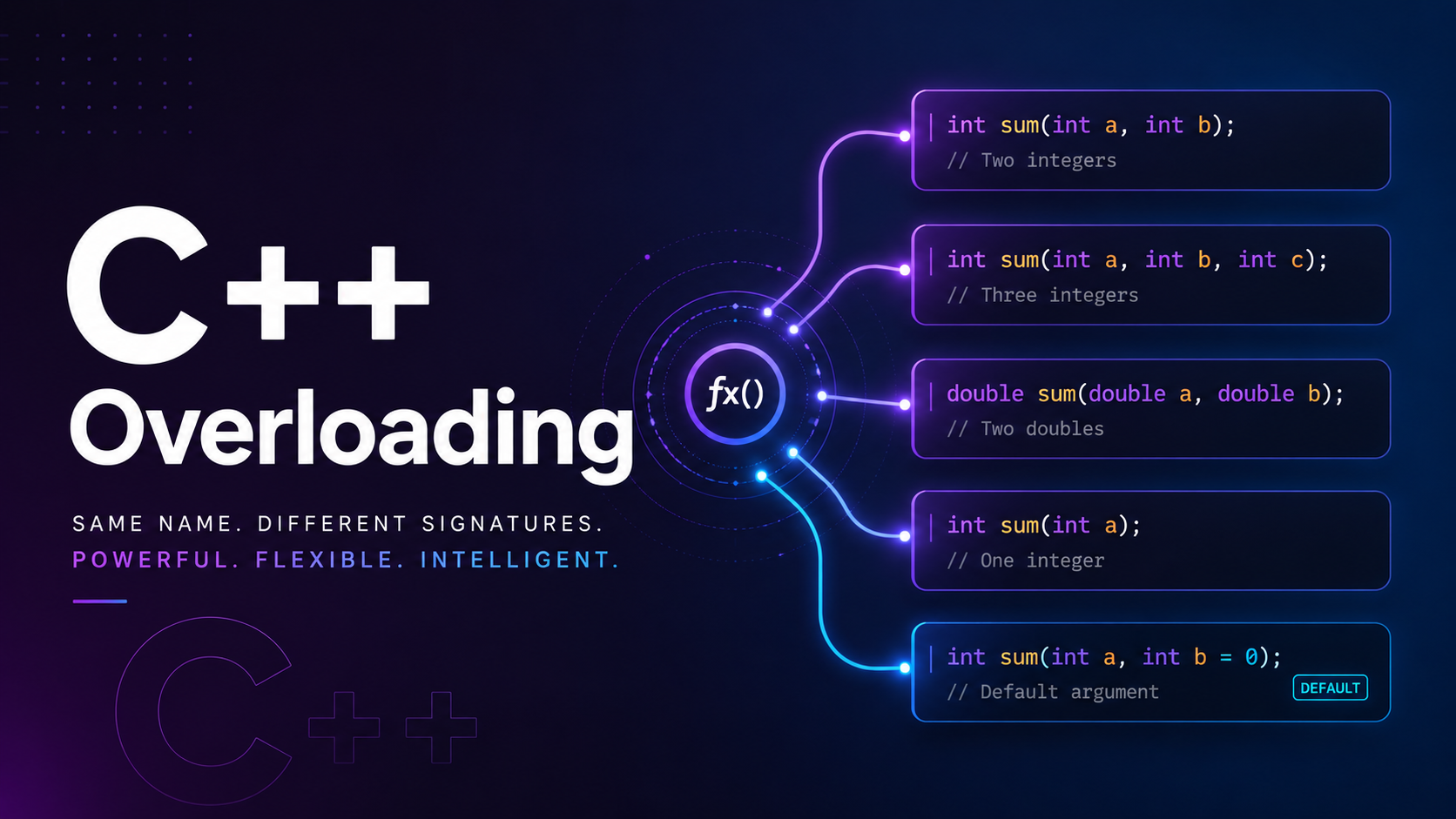
In C, if you wanted a function that prints an integer and another that prints a double, you needed two different names — print_int() and print_double(). C++ eliminated this inconvenience with function overloading: you can define multiple functions with the same name as long as their parameter lists differ.
Overloading makes APIs cleaner. The standard library uses it everywhere — std::to_string() works with int, double, long, and more. One name, many implementations. This lesson teaches you how to use it, what the compiler does behind the scenes, and when to use default arguments instead.
Function Overloading Basics
Two functions can share the same name if they differ in the number or types of their parameters. The return type alone is not enough to distinguish overloads.
#include <iostream>
#include <string>
using namespace std;

void print(int value) {
    cout << "Integer: " << value << endl;
}

void print(double value) {
    cout << "Double: " << value << endl;
}

void print(string value) {
    cout << "String: " << value << endl;
}

int main() {
    print(42);          // Calls print(int)
    print(3.14);        // Calls print(double)
    print("hello"s);    // Calls print(string)
    return 0;
}
// Output:
// Integer: 42
// Double: 3.14
// String: hello
The compiler chooses the correct function at compile time based on the argument types. This is called static dispatch or overload resolution.
How the Compiler Resolves Overloads
When you call an overloaded function, the compiler follows a strict resolution process. It first looks for an exact match, then tries standard conversions (like int to double), and finally tries user-defined conversions. If multiple matches are equally good, the call is ambiguous and the compiler rejects it.
#include <iostream>
using namespace std;

void foo(int x)    { cout << "int: " << x << endl; }
void foo(double x) { cout << "double: " << x << endl; }
void foo(long x)   { cout << "long: " << x << endl; }

int main() {
    foo(10);        // Exact match: foo(int)
    foo(3.14);      // Exact match: foo(double)
    foo(10L);       // Exact match: foo(long)
    foo(3.14f);     // float -> double promotion: foo(double)
    // foo('A');     // Ambiguous? char promotes to int: foo(int)
    return 0;
}
The resolution priority from the C++ standard is: exact match > promotion (e.g., float to double, char to int) > standard conversion (e.g., int to double) > user-defined conversion.
Overloading by Type
#include <iostream>
#include <cmath>
using namespace std;

// Same name, different parameter types
double absolute(double x) {
    return (x < 0) ? -x : x;
}

int absolute(int x) {
    return (x < 0) ? -x : x;
}

long absolute(long x) {
    return (x < 0) ? -x : x;
}

int main() {
    cout << absolute(-42) << endl;       // 42 (int version)
    cout << absolute(-3.14) << endl;     // 3.14 (double version)
    cout << absolute(-100L) << endl;     // 100 (long version)
    return 0;
}
Overloading by Parameter Count
#include <iostream>
using namespace std;

int area(int side) {
    return side * side;  // Square
}

int area(int length, int width) {
    return length * width;  // Rectangle
}

double area(double radius) {
    return 3.14159265 * radius * radius;  // Circle
}

int main() {
    cout << "Square:    " << area(5) << endl;
    cout << "Rectangle: " << area(5, 10) << endl;
    cout << "Circle:    " << area(5.0) << endl;
    return 0;
}
// Output:
// Square:    25
// Rectangle: 50
// Circle:    78.5398
Overloading with const
For member functions (covered in depth in the OOP lessons), you can overload based on const qualification. A const object calls the const version; a non-const object calls the non-const version.
#include <iostream>
#include <string>
using namespace std;

class TextBuffer {
    string data;
public:
    TextBuffer(string s) : data(s) {}

    // Non-const version: allows modification
    char& at(int index) {
        cout << "(mutable access) ";
        return data[index];
    }

    // Const version: read-only
    const char& at(int index) const {
        cout << "(const access) ";
        return data[index];
    }
};

int main() {
    TextBuffer buf("Hello");
    const TextBuffer cbuf("World");

    cout << buf.at(0) << endl;    // (mutable access) H
    cout << cbuf.at(0) << endl;   // (const access) W

    buf.at(0) = 'J';  // Allowed — non-const
    // cbuf.at(0) = 'X';  // Error — const version returns const ref

    return 0;
}
Ambiguous Overloads
If the compiler cannot decide which overload to call, it flags the call as ambiguous. This is a compile-time error.
#include <iostream>
using namespace std;

void process(int x, double y) {
    cout << "int, double" << endl;
}

void process(double x, int y) {
    cout << "double, int" << endl;
}

int main() {
    process(10, 3.14);     // OK: exact match for (int, double)
    process(3.14, 10);     // OK: exact match for (double, int)
    // process(10, 20);    // ERROR: ambiguous — both need one conversion
    // Fix: cast one argument
    process(10, static_cast<double>(20));  // Now calls (int, double)
    return 0;
}
Default Arguments
Default arguments let you give parameters a fallback value. If the caller omits those arguments, the defaults kick in. This reduces the need for multiple overloads that differ only in the number of parameters.
#include <iostream>
#include <string>
using namespace std;

void greet(string name, string greeting = "Hello", int times = 1) {
    for (int i = 0; i < times; i++) {
        cout << greeting << ", " << name << "!" << endl;
    }
}

int main() {
    greet("Alice");                    // Hello, Alice!
    greet("Bob", "Hey");              // Hey, Bob!
    greet("Charlie", "Hi", 3);        // Hi, Charlie! (3 times)
    return 0;
}
Rules for Default Arguments
Default arguments have strict rules that catch many beginners off guard.
#include <iostream>
using namespace std;

// Rule 1: Defaults must be rightmost parameters
// void bad(int a = 1, int b);  // ERROR: non-default after default
void good(int a, int b = 10);   // OK

// Rule 2: Defaults are specified ONCE (declaration OR definition, not both)
int multiply(int a, int b = 2);  // Declaration with default

int multiply(int a, int b) {     // Definition WITHOUT repeating default
    return a * b;
}

// Rule 3: Defaults can be expressions
int get_default() { return 42; }
void demo(int x = get_default()) {
    cout << x << endl;
}

int main() {
    cout << multiply(5) << endl;     // 10 (b defaults to 2)
    cout << multiply(5, 3) << endl;  // 15
    demo();                            // 42
    demo(100);                         // 100
    return 0;
}
Key rule: once you give a parameter a default, every parameter to its right must also have a default. You cannot have void f(int a = 1, int b) — the compiler would not know which argument maps to which parameter if you called f(5).
Overloading vs Default Arguments
When should you overload, and when should you use defaults? Here is a practical guide.
#include <iostream>
#include <string>
#include <vector>
using namespace std;

// USE DEFAULT ARGS: same logic, fewer inputs
string format_name(string first, string last, string title = "") {
    if (title.empty()) return first + " " + last;
    return title + " " + first + " " + last;
}

// USE OVERLOADING: fundamentally different logic
void log(string message) {
    cout << "[INFO] " << message << endl;
}

void log(string message, int error_code) {
    cout << "[ERROR " << error_code << "] " << message << endl;
}

void log(vector<string> messages) {
    cout << "[BATCH] " << messages.size() << " messages:" << endl;
    for (auto& m : messages) cout << "  - " << m << endl;
}

int main() {
    cout << format_name("John", "Doe") << endl;         // John Doe
    cout << format_name("John", "Doe", "Dr.") << endl;  // Dr. John Doe

    log("Server started");
    log("Connection failed", 503);
    log({"Init OK", "DB connected", "Cache warm"});
    return 0;
}
Rule of thumb: if the function body would be identical except for fewer lines, use defaults. If the implementations diverge based on argument types or count, use overloading.
Real-World Examples
#include <iostream>
#include <string>
#include <cmath>
using namespace std;

// Real-world: a connect function with sensible defaults
struct Connection {
    string host;
    int port;
    bool ssl;
    int timeout_ms;
};

Connection connect(string host, int port = 443,
                   bool ssl = true, int timeout_ms = 5000) {
    cout << "Connecting to " << host << ":" << port
         << (ssl ? " (SSL)" : "") << " timeout=" << timeout_ms << "ms" << endl;
    return {host, port, ssl, timeout_ms};
}

// Real-world: overloaded math function
double distance(double x1, double y1, double x2, double y2) {
    return sqrt(pow(x2-x1, 2) + pow(y2-y1, 2));
}

double distance(double x1, double y1, double z1,
                double x2, double y2, double z2) {
    return sqrt(pow(x2-x1,2) + pow(y2-y1,2) + pow(z2-z1,2));
}

int main() {
    connect("api.example.com");               // port=443, ssl=true, 5s
    connect("db.local", 5432, false);         // PostgreSQL, no SSL
    connect("cache.local", 6379, false, 1000); // Redis, 1s timeout

    cout << "2D: " << distance(0,0, 3,4) << endl;       // 5
    cout << "3D: " << distance(0,0,0, 1,1,1) << endl;  // 1.73205
    return 0;
}
Common Mistakes
1. Overloading by return type alone:
// ERROR: cannot overload by return type alone
int convert(string s);
double convert(string s);  // Compiler error: redefinition
2. Ambiguity between overload and default:
void draw(int x, int y) { /* ... */ }
void draw(int x, int y, int z = 0) { /* ... */ }
// draw(10, 20);  // ERROR: ambiguous — matches both!
3. Forgetting that defaults are set once:
// In header:
void init(int size = 100);

// In .cpp — do NOT repeat the default:
void init(int size) {  // correct
    // ...
}
// void init(int size = 100) { }  // ERROR: default redefinition
Practice Exercises
Exercise 1: Create an overloaded max function that works with int, double, and string (lexicographic comparison).
Exercise 2: Write a repeat function with a default parameter: void repeat(string text, int times = 1, string separator = " ").
Exercise 3: Create overloaded print_array functions for int[], double[], and string[], each printing elements in a formatted way.
Exercise 4: Write a create_user function that uses default arguments for optional fields (role defaults to “viewer”, active defaults to true).
Summary
Function overloading lets you reuse the same name for functions that handle different types or argument counts, making your code cleaner and more intuitive. Default arguments reduce the number of overloads needed when the logic is the same but some inputs are optional. The compiler resolves overloads at compile time using a strict priority system, and flags ambiguities as errors. In the next lesson, you will learn pass by value vs pass by reference — a critical concept for understanding how C++ functions interact with data.