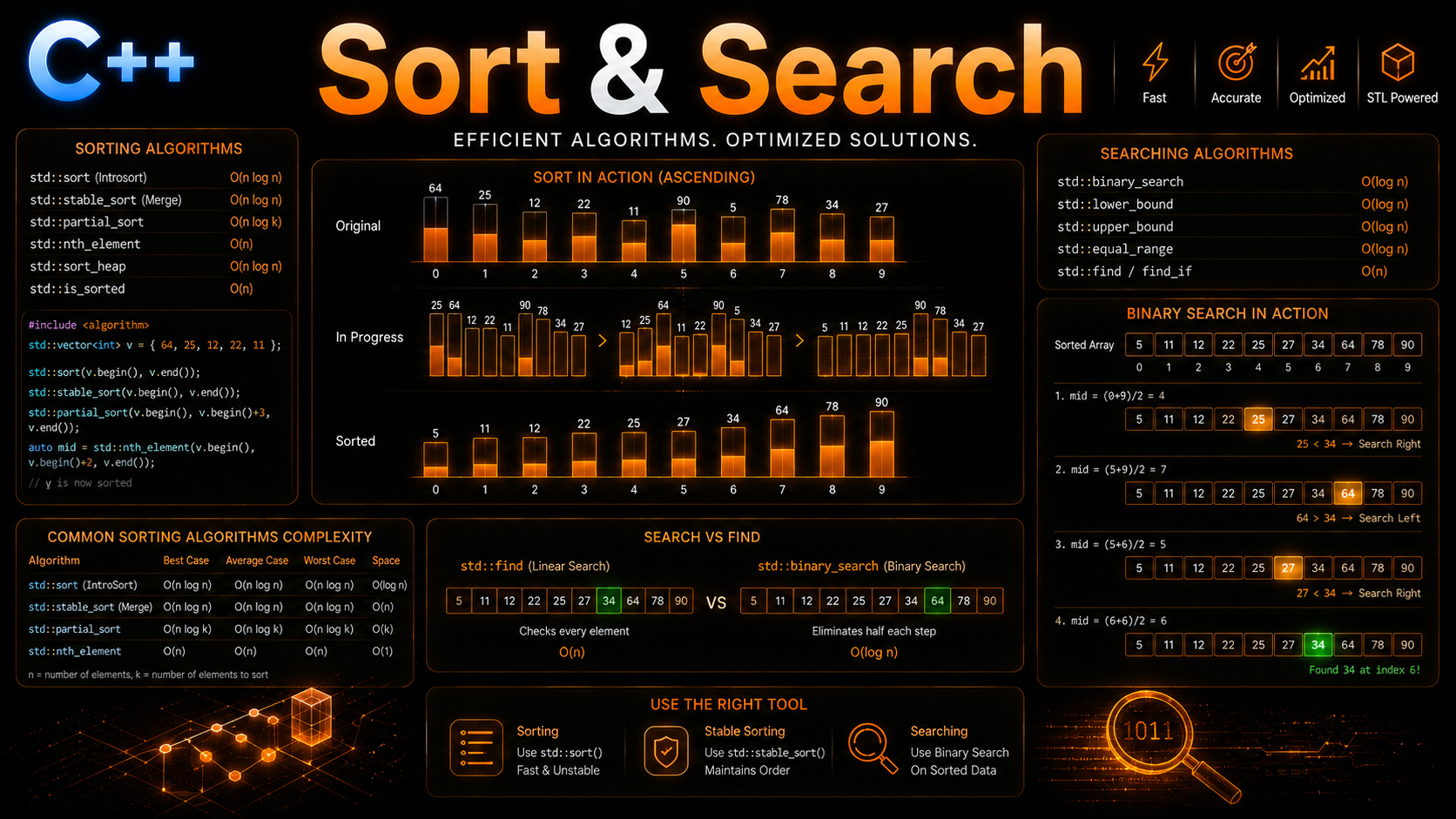
C++ Sorting & Searching Algorithms: sort, find, binary_search Guide
Table of Contents
STL Algorithm Philosophy
STL algorithms operate on iterator ranges, not containers directly. They take a [begin, end) pair and process elements without knowing what container holds them. This means the same std::sort works on vectors, arrays, deques, and raw C arrays — anything with random-access iterators.
All sorting and searching algorithms live in <algorithm>. They never allocate memory or change container size — they only rearrange or inspect elements within the given range. If you need to grow a container during an algorithm, use iterator adapters like std::back_inserter.
std::sort and Variants
#include <algorithm>
#include <vector>
#include <iostream>
#include <string>

int main() {
    std::vector<int> v = {5, 2, 8, 1, 9, 3, 7, 4, 6};

    // std::sort — Introsort (quicksort + heapsort + insertion sort)
    // O(n log n) average and worst case
    // Requires random-access iterators
    std::sort(v.begin(), v.end());
    // v = {1, 2, 3, 4, 5, 6, 7, 8, 9}

    // Sort descending
    std::sort(v.begin(), v.end(), std::greater<int>{});
    // v = {9, 8, 7, 6, 5, 4, 3, 2, 1}

    // Sort with custom comparator
    std::vector<std::string> words = {"banana", "apple", "cherry", "date"};
    std::sort(words.begin(), words.end(),
              [](const std::string& a, const std::string& b) {
                  return a.size() < b.size();  // sort by length
              });
    // words = {"date", "apple", "banana", "cherry"}

    // std::stable_sort — preserves order of equal elements
    // O(n log n) but may use O(n) extra memory
    struct Student { std::string name; int grade; };
    std::vector<Student> students = {
        {"Alice", 90}, {"Bob", 85}, {"Charlie", 90}, {"Diana", 85}
    };
    std::stable_sort(students.begin(), students.end(),
                     [](const Student& a, const Student& b) {
                         return a.grade > b.grade;
                     });
    // {Alice:90, Charlie:90, Bob:85, Diana:85}
    // Same-grade students keep original order

    // std::is_sorted — check if range is sorted
    std::vector<int> sorted = {1, 2, 3, 4, 5};
    std::cout << std::is_sorted(sorted.begin(), sorted.end()) << "\n";  // 1

    // std::is_sorted_until — find where sorting breaks
    std::vector<int> partial = {1, 2, 5, 3, 4};
    auto until = std::is_sorted_until(partial.begin(), partial.end());
    std::cout << "Sorted until index: " << (until - partial.begin()) << "\n";  // 3
}
Partial Sorting
When you don’t need the entire range sorted — just the top K elements — partial sorting algorithms are faster:
#include <algorithm>
#include <vector>

std::vector<int> v = {9, 4, 7, 2, 5, 8, 1, 3, 6};

// std::partial_sort — sort first K elements
// O(n log k) — faster than full sort when k << n
std::partial_sort(v.begin(), v.begin() + 3, v.end());
// First 3 elements are sorted: {1, 2, 3, ...rest unsorted...}
// v = {1, 2, 3, 9, 7, 8, 5, 4, 6} (typical)

// Top 3 largest
std::partial_sort(v.begin(), v.begin() + 3, v.end(), std::greater<>{});
// First 3 = {9, 8, 7, ...rest unsorted...}

// std::nth_element — find the Kth element efficiently
// O(n) average — like quickselect
std::vector<int> data = {9, 4, 7, 2, 5, 8, 1, 3, 6};
std::nth_element(data.begin(), data.begin() + 4, data.end());
// data[4] is now 5 (the median-ish value)
// Elements before it are all <= 5
// Elements after it are all >= 5
// But neither side is sorted within itself

// Use case: find median
std::vector<int> nums = {3, 1, 4, 1, 5, 9, 2, 6};
size_t mid = nums.size() / 2;
std::nth_element(nums.begin(), nums.begin() + mid, nums.end());
int median = nums[mid];  // O(n) instead of O(n log n)

// std::partial_sort_copy — sort into separate output
std::vector<int> source = {5, 2, 8, 1, 9, 3};
std::vector<int> top3(3);
std::partial_sort_copy(source.begin(), source.end(),
                       top3.begin(), top3.end());
// top3 = {1, 2, 3} — source unchanged
Searching Unsorted Data
#include <algorithm>
#include <vector>
#include <string>

std::vector<int> v = {5, 2, 8, 1, 9, 3, 7, 4, 6};

// std::find — linear search O(n)
auto it = std::find(v.begin(), v.end(), 8);
if (it != v.end()) {
    std::cout << "Found 8 at index: " << (it - v.begin()) << "\n";
}

// std::find_if — search with predicate
auto even = std::find_if(v.begin(), v.end(), [](int x) { return x % 2 == 0; });
std::cout << "First even: " << *even << "\n";  // 2

// std::find_if_not — first element NOT matching predicate
auto not_small = std::find_if_not(v.begin(), v.end(), [](int x) { return x < 5; });

// std::count / std::count_if
int even_count = std::count_if(v.begin(), v.end(), [](int x) { return x % 2 == 0; });
std::cout << "Even numbers: " << even_count << "\n";  // 4

// std::all_of / std::any_of / std::none_of
bool all_positive = std::all_of(v.begin(), v.end(), [](int x) { return x > 0; });
bool has_negative = std::any_of(v.begin(), v.end(), [](int x) { return x < 0; });
bool no_zeros = std::none_of(v.begin(), v.end(), [](int x) { return x == 0; });

// std::search — find subsequence
std::vector<int> haystack = {1, 2, 3, 4, 5, 6, 7};
std::vector<int> needle = {3, 4, 5};
auto sub = std::search(haystack.begin(), haystack.end(),
                       needle.begin(), needle.end());
if (sub != haystack.end()) {
    std::cout << "Subsequence at: " << (sub - haystack.begin()) << "\n";  // 2
}

// std::adjacent_find — find consecutive equal elements
std::vector<int> data = {1, 2, 3, 3, 4, 5};
auto adj = std::adjacent_find(data.begin(), data.end());
if (adj != data.end()) {
    std::cout << "Adjacent pair: " << *adj << "\n";  // 3
}
Binary Search Algorithms
Binary search algorithms require a sorted range. They run in O(log n):
#include <algorithm>
#include <vector>

std::vector<int> v = {1, 2, 3, 4, 5, 6, 7, 8, 9, 10};
// MUST be sorted for binary search!

// std::binary_search — returns bool (exists or not)
bool found = std::binary_search(v.begin(), v.end(), 5);   // true
bool not_found = std::binary_search(v.begin(), v.end(), 11);  // false

// std::lower_bound — first element >= value
auto lb = std::lower_bound(v.begin(), v.end(), 5);
// points to 5

// std::upper_bound — first element > value
auto ub = std::upper_bound(v.begin(), v.end(), 5);
// points to 6

// Insertion point: lower_bound tells you where to insert to keep sorted
std::vector<int> sorted = {1, 3, 5, 7, 9};
auto pos = std::lower_bound(sorted.begin(), sorted.end(), 4);
sorted.insert(pos, 4);  // {1, 3, 4, 5, 7, 9}

// std::equal_range — returns [lower_bound, upper_bound) pair
std::vector<int> data = {1, 2, 2, 2, 3, 4, 5};
auto [lo, hi] = std::equal_range(data.begin(), data.end(), 2);
int count = std::distance(lo, hi);  // 3 (three 2s)
std::cout << "2 appears " << count << " times\n";

// Find exact element (lower_bound + check)
auto it = std::lower_bound(v.begin(), v.end(), 7);
if (it != v.end() && *it == 7) {
    std::cout << "Found 7 at index: " << (it - v.begin()) << "\n";
}
// Better than binary_search because you get the position, not just bool
In practice, prefer lower_bound over binary_search. binary_search only tells you yes/no. lower_bound gives you the position, and you can check *it == value yourself. It’s more flexible with the same O(log n) cost.
Custom Comparators
#include <algorithm>
#include <vector>
#include <string>

struct Employee {
    std::string name;
    int salary;
    int years;
};

std::vector<Employee> team = {
    {"Alice", 120000, 5},
    {"Bob", 95000, 3},
    {"Charlie", 110000, 7},
    {"Diana", 105000, 2}
};

// Sort by salary descending
std::sort(team.begin(), team.end(), [](const Employee& a, const Employee& b) {
    return a.salary > b.salary;
});

// Sort by multiple criteria: salary desc, then years asc
std::sort(team.begin(), team.end(), [](const Employee& a, const Employee& b) {
    if (a.salary != b.salary) return a.salary > b.salary;
    return a.years < b.years;
});

// Binary search with comparator (must match sort order!)
std::sort(team.begin(), team.end(), [](const Employee& a, const Employee& b) {
    return a.salary < b.salary;
});
// Find first employee with salary >= 100000
auto it = std::lower_bound(team.begin(), team.end(), 100000,
    [](const Employee& emp, int sal) { return emp.salary < sal; });

// Projection-based comparator pattern
auto by_field = [](auto getter) {
    return [getter](const auto& a, const auto& b) {
        return getter(a) < getter(b);
    };
};
std::sort(team.begin(), team.end(), by_field([](const Employee& e) { return e.name; }));
Min and Max Algorithms
#include <algorithm>
#include <vector>

std::vector<int> v = {5, 2, 8, 1, 9, 3};

// Min/max element — returns iterator
auto min_it = std::min_element(v.begin(), v.end());
auto max_it = std::max_element(v.begin(), v.end());
std::cout << "Min: " << *min_it << " at index " << (min_it - v.begin()) << "\n";
std::cout << "Max: " << *max_it << " at index " << (max_it - v.begin()) << "\n";

// minmax_element — find both in one pass (1.5n comparisons vs 2n)
auto [lo, hi] = std::minmax_element(v.begin(), v.end());

// std::min / std::max / std::minmax — for individual values
int a = std::min(3, 7);       // 3
int b = std::max(3, 7);       // 7
auto [mn, mx] = std::minmax(3, 7);  // {3, 7}

// With initializer list
int smallest = std::min({5, 2, 8, 1, 9});  // 1

// std::clamp (C++17) — restrict to range
int clamped = std::clamp(15, 0, 10);  // 10
int clamped2 = std::clamp(-5, 0, 10); // 0
int clamped3 = std::clamp(7, 0, 10);  // 7
Heap Algorithms
You can build and manipulate heaps directly on a vector without using priority_queue:
#include <algorithm>
#include <vector>

std::vector<int> v = {5, 2, 8, 1, 9, 3};

// Build a max-heap — O(n)
std::make_heap(v.begin(), v.end());
// v[0] is now the largest: 9

// Push to heap — O(log n)
v.push_back(10);
std::push_heap(v.begin(), v.end());  // restore heap property
// v[0] is now 10

// Pop from heap — O(log n)
std::pop_heap(v.begin(), v.end());   // moves max to back
int max_val = v.back();              // 10
v.pop_back();                        // remove it

// Sort a heap — O(n log n)
std::sort_heap(v.begin(), v.end());
// v is now sorted ascending

// Check if range is a heap
bool is_heap = std::is_heap(v.begin(), v.end());

// Heapsort in one line
std::vector<int> data = {5, 2, 8, 1, 9, 3};
std::make_heap(data.begin(), data.end());
std::sort_heap(data.begin(), data.end());
// data = {1, 2, 3, 5, 8, 9}
Merge Algorithms
#include <algorithm>
#include <vector>

// Merge two sorted ranges — O(n + m)
std::vector<int> a = {1, 3, 5, 7};
std::vector<int> b = {2, 4, 6, 8};
std::vector<int> merged(a.size() + b.size());
std::merge(a.begin(), a.end(), b.begin(), b.end(), merged.begin());
// merged = {1, 2, 3, 4, 5, 6, 7, 8}

// std::inplace_merge — merge two sorted halves of one range
std::vector<int> v = {1, 3, 5, 2, 4, 6};
//                     sorted    sorted
std::inplace_merge(v.begin(), v.begin() + 3, v.end());
// v = {1, 2, 3, 4, 5, 6}
// Useful after sorting two halves independently
Ranges Versions (C++20)
#include <algorithm>
#include <ranges>
#include <vector>

std::vector<int> v = {5, 2, 8, 1, 9, 3};

// Ranges algorithms accept containers directly — no .begin()/.end()
std::ranges::sort(v);
std::ranges::reverse(v);

// Projection — sort by a derived value
struct Person { std::string name; int age; };
std::vector<Person> people = {{"Alice", 30}, {"Bob", 25}, {"Charlie", 35}};

// Sort by age using projection (no lambda comparator needed!)
std::ranges::sort(people, {}, &Person::age);
// Equivalent to: sort by person.age ascending

// Sort by name descending
std::ranges::sort(people, std::ranges::greater{}, &Person::name);

// Find with projection
auto it = std::ranges::find(people, "Bob", &Person::name);

// Binary search with projection
std::ranges::sort(people, {}, &Person::age);
bool found = std::ranges::binary_search(people, 30, {}, &Person::age);

// min/max with projection
auto youngest = std::ranges::min(people, {}, &Person::age);
auto oldest = std::ranges::max(people, {}, &Person::age);
C++20 ranges projections are a game-changer. Instead of writing [](const Person& a, const Person& b) { return a.age < b.age; }, you write {}, &Person::age. The {} is the default comparator (less), and the projection extracts the field to compare on. Cleaner, shorter, less error-prone.
Common Mistakes
Binary searching unsorted data. binary_search, lower_bound, and upper_bound require sorted ranges. Using them on unsorted data produces wrong results — no error, just silently incorrect.
Mismatched sort and search comparators. If you sort with std::greater (descending), you must also pass std::greater to lower_bound. Using the default less comparator on descending data gives wrong results.
Using std::sort on list. std::sort requires random-access iterators. list provides bidirectional iterators. Use list.sort() instead.
Not checking find return value. std::find returns end() when the element isn’t found. Dereferencing end() is undefined behavior. Always check it != container.end().
Confusing lower_bound and upper_bound. lower_bound returns the first element >= value. upper_bound returns the first element > value. For counting occurrences of a value, use equal_range which returns both.
Summary
std::sort provides O(n log n) general-purpose sorting with Introsort. stable_sort preserves equal-element order. partial_sort and nth_element handle top-K and selection problems faster. Linear search uses find/find_if/count_if. Binary search algorithms (lower_bound, upper_bound, equal_range) provide O(log n) lookup on sorted data. Heap algorithms build and manipulate heaps directly on vectors. C++20 ranges add projections for cleaner comparisons. Always ensure data is sorted before using binary search algorithms. In the next lesson, you’ll explore transform, accumulate, and other data-processing algorithms that round out the STL toolkit.