C break continue goto: Loop Control Statements Guide 2026
C break, continue, and goto
Normal loop execution follows a predictable pattern — check condition, run body, update, repeat. But sometimes you need to break that pattern. You might find the answer early and want to stop looping. You might encounter invalid data and want to skip to the next iteration. Or, in rare cases, you might need to jump out of deeply nested code to a cleanup section.
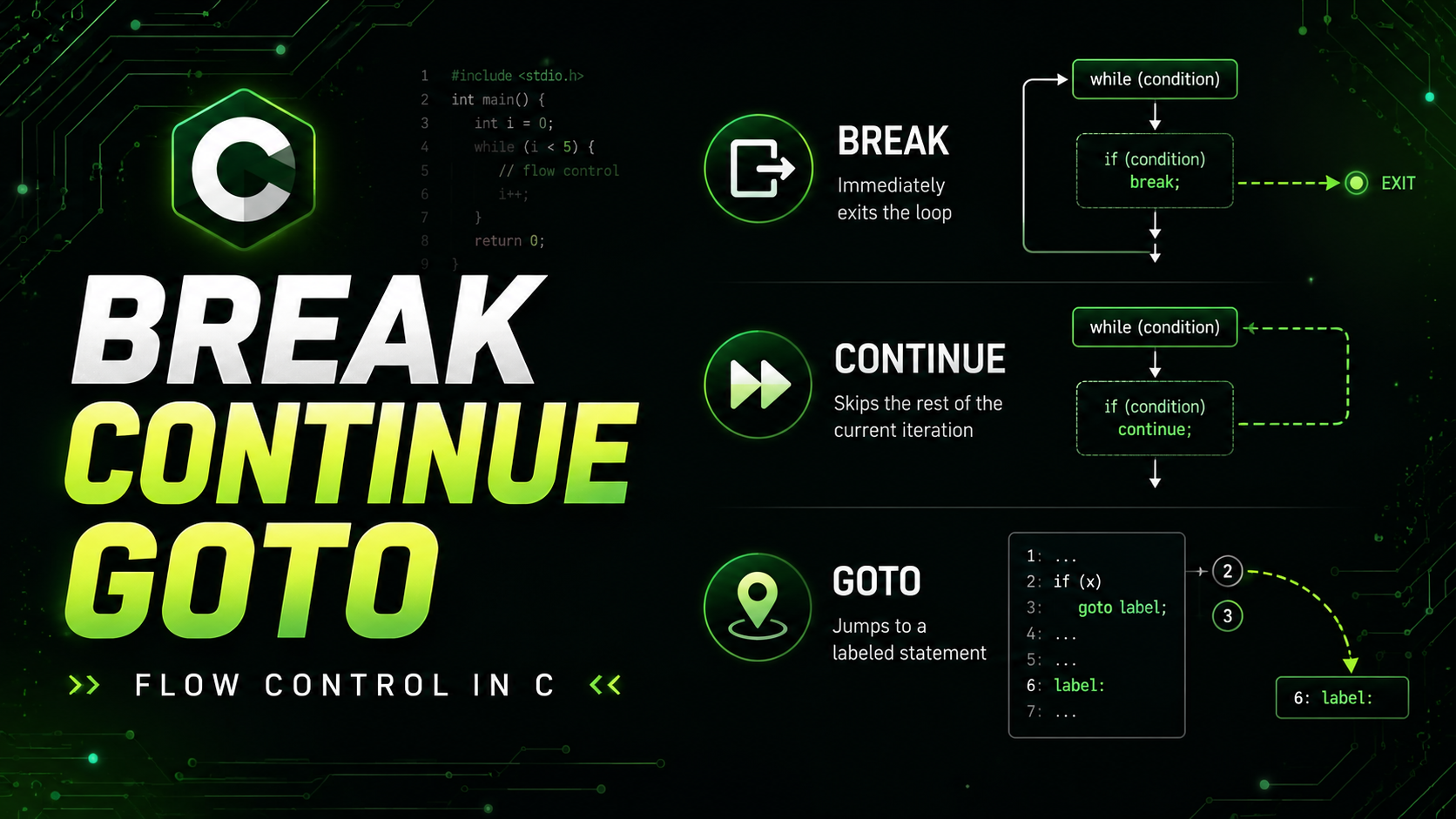
C provides three statements for altering control flow: break exits the nearest loop or switch immediately, continue skips the rest of the current iteration and jumps to the next one, and goto jumps unconditionally to a labeled statement anywhere in the same function.
The break Statement
The break statement exits the innermost enclosing loop or switch immediately. Execution continues with the first statement after the loop:
#include <stdio.h>

int main(void) {
    // Search for a value in an array
    int arr[] = {4, 8, 15, 16, 23, 42};
    int len = sizeof(arr) / sizeof(arr[0]);
    int target = 16;
    int found = -1;

    for (int i = 0; i < len; i++) {
        if (arr[i] == target) {
            found = i;
            break;  // no need to keep searching
        }
    }

    if (found >= 0) {
        printf("Found %d at index %d\n", target, found);
    } else {
        printf("%d not found\n", target);
    }

    return 0;
}
Without break, the loop would continue checking the remaining elements even after finding the target. For large arrays, this wastes significant time.
break in while Loops
// Read input until user types "quit" or max entries reached
char input[100];
int count = 0;

while (count < 100) {
    printf("Enter command (or 'quit'): ");
    scanf("%99s", input);

    if (strcmp(input, "quit") == 0) {
        printf("Exiting...\n");
        break;
    }

    printf("Processing: %s\n", input);
    count++;
}
// Execution continues here after break
break in Infinite Loops
// Event loop pattern
while (1) {
    Event event = get_next_event();

    if (event.type == EVENT_QUIT) {
        break;
    }

    handle_event(event);
}
The infinite loop with an internal break is a standard pattern in C. It cleanly expresses "run until a condition is met" without duplicating the exit condition in both the loop header and the body.
break Only Exits One Level
In nested loops, break only exits the innermost loop:
for (int i = 0; i < 5; i++) {
    for (int j = 0; j < 5; j++) {
        if (j == 3) break;  // exits inner loop only
        printf("(%d,%d) ", i, j);
    }
    printf("\n");
    // break does NOT exit outer loop
}
// Prints:
// (0,0) (0,1) (0,2)
// (1,0) (1,1) (1,2)
// ... etc
To exit multiple nested loops, you need either a flag variable, a goto, or restructuring the code into a function with return. We will cover the goto approach later in this lesson.
The continue Statement
The continue statement skips the rest of the current iteration and jumps to the next one. In a for loop, it jumps to the update step. In a while loop, it jumps to the condition check:
// Print only odd numbers
for (int i = 0; i < 10; i++) {
    if (i % 2 == 0) continue;  // skip even numbers
    printf("%d ", i);
}
// Output: 1 3 5 7 9
continue in for vs while
In a for loop, continue still executes the update expression:
for (int i = 0; i < 5; i++) {
    if (i == 2) continue;
    printf("%d ", i);  // prints 0 1 3 4
}
// i++ still runs when continue is hit
In a while loop, continue jumps directly to the condition — if the update is in the body, it gets skipped:
// BUG: infinite loop!
int i = 0;
while (i < 5) {
    if (i == 2) continue;  // skips i++ below!
    printf("%d ", i);
    i++;  // never reached when i == 2
}

// FIX: put the update before continue
int i = 0;
while (i < 5) {
    if (i == 2) {
        i++;
        continue;
    }
    printf("%d ", i);
    i++;
}
This is a common bug when converting for loops to while loops. The for loop's update is always executed, but a while loop's update in the body is skippable.
Practical Uses of continue
// Skip invalid records
for (int i = 0; i < record_count; i++) {
    if (!is_valid(records[i])) {
        log_warning("Skipping invalid record %d", i);
        continue;
    }
    process_record(records[i]);
}

// Filter while processing
for (int i = 0; i < len; i++) {
    if (arr[i] < 0) continue;     // skip negatives
    if (arr[i] > 1000) continue;  // skip outliers
    sum += arr[i];
    count++;
}
The continue pattern keeps the main logic at the natural indentation level instead of wrapping it in deeply nested conditions. Compare:
// Without continue: deep nesting
for (int i = 0; i < n; i++) {
    if (is_valid(data[i])) {
        if (data[i].active) {
            if (data[i].age > 18) {
                process(data[i]);
            }
        }
    }
}

// With continue: flat structure
for (int i = 0; i < n; i++) {
    if (!is_valid(data[i])) continue;
    if (!data[i].active) continue;
    if (data[i].age <= 18) continue;
    process(data[i]);
}
The second version is called "guard clauses" — each continue guards against an invalid case, leaving the main logic clear and unindented.
The goto Statement
The goto statement jumps unconditionally to a labeled statement in the same function:
goto label_name;

// ... other code ...

label_name:
    // execution continues here
goto is the most controversial statement in C. Edsger Dijkstra's famous 1968 letter "Go To Statement Considered Harmful" argued that unrestricted jumps make code hard to reason about. Most coding standards discourage or ban goto. However, there are a few specific situations where goto produces cleaner code than the alternatives.
Legitimate Use 1: Exiting Nested Loops
// Find a specific value in a 2D matrix
int found_row = -1, found_col = -1;

for (int i = 0; i < rows; i++) {
    for (int j = 0; j < cols; j++) {
        if (matrix[i][j] == target) {
            found_row = i;
            found_col = j;
            goto found;
        }
    }
}
printf("Not found.\n");
goto done;

found:
    printf("Found at (%d, %d)\n", found_row, found_col);

done:
    // cleanup or continue
Without goto, you would need a flag variable and checks in both loops, which is more verbose and harder to follow.
Legitimate Use 2: Centralized Cleanup (Error Handling)
This is the most widely accepted use of goto in C. The Linux kernel uses this pattern extensively:
int process_file(const char *path) {
    FILE *fp = NULL;
    char *buffer = NULL;
    int result = -1;

    fp = fopen(path, "r");
    if (!fp) {
        perror("fopen");
        goto cleanup;
    }

    buffer = malloc(4096);
    if (!buffer) {
        perror("malloc");
        goto cleanup;
    }

    // Do the actual work
    if (fread(buffer, 1, 4096, fp) == 0) {
        perror("fread");
        goto cleanup;
    }

    // Process buffer...
    result = 0; // success

cleanup:
    free(buffer);   // free(NULL) is safe
    if (fp) fclose(fp);
    return result;
}
The goto cleanup pattern ensures all resources are freed regardless of where an error occurs. Without it, you would need nested if blocks or repeated cleanup code at each error point. The Linux kernel has over 100,000 uses of goto, almost all following this cleanup pattern.
When NOT to Use goto
Never use goto to jump backward (creating a loop), jump into the middle of a block, or jump into or out of a different function. These uses create spaghetti code that is impossible to maintain. If you can solve the problem with a loop, function call, or simple restructuring, do that instead.
// TERRIBLE: goto as a loop
int i = 0;
loop_start:
    if (i >= 5) goto loop_end;
    printf("%d\n", i);
    i++;
    goto loop_start;
loop_end:
    // Just use a for loop!!
Combining break, continue, and Conditional Logic
#include <stdio.h>
#include <ctype.h>

int main(void) {
    // Process a string: count letters, digits, other
    char input[] = "Hello, World! 2026 #C";
    int letters = 0, digits = 0, other = 0;

    for (int i = 0; input[i] != '\0'; i++) {
        char c = input[i];

        if (c == ' ') continue;  // skip spaces

        if (isalpha(c)) {
            letters++;
        } else if (isdigit(c)) {
            digits++;
        } else {
            other++;
        }
    }

    printf("Letters: %d, Digits: %d, Other: %d\n",
           letters, digits, other);

    return 0;
}
Practical Example: Simple Command Parser
#include <stdio.h>
#include <string.h>

int main(void) {
    char cmd[100];

    printf("Commands: help, version, count N, quit\n");

    while (1) {
        printf("> ");
        fflush(stdout);

        if (fgets(cmd, sizeof(cmd), stdin) == NULL) break;

        // Remove trailing newline
        cmd[strcspn(cmd, "\n")] = '\0';

        if (strlen(cmd) == 0) continue;  // empty input

        if (strcmp(cmd, "quit") == 0 || strcmp(cmd, "q") == 0) {
            printf("Goodbye!\n");
            break;
        }

        if (strcmp(cmd, "help") == 0) {
            printf("Available commands: help, version, count N, quit\n");
            continue;
        }

        if (strcmp(cmd, "version") == 0) {
            printf("v1.0.0\n");
            continue;
        }

        int n;
        if (sscanf(cmd, "count %d", &n) == 1) {
            for (int i = 1; i <= n; i++) {
                printf("%d ", i);
            }
            printf("\n");
            continue;
        }

        printf("Unknown command: '%s'. Type 'help'.\n", cmd);
    }

    return 0;
}
This command parser demonstrates the interplay between while(1), break (for quitting), and continue (for jumping back to the prompt after handling each command). This pattern is the backbone of interactive programs, shells, and CLI tools.
Summary: When to Use Each
Use break when you have found what you need and continuing the loop would waste time. Use continue when the current iteration has invalid or uninteresting data and you want to skip to the next one. Use goto only for centralized resource cleanup or breaking out of deeply nested loops — and only when the alternatives are messier.
What Comes Next
You now have the complete set of C control flow tools: conditionals (if/else, switch), loops (while, do-while, for), and flow modifiers (break, continue, goto). The next section of the C roadmap moves to Functions — defining, calling, and organizing code into reusable, testable units. Functions are where C programs go from linear scripts to structured, maintainable software.