C for Loop: Counted Iteration and Array Traversal Guide 2026
C for Loop
The for loop is C’s most commonly used loop construct. It packs initialization, condition, and update into a single line, making the loop’s structure immediately visible. When you know how many times a loop should run — iterating through an array, counting from 0 to N, or stepping through a range — the for loop is the natural choice.
for Loop Syntax
for (initialization; condition; update) {
    // body
}
The three parts inside the parentheses control the loop:
#include <stdio.h>

int main(void) {
    for (int i = 0; i < 5; i++) {
        printf("i = %d\n", i);
    }
    return 0;
}
// Output: i = 0, 1, 2, 3, 4
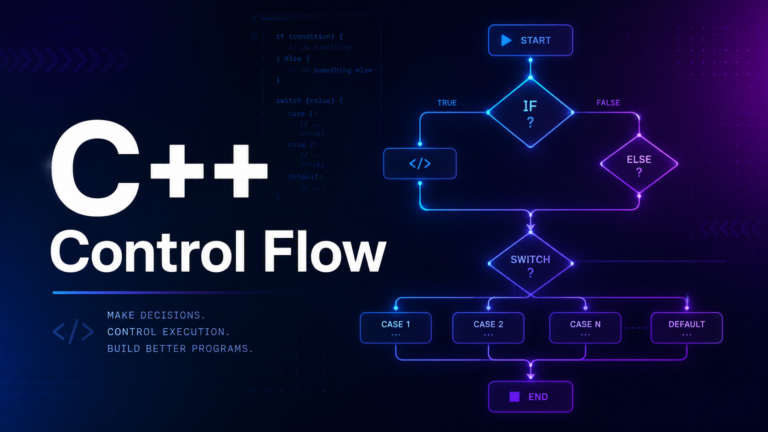
Initialization (int i = 0) runs once before the loop starts. Condition (i < 5) is checked before each iteration — if false, the loop exits. Update (i++) runs after each iteration, before the condition is checked again.
Execution Order
The exact execution sequence is: init → check condition → body → update → check condition → body → update → ... → check condition (false) → exit. The update always runs after the body, and the condition is always checked before the body.
Common for Loop Patterns
Counting Up
// 0 to 9 (10 iterations)
for (int i = 0; i < 10; i++) {
    printf("%d ", i);
}

// 1 to 10 (10 iterations)
for (int i = 1; i <= 10; i++) {
    printf("%d ", i);
}

// Even numbers: 0, 2, 4, 6, 8
for (int i = 0; i < 10; i += 2) {
    printf("%d ", i);
}
Counting Down
// 10 to 1
for (int i = 10; i >= 1; i--) {
    printf("%d ", i);
}
printf("Go!\n");

// 5 to 0
for (int i = 5; i >= 0; i--) {
    printf("%d\n", i);
}
Iterating Over an Array
int scores[] = {85, 92, 78, 95, 88};
int len = sizeof(scores) / sizeof(scores[0]);

for (int i = 0; i < len; i++) {
    printf("Score %d: %d\n", i + 1, scores[i]);
}

// Calculate average
int sum = 0;
for (int i = 0; i < len; i++) {
    sum += scores[i];
}
printf("Average: %.1f\n", (double)sum / len);
The idiom sizeof(arr) / sizeof(arr[0]) computes the number of elements in an array. This only works when the array is in scope — once an array is passed to a function, it decays to a pointer and sizeof returns the pointer size, not the array size. We will cover this in the Arrays lesson.
Iterating Over a String
char name[] = "SudoFlare";

for (int i = 0; name[i] != '\0'; i++) {
    printf("%c ", name[i]);
}
printf("\n");

// Count uppercase letters
int upper_count = 0;
for (int i = 0; name[i]; i++) {  // name[i] is false when '\0'
    if (name[i] >= 'A' && name[i] <= 'Z') {
        upper_count++;
    }
}
printf("Uppercase letters: %d\n", upper_count);
Nested for Loops
Nested loops are essential for working with 2D data structures, generating patterns, and implementing algorithms:
Multiplication Table
printf("    ");
for (int j = 1; j <= 10; j++) {
    printf("%4d", j);
}
printf("\n    ");
for (int j = 0; j < 10; j++) {
    printf("----");
}
printf("\n");

for (int i = 1; i <= 10; i++) {
    printf("%2d |", i);
    for (int j = 1; j <= 10; j++) {
        printf("%4d", i * j);
    }
    printf("\n");
}
Right Triangle Pattern
int rows = 5;
for (int i = 1; i <= rows; i++) {
    for (int j = 1; j <= i; j++) {
        printf("* ");
    }
    printf("\n");
}
// *
// * *
// * * *
// * * * *
// * * * * *
Matrix Operations
int matrix[3][3] = {
    {1, 2, 3},
    {4, 5, 6},
    {7, 8, 9}
};

// Print matrix
for (int i = 0; i < 3; i++) {
    for (int j = 0; j < 3; j++) {
        printf("%3d", matrix[i][j]);
    }
    printf("\n");
}

// Calculate sum of all elements
int total = 0;
for (int i = 0; i < 3; i++) {
    for (int j = 0; j < 3; j++) {
        total += matrix[i][j];
    }
}
printf("Sum: %d\n", total);
Optional Parts of a for Loop
Any or all three parts of the for loop can be omitted:
// No initialization (variable declared outside)
int i = 0;
for (; i < 5; i++) {
    printf("%d ", i);
}

// No update (done inside the body)
for (int i = 0; i < 10; ) {
    printf("%d ", i);
    i += 3;
}

// No condition (infinite loop — equivalent to while(1))
for (;;) {
    printf("Forever...\n");
    break; // exit manually
}

// Multiple variables
for (int i = 0, j = 10; i < j; i++, j--) {
    printf("i=%d, j=%d\n", i, j);
}
for Loop vs while Loop
A for loop and a while loop can express the same logic. Choose based on clarity:
// for: when iteration count is clear
for (int i = 0; i < n; i++) {
    process(arr[i]);
}

// while: when the number of iterations is unknown
while (fgets(line, sizeof(line), fp)) {
    process(line);
}
Use for when all three components (init, condition, update) relate to the same loop variable. Use while when the loop is driven by an external condition (user input, file data, network events).
Loop Variable Scope (C99+)
In C99 and later, you can declare the loop variable inside the for statement. The variable exists only within the loop:
for (int i = 0; i < 5; i++) {
    printf("%d\n", i);
}
// printf("%d\n", i); // ERROR: 'i' is not declared here

// In C89, you must declare before the loop:
int j;
for (j = 0; j < 5; j++) {
    printf("%d\n", j);
}
// j is still accessible here (j == 5)
Declaring loop variables in the for statement is a C99 feature and a best practice — it prevents accidental use of the loop variable after the loop ends. Always compile with -std=c99 or later to enable this.
Performance Considerations
Avoid Recomputing Loop Bounds
// Potentially slow: strlen called every iteration
for (int i = 0; i < strlen(str); i++) {
    // strlen walks the entire string each time — O(n²) total!
}

// Better: compute length once
int len = strlen(str);
for (int i = 0; i < len; i++) {
    // O(n) total
}
Loop Unrolling
Modern compilers (with -O2 or -O3) automatically unroll simple loops for performance. You rarely need to do this manually. Focus on writing clear, correct code and let the optimizer handle the rest.
Common Mistakes
Semicolon After for
// BUG: semicolon makes the for loop do nothing
for (int i = 0; i < 5; i++);  // empty body!
{
    printf("%d\n", i); // runs once, with i = 5
}
The semicolon after the closing parenthesis is a null statement — it becomes the entire loop body. The block in braces below runs once after the loop finishes. This is a silent, hard-to-find bug.
Off-by-One Errors
int arr[5] = {10, 20, 30, 40, 50};

// BUG: accesses arr[5] which is out of bounds!
for (int i = 0; i <= 5; i++) {
    printf("%d\n", arr[i]);
}

// CORRECT: use < instead of <=
for (int i = 0; i < 5; i++) {
    printf("%d\n", arr[i]);
}
The convention in C is to use i < n (exclusive upper bound), not i <= n-1. This aligns with zero-based indexing and eliminates most off-by-one errors.
Practical Example: Bubble Sort
#include <stdio.h>

int main(void) {
    int arr[] = {64, 34, 25, 12, 22, 11, 90};
    int n = sizeof(arr) / sizeof(arr[0]);

    // Bubble sort
    for (int i = 0; i < n - 1; i++) {
        for (int j = 0; j < n - i - 1; j++) {
            if (arr[j] > arr[j + 1]) {
                int temp = arr[j];
                arr[j] = arr[j + 1];
                arr[j + 1] = temp;
            }
        }
    }

    printf("Sorted: ");
    for (int i = 0; i < n; i++) {
        printf("%d ", arr[i]);
    }
    printf("\n");

    return 0;
}
Bubble sort uses nested for loops to compare adjacent elements and swap them if they are in the wrong order. The outer loop runs n-1 times, and the inner loop shrinks by one each pass because the largest element "bubbles" to the end. This is O(n²) and not used in production, but it is an excellent exercise for understanding nested loops.
Practical Example: Fibonacci Sequence
#include <stdio.h>

int main(void) {
    int n = 20;
    long long a = 0, b = 1;

    printf("Fibonacci sequence (first %d terms):\n", n);

    for (int i = 0; i < n; i++) {
        printf("%lld ", a);
        long long temp = a + b;
        a = b;
        b = temp;
    }
    printf("\n");

    return 0;
}
What Comes Next
You now have all three loop constructs. The next lesson covers break, continue & goto — statements that alter the normal flow of loops. break exits a loop early, continue skips to the next iteration, and goto jumps to a labeled statement. You will learn when each is appropriate and when they should be avoided.