C++ Preprocessor & Macros: Complete Guide to #define, #include & Conditionals
What the Preprocessor Is
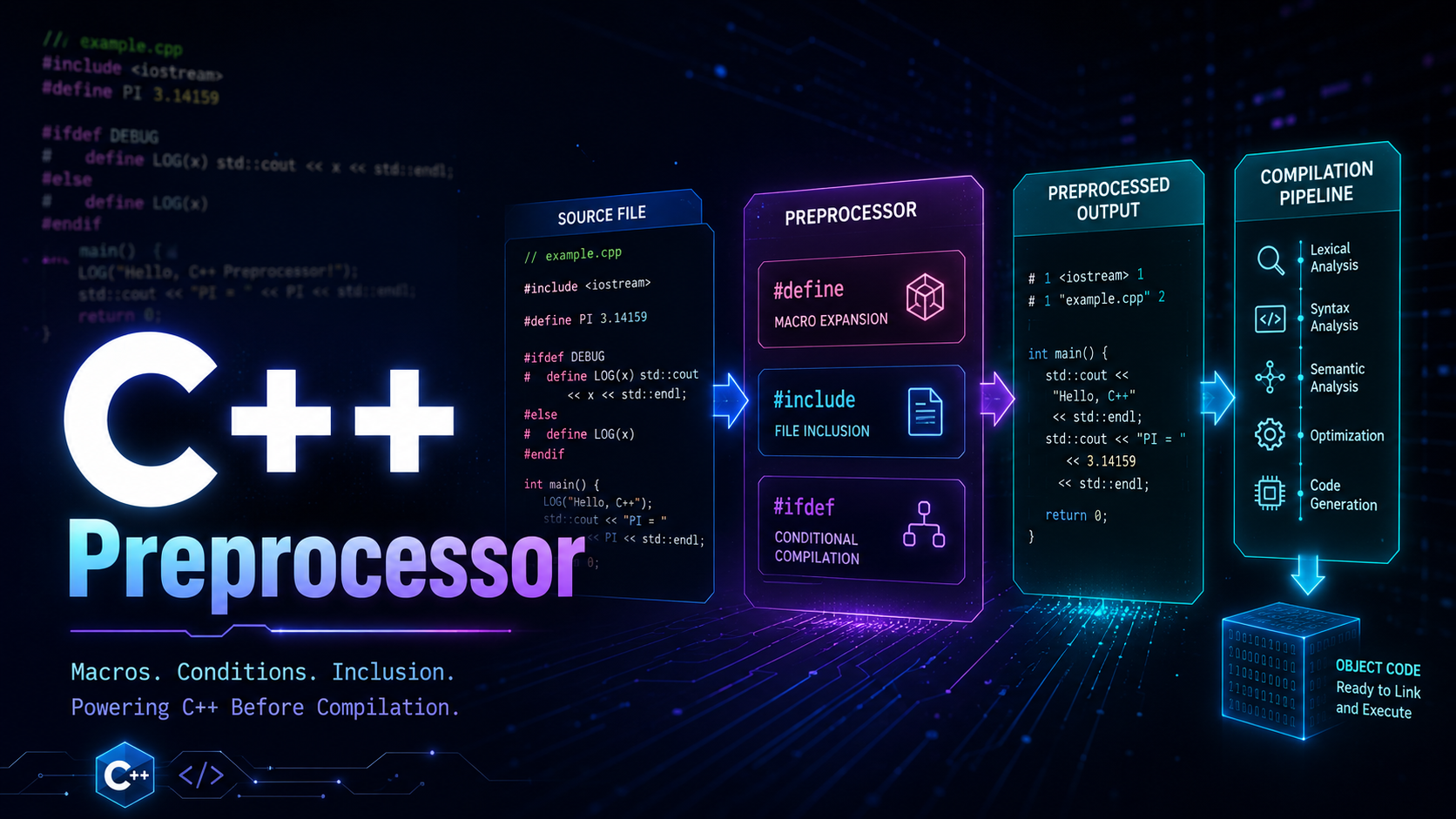
Before a single line of your C++ code gets compiled, another program runs first: the preprocessor. It operates on raw text, performing substitutions, file inclusions, and conditional removals before the compiler ever sees the result. This is not some minor detail — it is translation phase 4 out of nine defined by the C++ standard, and every C++ program you have ever compiled has gone through it.
The C++ compilation model works in phases. First, the source file is decoded and physical lines are joined (backslash-newline splicing). Then trigraphs and comments are replaced. Then the preprocessor runs: it handles every line starting with #, expands macros, includes files, and strips conditional blocks. Only after all of this does the compiler receive a translation unit — a single, flattened file of pure C++ code with no directives remaining.
If you have worked through our introduction to C++, you already know that #include <iostream> is not a compiler instruction — it is a preprocessor command. Every # directive is. Understanding the preprocessor is essential because it explains include guards, platform-specific builds, debug logging, and a large category of bugs that make no sense until you realize the compiler never saw what you thought it saw.
You can see the preprocessor’s output yourself. With GCC or Clang, pass the -E flag:
// file: demo.cpp
#include <iostream>

int main() {
    std::cout << "hello\n";
    return 0;
}
# Show preprocessed output
g++ -E demo.cpp | tail -20The output will be thousands of lines — the entire <iostream> header, expanded inline. Your five-line program becomes a massive translation unit. This is what the compiler actually processes.
The #include Directive
#include is the most-used preprocessor directive. It does exactly one thing: replaces the #include line with the entire contents of the specified file. That is it. No linking, no importing, no dependency resolution — just raw text insertion.
Angle Brackets vs Quotes
The two forms have different search behaviors:
#include <iostream>      // Search system/standard include paths first
#include "my_header.h"   // Search current directory first, then system paths
Use angle brackets for standard library and third-party library headers. Use quotes for your own project headers. The exact search order is implementation-defined, but every major compiler follows this convention.
Include Guards
Because #include is blind text insertion, including the same header twice causes redefinition errors. Include guards solve this:
// file: math_utils.h

#ifndef MATH_UTILS_H
#define MATH_UTILS_H

struct Vector3 {
    double x, y, z;
};

double dot(const Vector3& a, const Vector3& b);

#endif // MATH_UTILS_H
The first time this file is included, MATH_UTILS_H is not defined, so the preprocessor processes everything between #ifndef and #endif and defines MATH_UTILS_H. The second time, MATH_UTILS_H is already defined, so the entire content is skipped. This pattern is so universal that you should consider every header without include guards to be broken.
The naming convention matters. Use the file name in uppercase with underscores: MY_PROJECT_COMPONENT_H. If two headers accidentally use the same guard name, one of them silently vanishes. In large codebases, prefix with the project or namespace to avoid collisions.
The #define Directive — Object-Like and Function-Like Macros
Object-Like Macros
The simplest macro form creates a text substitution constant:
#define MAX_CONNECTIONS 1024
#define PI 3.14159265358979
#define VERSION_STRING "2.4.1"

int pool[MAX_CONNECTIONS];  // Becomes: int pool[1024];
double area = PI * r * r;   // Becomes: double area = 3.14159265358979 * r * r;
These macros are not variables. They have no type, no address, and no scope. The preprocessor replaces every occurrence of the name with the replacement text, blindly. This worked in C, but modern C++ gives you better tools — constexpr values and const variables — which participate in the type system. We will return to this in the alternatives section.
Function-Like Macros
Macros can take parameters, mimicking function calls:
#define SQUARE(x) ((x) * (x))
#define MIN(a, b) ((a) < (b) ? (a) : (b))
#define ARRAY_SIZE(arr) (sizeof(arr) / sizeof((arr)[0]))

int result = SQUARE(5);      // Becomes: int result = ((5) * (5));
int m = MIN(a + 1, b);       // Becomes: int m = ((a + 1) < (b) ? (a + 1) : (b));

int data[] = {10, 20, 30, 40};
size_t n = ARRAY_SIZE(data);  // Becomes: size_t n = (sizeof(data) / sizeof((data)[0]));
Notice the aggressive parenthesization. Every parameter use and the entire macro body are wrapped in parentheses. Without them, operator precedence creates disasters. SQUARE(a + 1) without parentheses expands to a + 1 * a + 1, which equals 2a + 1, not (a+1)^2. This is one of the classic macro pitfalls, and it has caused real production bugs in every C and C++ codebase of sufficient age.
The Stringizing Operator (#)
The # operator inside a macro converts a parameter to a string literal:
#define STRINGIFY(x) #x
#define TO_STRING(x) STRINGIFY(x)

#define LOG_VAR(var) std::cout << #var << " = " << (var) << std::endl

int count = 42;
LOG_VAR(count);  // Expands to: std::cout << "count" << " = " << (count) << std::endl;
// Output: count = 42

// Two-level stringizing for macro expansion:
#define MAJOR 3
std::cout << STRINGIFY(MAJOR) << "\n";   // Prints: MAJOR (not expanded!)
std::cout << TO_STRING(MAJOR) << "\n";   // Prints: 3 (expanded first)
The two-level trick (STRINGIFY / TO_STRING) is necessary because # prevents macro expansion of its argument. By adding an indirection layer, the argument is expanded first, then stringized. This pattern appears in virtually every serious macro-based utility.
The Token Pasting Operator (##)
The ## operator concatenates two tokens into one:
#define DECLARE_HANDLER(name) \
    void handle_##name(const Event& e) { \
        std::cout << "Handling " #name << std::endl; \
        process_##name(e); \
    }

DECLARE_HANDLER(click)
// Expands to:
// void handle_click(const Event& e) {
//     std::cout << "Handling " "click" << std::endl;
//     process_click(e);
// }

DECLARE_HANDLER(keypress)
// Generates: handle_keypress, process_keypress

// Generating unique variable names:
#define UNIQUE_VAR(prefix) prefix##__LINE__
// Note: needs two-level expansion for __LINE__ to work — see predefined macros section
Token pasting is a code generation tool. Serialization libraries, test frameworks (like Catch2), and plugin systems use it to generate boilerplate from concise declarations. It is powerful, but the generated code is invisible to your IDE, debugger, and sometimes to you.
Conditional Compilation
Conditional directives let you include or exclude code based on compile-time conditions. This is how C++ codebases handle platform differences, debug builds, and feature flags — and it is one area where macros remain irreplaceable.
// Platform-specific code
#if defined(_WIN32)
    #include <windows.h>
    void sleep_ms(int ms) { Sleep(ms); }
#elif defined(__linux__)
    #include <unistd.h>
    void sleep_ms(int ms) { usleep(ms * 1000); }
#elif defined(__APPLE__)
    #include <unistd.h>
    void sleep_ms(int ms) { usleep(ms * 1000); }
#else
    #error "Unsupported platform"
#endif

// Debug vs release builds
#ifdef NDEBUG
    #define DBG_LOG(msg) ((void)0)
#else
    #define DBG_LOG(msg) std::cerr << "[DEBUG] " << __FILE__ \
        << ":" << __LINE__ << " " << msg << std::endl
#endif

// Feature flags
#ifndef FEATURE_EXPERIMENTAL_PARSER
    #define FEATURE_EXPERIMENTAL_PARSER 0
#endif

#if FEATURE_EXPERIMENTAL_PARSER
    #include "experimental_parser.h"
#else
    #include "stable_parser.h"
#endif
Key directives:
#if— evaluates a constant integer expression (zero = false, nonzero = true)#ifdef NAME— equivalent to#if defined(NAME)#ifndef NAME— equivalent to#if !defined(NAME)#elif— else-if chain#else— fallback branch#endif— closes any conditional block#error "message"— halts compilation with a message
The defined() operator is generally preferred over #ifdef because it composes in boolean expressions: #if defined(A) && defined(B) cannot be written with #ifdef alone.
Conditional compilation is also how you write code that gracefully degrades across different C++ standard versions:
#if __cplusplus >= 202002L
    // C++20 features available
    #include <concepts>
    template<std::integral T>
    T safe_add(T a, T b) { /* ... */ }
#elif __cplusplus >= 201703L
    // C++17 fallback
    template<typename T>
    T safe_add(T a, T b) { /* ... */ }
#else
    // Pre-C++17 fallback
    template<typename T>
    T safe_add(T a, T b) { /* ... */ }
#endif
Predefined Macros
The C++ standard mandates several macros that every compiler must define. These are invaluable for debugging, logging, and conditional compilation:
#include <iostream>
using namespace std;

void demonstrate_predefined() {
    // Standard predefined macros
    cout << "File: "      << __FILE__     << endl;  // Current source file path
    cout << "Line: "      << __LINE__     << endl;  // Current line number
    cout << "Date: "      << __DATE__     << endl;  // Compilation date "Mmm dd yyyy"
    cout << "Time: "      << __TIME__     << endl;  // Compilation time "hh:mm:ss"
    cout << "C++ version: " << __cplusplus << endl;  // C++ standard version
    cout << "Function: " << __func__     << endl;  // Current function name (C++11)
}

// __cplusplus values:
// 199711L = C++98/03
// 201103L = C++11
// 201402L = C++14
// 201703L = C++17
// 202002L = C++20
// 202302L = C++23
There is a subtle but important distinction: __func__ is technically not a preprocessor macro. It is a predefined identifier — the compiler generates it as a static const char[] inside each function. The preprocessor does not know what function it is inside because functions do not exist at the preprocessing phase. The practical difference rarely matters, but if someone asks you in an interview, now you know.
Compiler-specific predefined macros are also essential in practice:
// Compiler detection
#if defined(__clang__)
    cout << "Clang " << __clang_major__ << "." << __clang_minor__ << endl;
#elif defined(__GNUC__)
    cout << "GCC " << __GNUC__ << "." << __GNUC_MINOR__ << endl;
#elif defined(_MSC_VER)
    cout << "MSVC " << _MSC_VER << endl;
#endif

// Architecture detection
#if defined(__x86_64__) || defined(_M_X64)
    cout << "64-bit x86" << endl;
#elif defined(__aarch64__) || defined(_M_ARM64)
    cout << "64-bit ARM" << endl;
#endif
Macro Pitfalls — Why Macros Bite Back
Macros operate on text, not on C++ syntax. This fundamental difference causes a class of bugs that no other C++ feature produces. Understanding these pitfalls is not optional — you will encounter them in real codebases.
Double Evaluation
#define MAX(a, b) ((a) > (b) ? (a) : (b))

int x = 5, y = 3;
int result = MAX(x++, y);
// Expands to: ((x++) > (y) ? (x++) : (y))
// x is incremented TWICE if x > y!
// result = 6, x = 7 — almost certainly not what you wanted
This is the most famous macro bug. Function-like macros evaluate their arguments at each point of use. If an argument has side effects — increments, function calls, I/O — those side effects happen multiple times. Real functions evaluate each argument exactly once.
No Type Safety
#define ADD(a, b) ((a) + (b))

string s = ADD("hello", " world");  // String concatenation? No — pointer arithmetic!
// This compiles but produces undefined behavior.
// An inline function with proper parameter types would catch this at compile time.
Macros accept any tokens. They cannot enforce types, produce meaningful error messages, or participate in overload resolution. If you have been following our lesson on variables and types, you know how important C++’s type system is. Macros bypass it entirely.
Scope Blindness
#define STATUS_OK 0

namespace mylib {
    enum Status { STATUS_OK = 0, STATUS_ERROR = 1 };  // ERROR: macro expands STATUS_OK to 0
    // Becomes: enum Status { 0 = 0, STATUS_ERROR = 1 };
}

// Macros ignore namespaces, classes, and all scope boundaries.
// This is why ALL_CAPS naming for macros exists — to reduce collisions.
Debugging Nightmare
When a macro expands to broken code, the compiler error points to the expansion site, not the macro definition. With complex nested macros, the error message references code you never wrote. Some compilers provide a “macro expansion trace,” but many do not show it by default. The -E flag becomes your debugging tool — inspect the preprocessed output to see what the compiler actually received.
Comma in Arguments
#define CALL(func, arg) func(arg)

CALL(process, std::pair<int, int>{1, 2});
// Preprocessor sees THREE arguments: process, std::pair<int, and int>{1, 2}
// The comma inside the template angle brackets is treated as a macro argument separator

// Fix: use a typedef or extra parentheses
using IntPair = std::pair<int, int>;
CALL(process, IntPair{1, 2});  // Now it works
The #pragma Directive
#pragma provides implementation-defined behavior — compiler-specific instructions that do not affect program semantics on compilers that do not recognize them. Unknown pragmas are ignored (not errors), making them relatively safe to use.
#pragma once
// file: vector3.h
#pragma once

struct Vector3 {
    double x, y, z;
};

// Equivalent to include guards, but:
// - Less boilerplate
// - No risk of guard name collisions
// - Technically non-standard (not in ISO C++)
// - Supported by GCC, Clang, MSVC, and every compiler you will actually use
The #pragma once vs include guards debate is settled in practice: #pragma once is supported everywhere and is simpler. The ISO committee has not standardized it primarily because of edge cases with symlinks and hard links on certain filesystems. For almost every project, #pragma once is the right choice. Some coding standards (notably Google’s) still mandate traditional include guards — follow your project’s convention.
#pragma pack
// Control struct alignment and padding
#pragma pack(push, 1)  // Save current packing, set to 1-byte alignment
struct NetworkPacket {
    uint8_t  type;      // 1 byte
    uint32_t sequence;  // 4 bytes — NO padding before this
    uint16_t length;    // 2 bytes
    // Total: 7 bytes (normally would be 8 or 12 with padding)
};
#pragma pack(pop)      // Restore previous packing

// Without pragma pack, the compiler inserts padding for alignment:
struct NormalStruct {
    uint8_t  type;      // 1 byte + 3 bytes padding
    uint32_t sequence;  // 4 bytes
    uint16_t length;    // 2 bytes + 2 bytes padding
    // Total: 12 bytes
};
Packed structs are essential for network protocols, binary file formats, and hardware register maps. But packed access can be slower (unaligned memory access) and some architectures will fault on it. Use packing only when you need exact memory layout control.
Other Useful Pragmas
// Suppress specific warnings (MSVC)
#pragma warning(push)
#pragma warning(disable: 4996)  // Disable deprecation warning
    // Code using deprecated functions
#pragma warning(pop)

// Suppress specific warnings (GCC/Clang)
#pragma GCC diagnostic push
#pragma GCC diagnostic ignored "-Wunused-variable"
    int unused = 42;
#pragma GCC diagnostic pop

// Link a library (MSVC)
#pragma comment(lib, "user32.lib")

// Mark a section of code
#pragma region MySection
    // Collapsible in Visual Studio
#pragma endregion
Practical Examples
Despite the warnings about macro pitfalls, there are situations where macros are the right tool. Here are patterns used in production C++ code.
Debug Logging Macro
#include <iostream>
#include <cstring>

// Strip path, keep only filename
#define __FILENAME__ (strrchr(__FILE__, '/') ? strrchr(__FILE__, '/') + 1 : \
                      strrchr(__FILE__, '\\') ? strrchr(__FILE__, '\\') + 1 : __FILE__)

#ifdef NDEBUG
    #define LOG_DEBUG(msg) ((void)0)
    #define LOG_ERROR(msg) ((void)0)
#else
    #define LOG_DEBUG(msg) \
        std::cerr << "[DEBUG " << __FILENAME__ << ":" << __LINE__ \
                  << " " << __func__ << "] " << msg << std::endl

    #define LOG_ERROR(msg) \
        std::cerr << "[ERROR " << __FILENAME__ << ":" << __LINE__ \
                  << " " << __func__ << "] " << msg << std::endl
#endif

void process_data(int value) {
    LOG_DEBUG("Processing value: " << value);
    if (value < 0) {
        LOG_ERROR("Negative value received: " << value);
    }
}
// In debug build, outputs:
// [DEBUG main.cpp:25 process_data] Processing value: 42
// In release build, the macro expands to nothing — zero overhead
This cannot be a function. A function would report its own file and line, not the caller’s. __FILE__ and __LINE__ must be expanded at the call site, which only macros can do. This is the canonical legitimate macro use case.
Custom Assertion Macro
#define ASSERT(condition, message) \
    do { \
        if (!(condition)) { \
            std::cerr << "ASSERTION FAILED: " << #condition << "\n" \
                      << "  Message: " << message << "\n" \
                      << "  File: " << __FILE__ << "\n" \
                      << "  Line: " << __LINE__ << "\n" \
                      << "  Function: " << __func__ << std::endl; \
            std::abort(); \
        } \
    } while (0)

void transfer(Account& from, Account& to, double amount) {
    ASSERT(amount > 0, "Transfer amount must be positive, got " << amount);
    ASSERT(from.balance() >= amount, "Insufficient funds: " << from.balance());
    // proceed with transfer...
}
The do { ... } while (0) wrapper is a well-known macro idiom. It makes the macro behave like a single statement, so it works correctly in if/else branches without braces. Without it, if (x) ASSERT(y, "msg"); else doSomething(); would break because the semicolon after the macro ends the if body prematurely.
Feature Flags
// Typically set via compiler flags: g++ -DFEATURE_NEW_PARSER=1
#ifndef FEATURE_NEW_PARSER
    #define FEATURE_NEW_PARSER 0
#endif

#ifndef FEATURE_METRICS
    #define FEATURE_METRICS 0
#endif

void parse_input(const std::string& input) {
#if FEATURE_NEW_PARSER
    // New experimental parser implementation
    auto ast = new_parser::parse(input);
    LOG_DEBUG("Using new parser");
#else
    // Battle-tested stable parser
    auto ast = legacy_parser::parse(input);
#endif

#if FEATURE_METRICS
    metrics::record("parse_time_ms", timer.elapsed());
#endif
}
Feature flags via preprocessor conditionals are how large C++ projects (Chromium, LLVM, game engines) manage gradual rollouts and A/B testing at the code level. The unused code paths are completely removed from the binary — there is zero runtime cost. This pattern works hand-in-hand with error-handling strategies that may differ between experimental and stable code paths.
When to Use Macros vs Modern Alternatives
Modern C++ has systematically replaced most macro use cases. Here is a concrete decision framework:
Use constexpr instead of #define constants:
// Old way — macro constant
#define MAX_BUFFER 4096

// Modern way — typed, scoped, debuggable
constexpr size_t MAX_BUFFER = 4096;

// constexpr can do things macros cannot:
constexpr size_t compute_buffer_size(size_t elements) {
    return elements * sizeof(double) + 64;  // alignment padding
}
constexpr size_t BUF = compute_buffer_size(100);  // Evaluated at compile time
Use inline functions or templates instead of function-like macros:
// Old way — dangerous macro
#define SQUARE(x) ((x) * (x))  // Double evaluation, no type checking

// Modern way — safe, typed, debuggable
template<typename T>
constexpr T square(T x) { return x * x; }

// Works correctly:
int y = 5;
int result = square(y++);  // y is incremented once, result = 25
Use if constexpr (C++17) instead of #if for type-based branching:
template<typename T>
void serialize(const T& value) {
    if constexpr (std::is_integral_v<T>) {
        write_int(value);
    } else if constexpr (std::is_floating_point_v<T>) {
        write_float(value);
    } else {
        value.serialize();  // Must have a serialize() method
    }
}
Macros still win in these cases:
- Include guards — no alternative (except
#pragma once, which is also a preprocessor feature) - Platform-specific
#include— you cannot conditionally include headers withif constexpr __FILE__,__LINE__logging —std::source_location(C++20) is the modern replacement, but adoption is still catching up- Stringizing and token pasting — no language feature generates identifiers or string literals from expressions
- Reducing boilerplate in test frameworks —
TEST_CASE("name")macros in Catch2, Google Test, etc.
C++20 introduced std::source_location as a replacement for __FILE__/__LINE__ macros in function parameters:
#include <source_location>
#include <iostream>

void log(const std::string& msg,
         const std::source_location loc = std::source_location::current()) {
    std::cout << loc.file_name() << ":" << loc.line()
              << " [" << loc.function_name() << "] " << msg << std::endl;
}

// Now log() reports the CALLER's location, without macros
This is genuinely better than the macro approach — it has type safety, works with namespaces, and the caller’s location is captured automatically via the default argument. If your project targets C++20 or later, prefer std::source_location for new logging code.
Practice Exercises
Exercise 1: Write a header file with proper include guards. Define a Config struct with at least five fields. Include this header from two different .cpp files and verify it compiles without errors. Then break it by removing the guards and observe the error.
Exercise 2: Create a TRACE macro that logs the function name, file, line, and the expression being traced along with its value. For example, TRACE(x + y) should print something like [main.cpp:15 calc] x + y = 42. Use stringizing (#) to capture the expression text.
Exercise 3: Write a cross-platform get_timestamp() function using conditional compilation. On Windows, use GetSystemTimeAsFileTime. On Linux/macOS, use clock_gettime. Use #error for unsupported platforms. Build and test on your platform.
Exercise 4: Take the SQUARE macro and demonstrate the double-evaluation bug with a counter variable. Then write a constexpr template replacement and prove it evaluates the argument only once. Compare the assembly output (g++ -S) of both versions.
Exercise 5: Build a simple unit-test framework using macros. Create TEST(name) to define a test function, EXPECT_EQ(a, b) to check equality (printing the expressions and values on failure), and RUN_ALL_TESTS() to execute them. This exercise will require token pasting, stringizing, and possibly a global test registry.
Summary
The C++ preprocessor is a text-processing engine that runs before compilation. It handles #include (file insertion), #define (text substitution macros), conditional compilation (#if, #ifdef, #ifndef), and compiler hints (#pragma). Macros are powerful — they can generate code, stringify expressions, and paste tokens — but they operate outside the type system, ignore scope, and create debugging headaches. Modern C++ has replaced most macro use cases: constexpr replaces constants, inline templates replace function-like macros, if constexpr replaces type-based conditionals, and std::source_location (C++20) replaces __FILE__/__LINE__ in function signatures. However, macros remain essential for include guards, platform-specific includes, and code generation in frameworks. The rule is simple: use macros only when no language feature can do the job, and when you do, parenthesize everything, use ALL_CAPS naming, and document the expansion.