C++ Control Flow: if, else, switch & Ternary Operator Guide
What is Control Flow?
Every program you write executes statements from top to bottom. Control flow lets you break that linear march — you can branch, skip, or choose between different paths depending on conditions that are evaluated at runtime. Without control flow, every program would do exactly the same thing every time it ran, which would make software pretty useless.
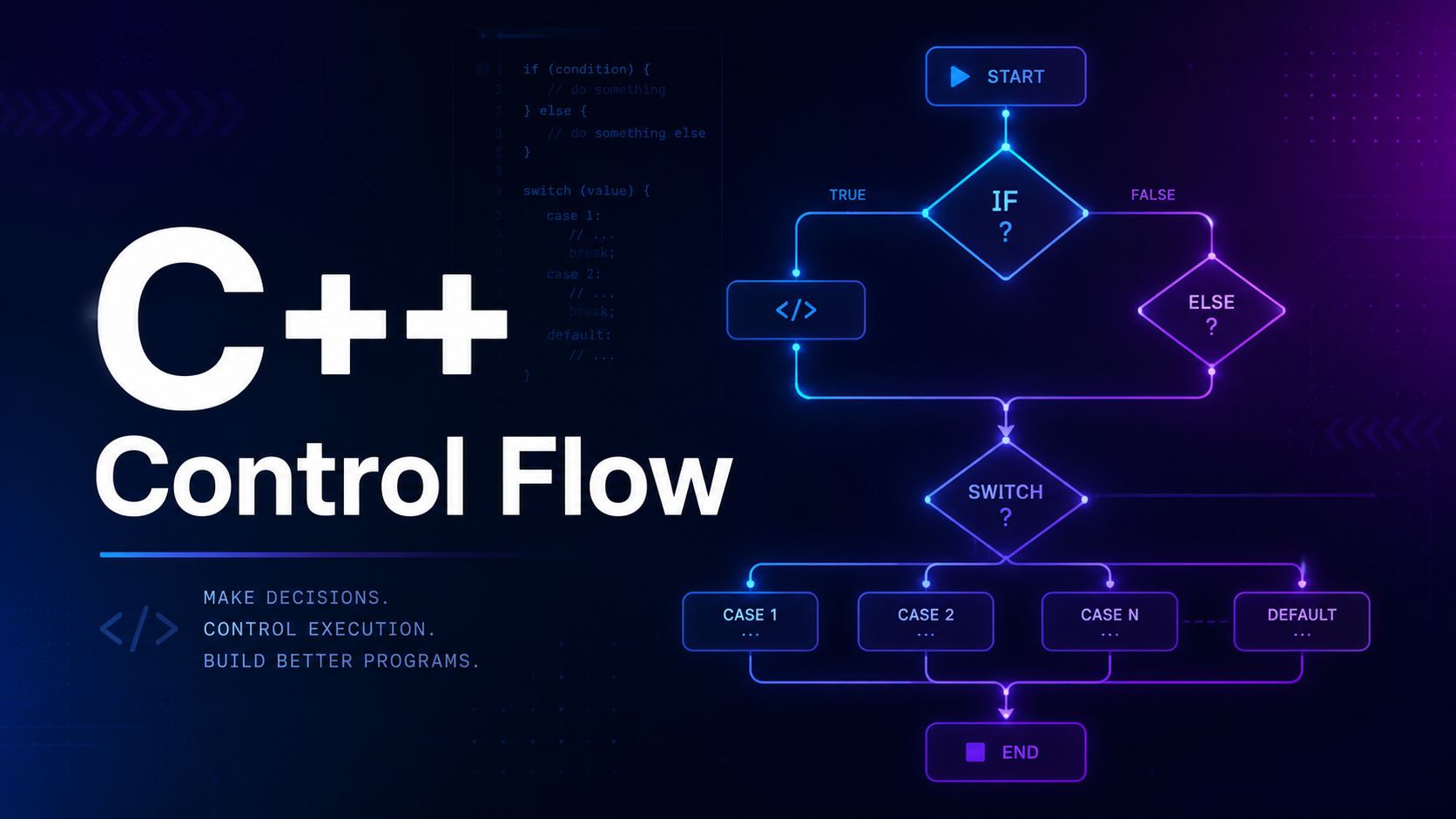
C++ gives you three primary control-flow tools for branching: the if statement, the switch statement, and the ternary operator (?:). In this lesson you will master all three, learn the modern C++17 enhancements, and avoid the bugs that trip up beginners. Loops are covered in the next lesson.
The if Statement
The if statement evaluates a condition inside parentheses. If the condition is true (any non-zero value), the block runs. If it is false (zero), the block is skipped entirely.
#include <iostream>
using namespace std;

int main() {
    int temperature = 35;

    if (temperature > 30) {
        cout << "It is hot outside!" << endl;
    }

    cout << "Program continues..." << endl;
    return 0;
}
// Output:
// It is hot outside!
// Program continues...
The braces {} define a block. If you have only a single statement, C++ lets you omit the braces, but doing so is the number-one source of control-flow bugs. Always use braces — it costs nothing and prevents the class of errors that bit Apple’s goto fail vulnerability.
if-else Chains
When you need to execute one block if a condition is true and a different block if it is false, add an else clause.
#include <iostream>
using namespace std;

int main() {
    int age = 16;

    if (age >= 18) {
        cout << "You can vote." << endl;
    } else {
        cout << "You cannot vote yet." << endl;
        cout << "Wait " << (18 - age) << " more years." << endl;
    }

    return 0;
}
// Output:
// You cannot vote yet.
// Wait 2 more years.
The else block is guaranteed to execute when the if condition is false. There is no condition on the else itself — it catches everything the if did not.
else if — Multiple Conditions
When you have more than two possible paths, chain else if clauses. C++ evaluates them top-down and runs the first block whose condition is true. Once a match is found, the rest of the chain is skipped.
#include <iostream>
using namespace std;

int main() {
    int score = 78;

    if (score >= 90) {
        cout << "Grade: A" << endl;
    } else if (score >= 80) {
        cout << "Grade: B" << endl;
    } else if (score >= 70) {
        cout << "Grade: C" << endl;
    } else if (score >= 60) {
        cout << "Grade: D" << endl;
    } else {
        cout << "Grade: F" << endl;
    }

    return 0;
}
// Output: Grade: C
Order matters. If you put the >= 60 check first, a score of 95 would print “Grade: D” because 95 is also ≥ 60 and the first match wins. Always put the most restrictive condition first.
Nested if Statements
You can place if statements inside other if blocks. This is useful when a second condition only makes sense after a first condition passes.
#include <iostream>
using namespace std;

int main() {
    bool has_ticket = true;
    int age = 14;

    if (has_ticket) {
        if (age >= 13) {
            cout << "You may enter the PG-13 movie." << endl;
        } else {
            cout << "You need a parent for this movie." << endl;
        }
    } else {
        cout << "Please buy a ticket first." << endl;
    }

    return 0;
}
// Output: You may enter the PG-13 movie.
Deeply nested if blocks make code hard to read. If you find yourself going deeper than two levels, refactor by using early returns, guard clauses, or functions.
The switch Statement
When you are comparing a single variable against many constant values, switch is cleaner and often faster than a long if-else if chain. The compiler can optimize a switch into a jump table.
#include <iostream>
using namespace std;

int main() {
    int day = 3;

    switch (day) {
        case 1:
            cout << "Monday" << endl;
            break;
        case 2:
            cout << "Tuesday" << endl;
            break;
        case 3:
            cout << "Wednesday" << endl;
            break;
        case 4:
            cout << "Thursday" << endl;
            break;
        case 5:
            cout << "Friday" << endl;
            break;
        case 6:
            cout << "Saturday" << endl;
            break;
        case 7:
            cout << "Sunday" << endl;
            break;
        default:
            cout << "Invalid day" << endl;
            break;
    }

    return 0;
}
// Output: Wednesday
The expression inside switch() must evaluate to an integral or enumeration type — int, char, enum, or bool. You cannot switch on string, float, or double in C++.
Switch Fallthrough and break
Without break, execution falls through from one case to the next. This is by design but catches beginners off guard.
#include <iostream>
using namespace std;

int main() {
    int month = 3;

    switch (month) {
        case 12:
        case 1:
        case 2:
            cout << "Winter" << endl;
            break;
        case 3:
        case 4:
        case 5:
            cout << "Spring" << endl;
            break;
        case 6:
        case 7:
        case 8:
            cout << "Summer" << endl;
            break;
        case 9:
        case 10:
        case 11:
            cout << "Autumn" << endl;
            break;
        default:
            cout << "Invalid month" << endl;
    }

    return 0;
}
// Output: Spring
Intentional fallthrough is useful for grouping cases (like the seasons above). In C++17 you can annotate intentional fallthrough with [[fallthrough]]; to silence compiler warnings.
switch (level) {
    case 3:
        apply_discount(20);
        [[fallthrough]];
    case 2:
        apply_discount(10);
        [[fallthrough]];
    case 1:
        apply_discount(5);
        break;
    default:
        break;
}
The Ternary Operator
The ternary operator condition ? value_if_true : value_if_false is a compact inline if-else that returns a value. Use it for simple assignments, not for complex logic.
#include <iostream>
#include <string>
using namespace std;

int main() {
    int age = 20;
    string status = (age >= 18) ? "adult" : "minor";
    cout << "You are an " << status << "." << endl;

    // Ternary inside cout
    int x = 10, y = 20;
    cout << "Max is: " << ((x > y) ? x : y) << endl;

    // Nested ternary (avoid this — hard to read)
    int score = 85;
    string grade = (score >= 90) ? "A"
                 : (score >= 80) ? "B"
                 : (score >= 70) ? "C" : "F";
    cout << "Grade: " << grade << endl;

    return 0;
}
// Output:
// You are an adult.
// Max is: 20
// Grade: B
Nested ternary operators become unreadable fast. If you catch yourself nesting more than one level, switch to an if-else chain or a function.
Logical Operators in Conditions
Most real-world conditions combine multiple checks using logical AND (&&), logical OR (||), and logical NOT (!).
#include <iostream>
using namespace std;

int main() {
    int age = 25;
    bool has_license = true;
    bool is_insured = false;

    // AND: both must be true
    if (age >= 18 && has_license) {
        cout << "You can drive." << endl;
    }

    // OR: at least one must be true
    if (has_license || is_insured) {
        cout << "You have some form of authorization." << endl;
    }

    // NOT: flips the boolean
    if (!is_insured) {
        cout << "Warning: you are not insured!" << endl;
    }

    // Combined
    if (age >= 18 && has_license && !is_insured) {
        cout << "Can drive but needs insurance." << endl;
    }

    return 0;
}
Short-Circuit Evaluation
C++ evaluates && and || from left to right and stops as soon as the result is determined. With &&, if the left side is false, the right side never runs. With ||, if the left side is true, the right side is skipped.
#include <iostream>
using namespace std;

int main() {
    int* ptr = nullptr;

    // Safe: the second condition is NOT evaluated if ptr is null
    if (ptr != nullptr && *ptr > 10) {
        cout << "Value is large" << endl;
    } else {
        cout << "Pointer is null or value is small" << endl;
    }

    // Without short-circuit, *ptr would crash (undefined behavior)

    // OR short-circuit example
    bool cached = true;
    if (cached || expensive_computation()) {
        // expensive_computation() never called if cached is true
    }

    return 0;
}
Short-circuit evaluation is not just an optimization trick — it is essential for safe null-pointer checks and bounds checking. You will use this pattern every day in production code.
C++17 if with Initializer
C++17 introduced if statements with an initializer, letting you declare a variable scoped to the if-else block. This keeps temporary variables from leaking into the outer scope.
#include <iostream>
#include <map>
#include <string>
using namespace std;

int main() {
    map<string, int> scores = {{"Alice", 95}, {"Bob", 82}};

    // C++17 if with initializer
    if (auto it = scores.find("Alice"); it != scores.end()) {
        cout << "Found: " << it->first
             << " = " << it->second << endl;
    } else {
        cout << "Not found" << endl;
    }
    // 'it' does not exist here — it is scoped to the if-else block

    // Without C++17: the iterator leaks into the outer scope
    // auto it2 = scores.find("Bob");
    // if (it2 != scores.end()) { ... }
    // it2 is still visible here — pollutes the scope

    return 0;
}
// Output: Found: Alice = 95
This pattern is particularly useful with std::map::find(), std::optional, and any function that returns an iterator or status code. Compile with -std=c++17 or later.
C++17 constexpr if
if constexpr evaluates the condition at compile time. The branch not taken is discarded entirely — it does not even need to compile. This is a game-changer for template metaprogramming.
#include <iostream>
#include <type_traits>
using namespace std;

template <typename T>
void print_type_info(T value) {
    if constexpr (is_integral_v<T>) {
        cout << value << " is an integer type" << endl;
    } else if constexpr (is_floating_point_v<T>) {
        cout << value << " is a floating-point type" << endl;
    } else {
        cout << "Unknown type" << endl;
    }
}

int main() {
    print_type_info(42);       // 42 is an integer type
    print_type_info(3.14);     // 3.14 is a floating-point type
    print_type_info('A');      // 65 is an integer type (char is integral)
    return 0;
}
Without if constexpr, you would need SFINAE or template specialization to achieve the same thing — both are far more verbose. This feature alone makes C++17 templates dramatically cleaner.
Common Mistakes
1. Assignment instead of comparison:
int x = 5;
if (x = 10) {  // BUG: assigns 10 to x, always true
    cout << "This always runs" << endl;
}
// Fix: use == for comparison
if (x == 10) { /* correct */ }
2. Dangling else:
if (a > 0)
    if (b > 0)
        cout << "Both positive";
else
    cout << "This belongs to the INNER if, not the outer one";
// Fix: always use braces
3. Comparing floating-point numbers for equality:
double x = 0.1 + 0.2;
if (x == 0.3) {  // May be FALSE due to floating-point precision
    cout << "Equal" << endl;
}
// Fix: use an epsilon comparison
if (abs(x - 0.3) < 1e-9) {
    cout << "Close enough" << endl;
}
4. Missing break in switch:
switch (choice) {
    case 1:
        cout << "Option 1" << endl;
        // Missing break! Falls through to case 2
    case 2:
        cout << "Option 2" << endl;
        break;
}
Practice Exercises
Exercise 1: Write a program that takes a number and prints whether it is positive, negative, or zero.
Exercise 2: Write a calculator using switch that takes two numbers and an operator (+, -, *, /) and prints the result. Handle division by zero.
Exercise 3: Write a program that determines a letter grade from a numeric score (A: 90-100, B: 80-89, C: 70-79, D: 60-69, F: below 60) using both an if-else chain and a ternary expression.
Exercise 4: Use C++17 if with initializer to look up a value in a std::map and print whether it was found.
Summary
Control flow is the backbone of every useful program. You learned the if, else if, and else chain for general branching, switch for matching against constant values, the ternary operator for inline conditionals, and the C++17 features — if with initializer and if constexpr — that make modern C++ cleaner and more powerful. The most important rule: always use braces, always use == for comparison, and always handle the default case in switch. In the next lesson, you will learn how to define and call functions to organize your code into reusable blocks.