C while and do-while Loops: Iteration Complete Guide 2026
C while and do-while Loops
Programs that run once and exit are rarely useful. Real software runs in loops — reading input until the user quits, processing records until the file ends, retrying network connections until one succeeds, updating a game frame 60 times per second. C provides three loop constructs: while, do-while, and for. This lesson covers the first two.
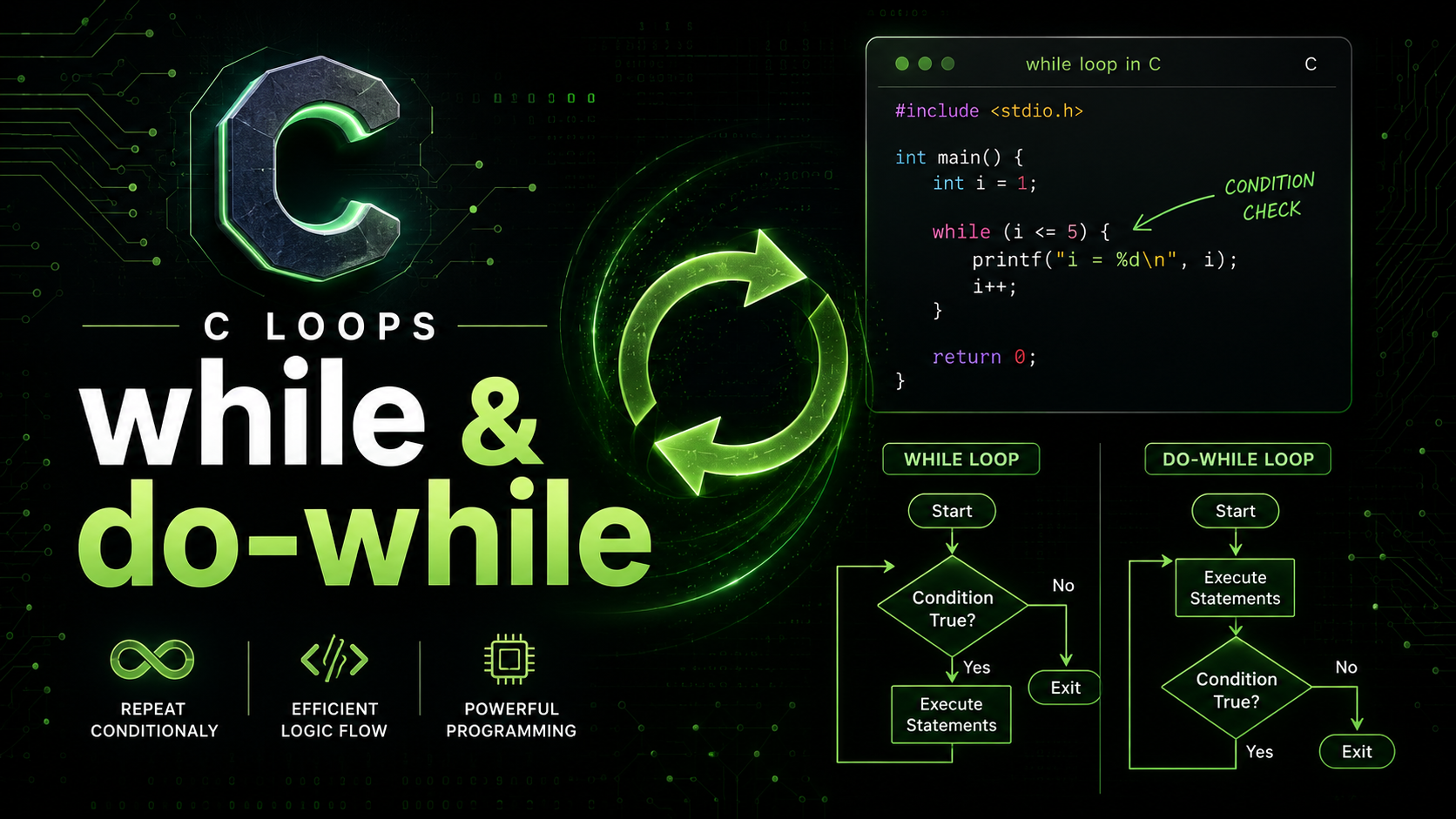
The while loop checks its condition before each iteration. If the condition is false from the start, the body never executes. The do-while loop checks its condition after each iteration, guaranteeing the body runs at least once. Choosing the right loop for the right situation makes your code clearer and more correct.
The while Loop
A while loop repeats its body as long as the condition is true:
#include <stdio.h>

int main(void) {
    int count = 0;

    while (count < 5) {
        printf("count = %d\n", count);
        count++;
    }

    printf("Loop finished. count = %d\n", count);
    return 0;
}
Output:
count = 0
count = 1
count = 2
count = 3
count = 4
Loop finished. count = 5
The condition count < 5 is checked before every iteration. When count reaches 5, the condition becomes false and the loop exits. After the loop, count is 5 — the first value that failed the condition.
Loop Anatomy
Every loop has four components: initialization (set the starting state), condition (test whether to continue), body (the repeated work), and update (change something so the condition eventually becomes false). In the example above: initialization is int count = 0, condition is count < 5, body is the printf, and update is count++.
Forgetting the update creates an infinite loop:
int count = 0;
while (count < 5) {
    printf("%d\n", count);
    // BUG: count never changes — infinite loop!
}
while Loop Patterns
Counting Down
int countdown = 10;
while (countdown > 0) {
    printf("%d...\n", countdown);
    countdown--;
}
printf("Launch!\n");
Sentinel Value (Loop Until Special Input)
int num, sum = 0, count = 0;

printf("Enter numbers (-1 to stop):\n");
scanf("%d", &num);

while (num != -1) {
    sum += num;
    count++;
    scanf("%d", &num);
}

if (count > 0) {
    printf("Average: %.2f\n", (double)sum / count);
} else {
    printf("No numbers entered.\n");
}
The sentinel pattern uses a special value (-1 here) to signal the end of input. The first scanf happens before the loop (priming read), and subsequent reads happen at the end of the loop body.
Reading Until EOF
int ch;
int char_count = 0;

while ((ch = getchar()) != EOF) {
    char_count++;
}
printf("Total characters: %d\n", char_count);
This pattern reads characters one at a time until end-of-file. On the terminal, press Ctrl+D (Linux/macOS) or Ctrl+Z (Windows) to send EOF. This is how tools like wc and cat work internally.
Input Validation Loop
int age;
int valid = 0;

while (!valid) {
    printf("Enter age (0-150): ");
    if (scanf("%d", &age) == 1 && age >= 0 && age <= 150) {
        valid = 1;
    } else {
        printf("Invalid input. Try again.\n");
        // Clear invalid input from buffer
        while (getchar() != '\n');
    }
}
printf("Your age: %d\n", age);
This pattern repeatedly asks for input until the user provides a valid value. The inner while (getchar() != '\n') clears any garbage left in the input buffer after a failed scanf.
The do-while Loop
A do-while loop executes the body first, then checks the condition:
int num;

do {
    printf("Enter a positive number: ");
    scanf("%d", &num);
} while (num <= 0);

printf("You entered: %d\n", num);
The body always runs at least once, regardless of the condition. This is perfect for situations where you need to perform an action before you can check whether to continue — like reading input before validating it.
Syntax Note
The do-while statement ends with a semicolon after the closing parenthesis. This is the only loop in C that requires a semicolon at the end:
do {
    // body
} while (condition);  // semicolon required!
Forgetting the semicolon is a syntax error.
while vs do-while
Use while when the loop might not need to execute at all — when the initial condition could be false. Use do-while when you need at least one execution — typically for input validation, menu systems, and retry loops.
// while: might skip entirely
// Reading a file that might be empty
while (fgets(line, sizeof(line), fp) != NULL) {
    process(line);
}

// do-while: always runs once
// Menu that must display at least once
do {
    display_menu();
    choice = get_input();
    handle_choice(choice);
} while (choice != QUIT);
Infinite Loops
An infinite loop runs forever (or until explicitly broken). There are two common idioms:
// Idiomatic infinite loop
while (1) {
    // process events, read input, etc.
    if (should_quit) break;
}

// Alternative (less common)
for (;;) {
    // same thing
}
Infinite loops are not bugs — they are essential in event loops, servers, embedded firmware, and game loops. The key is having a clear exit condition inside the loop (usually break or return).
Server-Style Loop
while (1) {
    int request = get_request();
    if (request < 0) {
        fprintf(stderr, "Error receiving request\n");
        continue; // skip to next iteration
    }
    if (request == SHUTDOWN) {
        printf("Shutting down...\n");
        break; // exit the loop
    }
    process_request(request);
}
Nested Loops
Loops inside loops are common for working with 2D data:
// Multiplication table
int i = 1;
while (i <= 5) {
    int j = 1;
    while (j <= 5) {
        printf("%4d", i * j);
        j++;
    }
    printf("\n");
    i++;
}
Output:
   1   2   3   4   5
   2   4   6   8  10
   3   6   9  12  15
   4   8  12  16  20
   5  10  15  20  25
Common while Loop Mistakes
Off-by-One Errors
// Prints 0 through 4 (5 iterations)
int i = 0;
while (i < 5) { printf("%d ", i); i++; }

// Prints 0 through 5 (6 iterations — off by one!)
int i = 0;
while (i <= 5) { printf("%d ", i); i++; }

// Prints 1 through 5 (5 iterations, starts at 1)
int i = 1;
while (i <= 5) { printf("%d ", i); i++; }
Off-by-one errors are the most common loop bug. Always trace through the first and last iterations mentally to verify your boundary conditions.
Modifying the Loop Variable Incorrectly
// BUG: unsigned underflow — infinite loop!
unsigned int i = 10;
while (i >= 0) {  // unsigned is ALWAYS >= 0!
    printf("%u\n", i);
    i--;
}
// When i reaches 0 and decrements, it wraps to 4294967295
This is a subtle bug with unsigned integers. Since unsigned int can never be negative, the condition i >= 0 is always true.
Practical Example: Number Guessing Game
#include <stdio.h>
#include <stdlib.h>
#include <time.h>

int main(void) {
    srand((unsigned)time(NULL));
    int secret = rand() % 100 + 1;
    int guess, attempts = 0;

    printf("I'm thinking of a number between 1 and 100.\n");

    do {
        printf("Your guess: ");
        if (scanf("%d", &guess) != 1) {
            printf("Enter a number!\n");
            while (getchar() != '\n');
            continue;
        }
        attempts++;

        if (guess < secret) {
            printf("Too low!\n");
        } else if (guess > secret) {
            printf("Too high!\n");
        } else {
            printf("Correct! You got it in %d attempts.\n", attempts);
        }
    } while (guess != secret);

    return 0;
}
This uses do-while because the user must guess at least once. The continue statement (covered in a later lesson) skips to the next iteration when input is invalid.
Practical Example: Power of Two Checker
#include <stdio.h>

int main(void) {
    unsigned int n;
    printf("Enter a positive integer: ");
    scanf("%u", &n);

    if (n == 0) {
        printf("0 is not a power of 2.\n");
        return 0;
    }

    unsigned int original = n;
    while (n > 1) {
        if (n % 2 != 0) {
            printf("%u is NOT a power of 2.\n", original);
            return 0;
        }
        n /= 2;
    }
    printf("%u IS a power of 2.\n", original);

    return 0;
}
What Comes Next
The while and do-while loops handle iteration when you don't know the exact count upfront. When you do know how many times to loop, the for loop is the cleaner choice. The next lesson covers for Loops — C's most versatile loop construct for counted iteration, array traversal, and more.