C Memory Bugs: Leaks, Dangling Pointers & Buffer Overflows Explained
Table of Contents
Why Memory Bugs Are Dangerous
C gives you direct access to memory. That power is exactly what makes it fast enough for operating systems, embedded devices, and game engines. But with great power comes great responsibility — and C memory bugs are among the most dangerous defects in all of software engineering.
Memory bugs are dangerous for three reasons. First, they are often silent. Your program might run fine for hours, then corrupt data at random. Second, they are non-deterministic. A bug that crashes on Monday might work on Tuesday because the heap layout changed. Third, they are exploitable. Cybersecurity researchers have found that approximately 70% of all security vulnerabilities in C/C++ codebases stem from memory safety issues.
Let us dissect every major category of memory bug, learn to recognize each one, and master the tools that catch them.
Memory Leaks
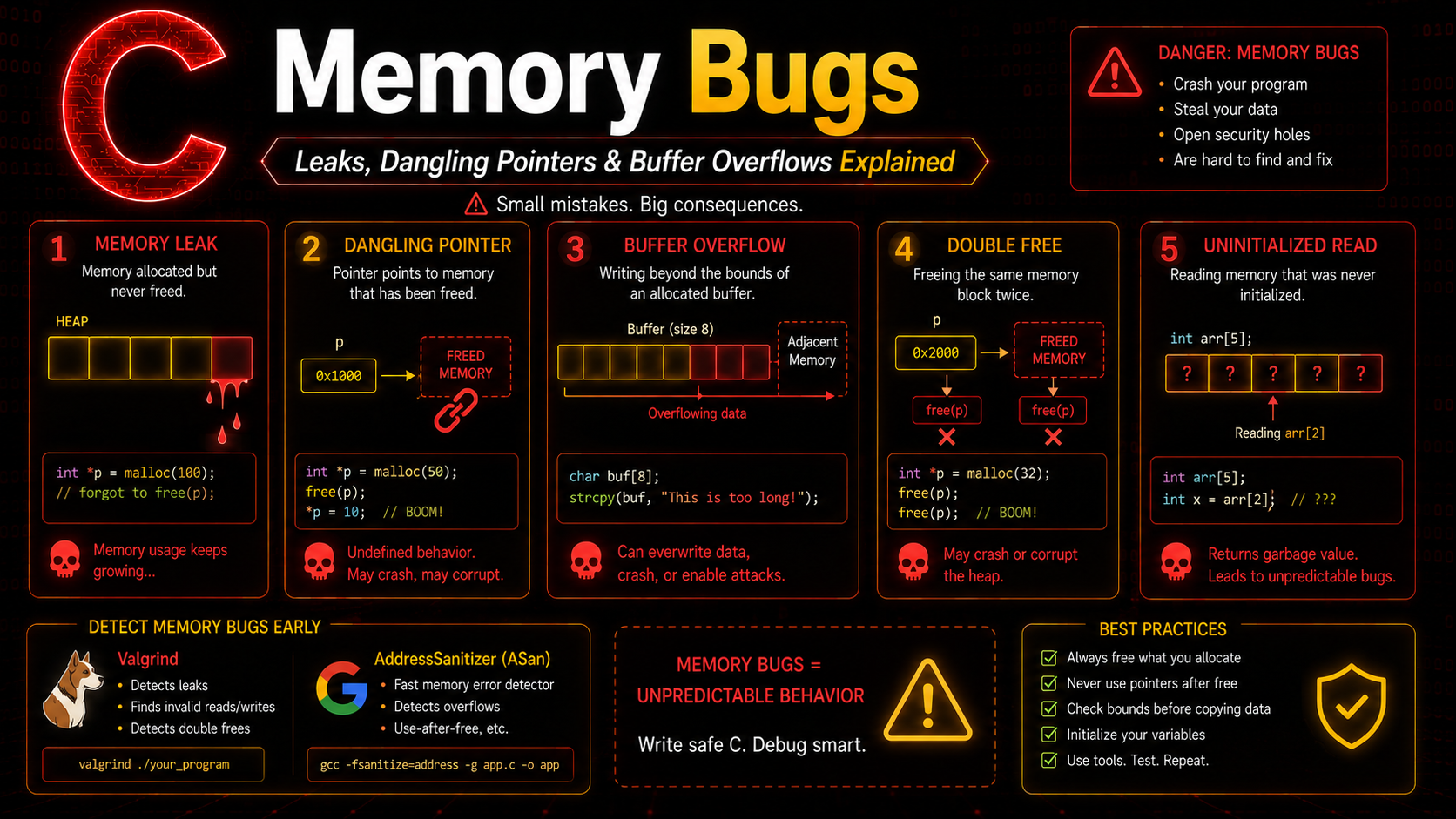
A memory leak occurs when you allocate heap memory and lose all references to it without calling free. The memory remains allocated but unreachable — your program slowly eats more and more RAM.
#include <stdlib.h>
#include <string.h>

// Leak Example 1: Forgetting to free
void process_data(void) {
    char *buffer = malloc(1024);
    // ... use buffer ...
    return;  // BUG: buffer never freed
    // 1KB leaked every time this function is called
}

// Leak Example 2: Overwriting the only pointer
void overwrite_leak(void) {
    int *p = malloc(100 * sizeof(int));  // Allocation 1
    p = malloc(200 * sizeof(int));       // Allocation 2 — Allocation 1 is leaked!
    free(p);  // Only frees Allocation 2
}

// Leak Example 3: Early return
int read_config(const char *path) {
    char *data = malloc(4096);
    if (!data) return -1;

    FILE *f = fopen(path, "r");
    if (!f) {
        return -1;  // BUG: data is leaked!
        // Fix: add free(data) before return
    }

    // ... process ...
    free(data);
    fclose(f);
    return 0;
}
Detecting Leaks
A small leak in a short-lived program is harmless. But in a web server, database, or any long-running process, leaked memory accumulates until the system runs out of RAM and starts killing processes. Servers have crashed from leaks as small as 64 bytes per request.
Fixing Leaks: The Ownership Pattern
// Clear ownership: whoever allocates is responsible for freeing
// OR: document that the caller must free

// Option 1: Function allocates AND frees internally
void process(void) {
    char *buf = malloc(1024);
    if (!buf) return;
    // ... use buf ...
    free(buf);  // Same function frees
}

// Option 2: Function allocates, caller frees (documented)
// Returns newly allocated string — caller must free()
char *create_greeting(const char *name) {
    char *msg = malloc(strlen(name) + 20);
    if (!msg) return NULL;
    sprintf(msg, "Hello, %s!", name);
    return msg;  // Caller's responsibility
}
Dangling Pointers
A dangling pointer points to memory that has already been freed or is no longer valid. Using a dangling pointer is undefined behavior — it might work, crash, or corrupt completely unrelated data.
#include <stdio.h>
#include <stdlib.h>

// Dangling pointer from free
void dangling_free(void) {
    int *p = malloc(sizeof(int));
    *p = 42;
    free(p);

    // p still holds the old address, but the memory is freed
    printf("%d\n", *p);  // BUG: use-after-free
    *p = 100;             // BUG: writing to freed memory
}

// Dangling pointer from function return
int *dangling_return(void) {
    int local = 42;
    return &local;  // BUG: local is destroyed when function returns
}

// Dangling pointer from scope
void dangling_scope(void) {
    int *p;
    {
        int temp = 99;
        p = &temp;
    }
    // temp is out of scope — p is dangling
    printf("%d\n", *p);  // BUG: undefined behavior
}
Prevention
// Always NULL-ify after free
int *p = malloc(sizeof(int));
*p = 42;
free(p);
p = NULL;  // Now p is safely NULL, not dangling

// Check before use
if (p != NULL) {
    printf("%d\n", *p);
}
Buffer Overflows
A buffer overflow writes data beyond the allocated boundary. This is the single most exploited bug class in the history of computing. The Morris Worm (1988), Code Red, Heartbleed — all buffer overflows.
#include <stdio.h>
#include <stdlib.h>
#include <string.h>

// Stack buffer overflow
void stack_overflow_example(void) {
    char buffer[10];
    strcpy(buffer, "This string is way too long for the buffer");
    // Overwrites beyond buffer into stack frame — corrupts return address
}

// Heap buffer overflow
void heap_overflow_example(void) {
    char *buf = malloc(10);
    strcpy(buf, "This is also too long");  // Overwrites heap metadata
    free(buf);  // May crash here because metadata is corrupted
}

// Off-by-one error
void off_by_one(void) {
    char *str = malloc(5);  // Space for "test" + null terminator
    strcpy(str, "test");    // OK — exactly fits

    // But common mistake:
    char *names[3] = {"Alice", "Bob", "Charlie"};
    for (int i = 0; i <= 3; i++) {  // BUG: should be i < 3
        printf("%s\n", names[i]);    // i=3 reads past the array
    }
    free(str);
}
Prevention
// Use bounded string functions
char buffer[10];
strncpy(buffer, input, sizeof(buffer) - 1);
buffer[sizeof(buffer) - 1] = '\0';  // Always null-terminate

// Use snprintf instead of sprintf
char msg[64];
snprintf(msg, sizeof(msg), "User: %s", username);

// Always validate array indices
if (index >= 0 && index < array_size) {
    array[index] = value;
}
Double Free
Freeing the same memory twice corrupts the allocator’s internal data structures. This can crash your program immediately or create an exploitable vulnerability where an attacker controls what gets allocated at that address next.
int *p = malloc(sizeof(int));
free(p);
free(p);  // BUG: double free — undefined behavior

// How it happens in real code
void cleanup(int *a, int *b) {
    free(a);
    free(b);
}

int main(void) {
    int *ptr = malloc(sizeof(int));
    cleanup(ptr, ptr);  // Same pointer passed twice — double free!
    return 0;
}
Prevention
// NULL-ify after free — free(NULL) is safe
free(p);
p = NULL;
free(p);  // No-op, safe

// Use wrapper function
void safe_free(void **pp) {
    if (pp && *pp) {
        free(*pp);
        *pp = NULL;
    }
}
Uninitialized Memory
Reading memory before writing to it gives you unpredictable garbage values:
#include <stdio.h>
#include <stdlib.h>

void uninitialized_examples(void) {
    // Stack — uninitialized local variable
    int x;
    printf("%d\n", x);  // BUG: undefined value

    // Heap — malloc doesn't initialize
    int *arr = malloc(5 * sizeof(int));
    printf("%d\n", arr[0]);  // BUG: garbage value

    // Fix: use calloc or memset
    int *safe = calloc(5, sizeof(int));      // Zero-initialized
    int *also_safe = malloc(5 * sizeof(int));
    memset(also_safe, 0, 5 * sizeof(int));   // Explicitly zeroed

    free(arr);
    free(safe);
    free(also_safe);
}
Integer Overflow in Allocation
// Dangerous: count * sizeof(int) can overflow
size_t count = SIZE_MAX / 2;
int *arr = malloc(count * sizeof(int));
// The multiplication wraps around, allocating a tiny buffer
// Writing 'count' integers causes massive buffer overflow

// Safe: use calloc (checks overflow internally)
int *safe_arr = calloc(count, sizeof(int));
// calloc returns NULL if count * sizeof(int) overflows
Detection with Valgrind
Valgrind is the gold-standard tool for detecting memory bugs in C programs. It runs your program inside a virtual CPU and tracks every byte of memory:
# Compile with debug info
gcc -g -O0 program.c -o program

# Run with Valgrind
valgrind --leak-check=full --show-leak-kinds=all --track-origins=yes ./program
Valgrind output for a memory leak:
==12345== 40 bytes in 1 blocks are definitely lost
==12345==    at 0x4C2FB0F: malloc (vg_replace_malloc.c:381)
==12345==    by 0x401156: create_data (program.c:8)
==12345==    by 0x40118A: main (program.c:15)
==12345==
==12345== LEAK SUMMARY:
==12345==    definitely lost: 40 bytes in 1 blocks
==12345==    indirectly lost: 0 bytes in 0 blocks
Valgrind tells you exactly which line allocated the leaked memory. It catches leaks, use-after-free, double free, uninitialized reads, and buffer overflows.
Address Sanitizer
Address Sanitizer (ASan) is a compiler feature that instruments your code to catch memory bugs at runtime. It is faster than Valgrind (2x slowdown vs 20x) and catches most of the same bugs:
# Compile with Address Sanitizer
gcc -fsanitize=address -g program.c -o program

# Run normally — ASan is embedded in the binary
./program
ASan output for a heap buffer overflow:
=================================================================
==12345==ERROR: AddressSanitizer: heap-buffer-overflow
WRITE of size 4 at 0x602000000018
    #0 0x401234 in main program.c:10
    #1 0x7f...
0x602000000018 is located 0 bytes to the right of 8-byte region
ASan also catches stack buffer overflows, use-after-free, double free, and memory leaks (with -fsanitize=leak).
Prevention Strategies
- Initialize everything — Use
callocinstead ofmallocwhen you need zeros. Initialize local variables at declaration. - NULL after free —
free(ptr); ptr = NULL;prevents dangling pointer use. - Use bounded functions —
strncpy,snprintf,fgetsinstead ofstrcpy,sprintf,gets. - Validate all inputs — Check array bounds, string lengths, allocation sizes.
- Own your memory — Document who allocates and who frees every dynamic allocation.
- Test with tools — Run Valgrind or ASan in CI/CD pipelines.
- Use realloc safely — Always use a temporary pointer to avoid losing memory on failure.
- Compile with warnings —
gcc -Wall -Wextra -Werrorcatches many issues at compile time.
Practice Exercises
Exercise 1: Bug Hunter
Write a program that intentionally contains one of each bug type: memory leak, use-after-free, buffer overflow, double free, and uninitialized read. Compile with -fsanitize=address and fix each bug one at a time.
Exercise 2: Safe String Library
Create a mini string library with functions: safe_strdup, safe_concat, safe_substr. Each function must check for NULL inputs, validate sizes, and handle allocation failures gracefully.
Exercise 3: Memory Pool
Implement a simple memory pool that pre-allocates a large block and hands out fixed-size chunks. This pattern eliminates leaks and fragmentation by freeing everything at once.
Memory bugs are the price C programmers pay for performance. But with disciplined coding and the right tools, you can write C code that is both fast and safe. Now let us move to organizing data — structs let you group related variables into meaningful types.