C++ Inheritance: Complete Guide to Base & Derived Classes
What Is Inheritance?
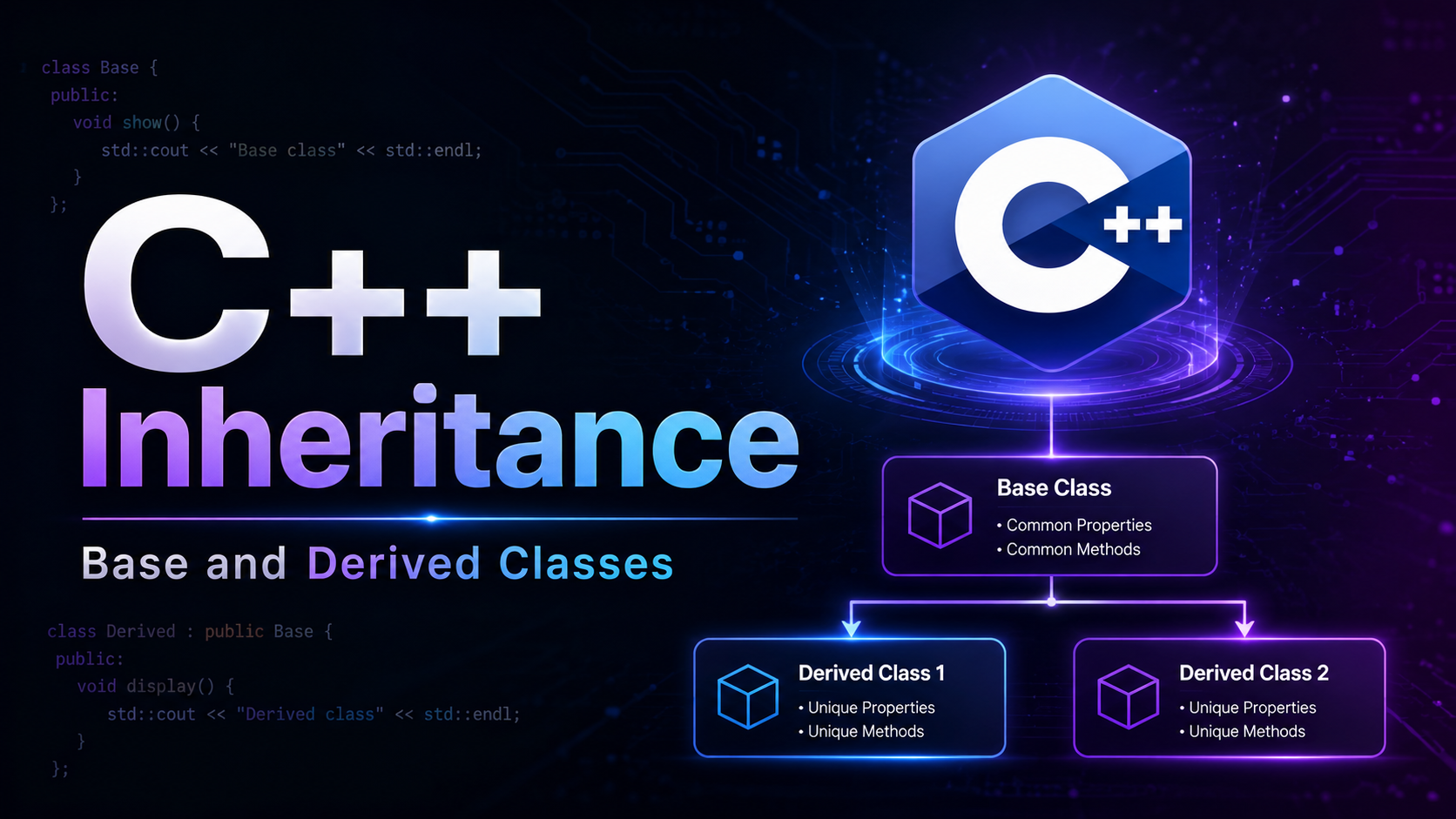
Inheritance lets a new class (the derived class) reuse and extend an existing class (the base class). Instead of writing the same code in multiple classes, you define common behavior once in the base class and inherit it. A Dog class inherits from Animal. A SavingsAccount inherits from BankAccount. A Button inherits from Widget.
This is one of the three pillars of object-oriented programming (alongside encapsulation and polymorphism). Inheritance models “is-a” relationships: a dog is an animal, a savings account is a bank account. When used correctly, it eliminates duplication, creates logical hierarchies, and enables polymorphism (which you will learn in the next lesson).
But inheritance is also frequently misused. Not every relationship should be modeled with inheritance. A car has an engine — that is composition, not inheritance. This lesson covers the mechanics of inheritance, when to use it, and when to choose composition instead.
Basic Syntax
The syntax is class Derived : public Base. The derived class inherits all public and protected members of the base:
#include <iostream>
#include <string>
using namespace std;

class Animal {
    string name;
    int age;

public:
    Animal(string n, int a) : name(n), age(a) {}

    void eat() const {
        cout << name << " is eating." << endl;
    }

    void sleep() const {
        cout << name << " is sleeping." << endl;
    }

    string getName() const { return name; }
    int getAge() const { return age; }
};

// Dog inherits from Animal
class Dog : public Animal {
    string breed;

public:
    Dog(string name, int age, string b)
        : Animal(name, age), breed(b) {}  // call base constructor

    void bark() const {
        cout << getName() << " says: Woof!" << endl;
    }

    void info() const {
        cout << getName() << " | " << breed << " | Age " << getAge() << endl;
    }
};

int main() {
    Dog rex("Rex", 3, "German Shepherd");

    rex.eat();     // inherited from Animal
    rex.sleep();   // inherited from Animal
    rex.bark();    // defined in Dog
    rex.info();    // defined in Dog

    return 0;
}
Dog inherits eat(), sleep(), getName(), and getAge() from Animal without rewriting them. It adds its own bark() and info() methods. The base class constructor is called via the member initializer list: Animal(name, age).
What Gets Inherited?
Inherited (accessible in derived class):
- Public member functions and variables
- Protected member functions and variables
Inherited but NOT accessible:
- Private members — they exist in the derived object’s memory but cannot be accessed directly. Use public/protected getters.
NOT inherited:
- Constructors (but the base constructor is called by the derived constructor)
- Destructor (but the base destructor is called automatically)
- Assignment operator (but can be explicitly invoked)
- Friend declarations (friendship is not inherited)
class Base {
private:
    int secret = 42;
protected:
    int shared = 100;
public:
    int visible = 200;
};

class Derived : public Base {
public:
    void test() {
        // cout << secret;  // ERROR: private in Base
        cout << shared;     // OK: protected is accessible in derived
        cout << visible;    // OK: public
    }
};
Access Specifiers in Inheritance
The keyword after the colon controls how base class members are exposed through the derived class:
class Base {
public:    int pub;
protected: int prot;
private:   int priv;
};

// public inheritance: preserves access levels
class PubDerived : public Base {
    // pub   → public
    // prot  → protected
    // priv  → not accessible
};

// protected inheritance: public members become protected
class ProtDerived : protected Base {
    // pub   → protected
    // prot  → protected
    // priv  → not accessible
};

// private inheritance: everything becomes private
class PrivDerived : private Base {
    // pub   → private
    // prot  → private
    // priv  → not accessible
};
In practice, almost always use public inheritance. Protected and private inheritance are rare and serve specialized purposes (implementation inheritance, where you want to reuse code without exposing the base’s interface). If you see class Derived : Base without a specifier, classes default to private inheritance, and structs default to public.
Constructors and Destructors
The derived class constructor must initialize the base class by calling a base constructor in the member initializer list. If you don’t explicitly call one, the compiler calls the base’s default constructor (which fails if one doesn’t exist):
#include <iostream>
#include <string>
using namespace std;

class Vehicle {
    string make;
    int year;

public:
    Vehicle(string m, int y) : make(m), year(y) {
        cout << "Vehicle constructor: " << make << " " << year << endl;
    }

    ~Vehicle() {
        cout << "Vehicle destructor: " << make << endl;
    }

    string getMake() const { return make; }
    int getYear() const { return year; }
};

class Car : public Vehicle {
    int doors;

public:
    Car(string make, int year, int d)
        : Vehicle(make, year), doors(d) {  // MUST call base constructor
        cout << "Car constructor: " << doors << " doors" << endl;
    }

    ~Car() {
        cout << "Car destructor" << endl;
    }

    void info() const {
        cout << getYear() << " " << getMake() << ", " << doors << " doors" << endl;
    }
};

int main() {
    cout << "--- Creating car ---" << endl;
    Car myCar("Toyota", 2024, 4);
    myCar.info();
    cout << "--- Destroying car ---" << endl;
    return 0;
}
// Output:
// --- Creating car ---
// Vehicle constructor: Toyota 2024
// Car constructor: 4 doors
// 2024 Toyota, 4 doors
// --- Destroying car ---
// Car destructor
// Vehicle destructor
Constructors are called base-first (Vehicle, then Car). Destructors are called in reverse order (Car, then Vehicle). This ensures the base is fully constructed before the derived class tries to use it, and the derived class cleans up before the base.
Overriding Member Functions
A derived class can provide its own version of a base class function. This is called overriding:
#include <iostream>
#include <string>
using namespace std;

class Shape {
public:
    string type;
    Shape(string t) : type(t) {}

    void describe() const {
        cout << "I am a " << type << endl;
    }

    double area() const {
        return 0.0;  // base implementation
    }
};

class Circle : public Shape {
    double radius;
public:
    Circle(double r) : Shape("Circle"), radius(r) {}

    // Override area() — provides Circle-specific implementation
    double area() const {
        return 3.14159265 * radius * radius;
    }

    // Override describe() — can still call base version
    void describe() const {
        Shape::describe();  // call base version
        cout << "Radius: " << radius << ", Area: " << area() << endl;
    }
};

class Rectangle : public Shape {
    double width, height;
public:
    Rectangle(double w, double h) : Shape("Rectangle"), width(w), height(h) {}

    double area() const {
        return width * height;
    }
};

int main() {
    Circle c(5);
    Rectangle r(4, 6);

    c.describe();
    // I am a Circle
    // Radius: 5, Area: 78.5398

    cout << "Rectangle area: " << r.area() << endl;
    // Rectangle area: 24

    return 0;
}
Use Base::function() to call the base class version from the derived class. This is useful when you want to extend rather than replace the base behavior.
Note: without the virtual keyword, overriding only works when you call the function directly on the derived type. If you use a base class pointer or reference, the base version is called instead. This is where polymorphism comes in — covered in the next lesson.
The protected Access Specifier
protected is specifically designed for inheritance. Protected members are accessible to the class itself and all derived classes, but not to outside code:
#include <iostream>
#include <string>
using namespace std;

class Employee {
private:
    string ssn;            // truly private — even derived classes can't see

protected:
    string name;           // accessible to derived classes
    double salary;

public:
    Employee(string n, double s, string id)
        : name(n), salary(s), ssn(id) {}

    void printPublic() const {
        cout << name << " - $" << salary << endl;
    }
};

class Manager : public Employee {
    int teamSize;

public:
    Manager(string name, double salary, string ssn, int team)
        : Employee(name, salary, ssn), teamSize(team) {}

    void printDetails() const {
        // Can access protected members
        cout << "Manager: " << name << endl;     // OK: protected
        cout << "Salary: $" << salary << endl;    // OK: protected
        cout << "Team size: " << teamSize << endl;
        // cout << ssn;                            // ERROR: private in Employee
    }
};

int main() {
    Manager m("Alice", 120000, "123-45-6789", 8);
    m.printDetails();
    m.printPublic();

    // m.name;      // ERROR: protected, not accessible from outside
    // m.salary;    // ERROR: protected
    return 0;
}
Use protected when derived classes genuinely need direct access to a member. But prefer private with public/protected getters — it gives you more control and flexibility to change the internal representation later.
The “is-a” Relationship
Public inheritance should model “is-a” relationships. A derived object can be used anywhere a base object is expected:
#include <iostream>
#include <string>
using namespace std;

class Animal {
    string name;
public:
    Animal(string n) : name(n) {}
    string getName() const { return name; }
    void eat() const { cout << name << " eats." << endl; }
};

class Dog : public Animal {
public:
    Dog(string name) : Animal(name) {}
    void bark() const { cout << getName() << " barks!" << endl; }
};

// This function accepts any Animal (or anything derived from Animal)
void feedAnimal(const Animal& a) {
    a.eat();
}

int main() {
    Dog buddy("Buddy");

    feedAnimal(buddy);  // Dog IS-AN Animal, so this works

    // A Dog can be used wherever an Animal is expected
    Animal& ref = buddy;   // OK: reference to base
    ref.eat();              // calls Animal::eat

    return 0;
}
This is called the Liskov Substitution Principle — objects of a derived class should be usable in place of base class objects without breaking correctness. If substituting a derived object would cause unexpected behavior, the inheritance relationship is wrong.
Object Slicing
When you assign a derived object to a base object by value, the derived-specific parts are sliced off:
#include <iostream>
#include <string>
using namespace std;

class Base {
public:
    int x = 10;
    void show() const { cout << "Base x=" << x << endl; }
};

class Derived : public Base {
public:
    int y = 20;
    void show() const { cout << "Derived x=" << x << " y=" << y << endl; }
};

int main() {
    Derived d;
    d.show();     // Derived x=10 y=20

    Base b = d;   // SLICING: only Base part is copied, y is lost
    b.show();     // Base x=10 (Derived::show is gone too)

    // Use references or pointers to avoid slicing
    Base& ref = d;
    ref.show();   // Base x=10 (still calls Base::show without virtual)
                  // With virtual, would call Derived::show

    return 0;
}
Object slicing is a common bug. It happens silently when passing derived objects by value to functions expecting the base type. The fix is to use references or pointers:
void process(Base b) { }        // BAD: slicing
void process(const Base& b) { } // GOOD: no slicing
void process(Base* b) { }       // GOOD: no slicing
Constructor and Destructor Call Order
In a multi-level hierarchy, constructors run top-down and destructors run bottom-up:
#include <iostream>
using namespace std;

class A {
public:
    A()  { cout << "A constructor" << endl; }
    ~A() { cout << "A destructor" << endl; }
};

class B : public A {
public:
    B()  { cout << "B constructor" << endl; }
    ~B() { cout << "B destructor" << endl; }
};

class C : public B {
public:
    C()  { cout << "C constructor" << endl; }
    ~C() { cout << "C destructor" << endl; }
};

int main() {
    cout << "--- Creating C ---" << endl;
    C obj;
    cout << "--- Destroying C ---" << endl;
    return 0;
}
// Output:
// --- Creating C ---
// A constructor
// B constructor
// C constructor
// --- Destroying C ---
// C destructor
// B destructor
// A destructor
This order guarantees that when a constructor runs, all base classes are already initialized. And when a destructor runs, all derived classes have already cleaned up.
Inheritance vs Composition
Inheritance models “is-a.” Composition models “has-a.” Choosing correctly is one of the most important design decisions in OOP:
#include <iostream>
#include <string>
using namespace std;

// BAD: Engine IS-A Vehicle? No!
// class Engine : public Vehicle { };

// GOOD: Composition — Car HAS-AN Engine
class Engine {
    int horsepower;
public:
    Engine(int hp) : horsepower(hp) {}
    void start() const { cout << "Engine started (" << horsepower << " HP)" << endl; }
    void stop() const { cout << "Engine stopped" << endl; }
    int getHp() const { return horsepower; }
};

class Transmission {
    int gears;
public:
    Transmission(int g) : gears(g) {}
    void shift(int gear) const { cout << "Shifted to gear " << gear << endl; }
};

class Car {
    string model;
    Engine engine;            // HAS-AN engine
    Transmission transmission; // HAS-A transmission

public:
    Car(string m, int hp, int gears)
        : model(m), engine(hp), transmission(gears) {}

    void start() {
        cout << model << ": ";
        engine.start();
    }

    void drive() {
        transmission.shift(1);
        cout << "Driving " << model << " at " << engine.getHp() << " HP" << endl;
    }
};

int main() {
    Car tesla("Model 3", 283, 1);
    tesla.start();
    tesla.drive();
    return 0;
}
Prefer composition over inheritance unless the relationship is genuinely “is-a.” Composition is more flexible: you can change the engine at runtime, have multiple engines, or swap implementations. Inheritance creates a tight coupling that is hard to modify later.
Guidelines for choosing:
- Use inheritance when: the derived class truly is a specialized version of the base (Dog is an Animal, Circle is a Shape)
- Use composition when: the class uses another class as a component (Car has an Engine, Player has an Inventory)
- If in doubt: choose composition. You can always add inheritance later, but removing it is difficult.
Real-World Example: GUI Widget Hierarchy
#include <iostream>
#include <string>
#include <vector>
using namespace std;

class Widget {
protected:
    int x, y, width, height;
    bool visible;
    string id;

public:
    Widget(string id, int x, int y, int w, int h)
        : id(id), x(x), y(y), width(w), height(h), visible(true) {}

    void show() { visible = true; }
    void hide() { visible = false; }
    bool isVisible() const { return visible; }

    void draw() const {
        if (!visible) return;
        cout << "[" << id << "] at (" << x << "," << y
             << ") size " << width << "x" << height << endl;
    }

    string getId() const { return id; }
};

class Button : public Widget {
    string label;
    bool pressed;

public:
    Button(string id, int x, int y, int w, int h, string lbl)
        : Widget(id, x, y, w, h), label(lbl), pressed(false) {}

    void click() {
        pressed = true;
        cout << "Button '" << label << "' clicked!" << endl;
        pressed = false;
    }

    void draw() const {
        if (!visible) return;
        cout << "[Button: " << label << "] at (" << x << "," << y
             << ") " << width << "x" << height << endl;
    }
};

class TextInput : public Widget {
    string text;
    string placeholder;
    int maxLength;

public:
    TextInput(string id, int x, int y, int w, int h, string ph, int maxLen = 100)
        : Widget(id, x, y, w, h), placeholder(ph), maxLength(maxLen) {}

    void type(const string& input) {
        if (text.length() + input.length() <= maxLength) {
            text += input;
            cout << "Input '" << id << "': " << text << endl;
        } else {
            cout << "Max length reached!" << endl;
        }
    }

    void clear() { text.clear(); }
    string getText() const { return text; }

    void draw() const {
        if (!visible) return;
        cout << "[Input: " << (text.empty() ? placeholder : text)
             << "] at (" << x << "," << y << ")" << endl;
    }
};

class Checkbox : public Widget {
    string label;
    bool checked;

public:
    Checkbox(string id, int x, int y, string lbl)
        : Widget(id, x, y, 20, 20), label(lbl), checked(false) {}

    void toggle() {
        checked = !checked;
        cout << label << ": " << (checked ? "[x]" : "[ ]") << endl;
    }

    bool isChecked() const { return checked; }

    void draw() const {
        if (!visible) return;
        cout << (checked ? "[x] " : "[ ] ") << label << endl;
    }
};

int main() {
    Button submitBtn("btn1", 10, 100, 120, 40, "Submit");
    TextInput nameField("input1", 10, 50, 200, 30, "Enter your name...");
    Checkbox agreeCb("cb1", 10, 140, "I agree to terms");

    // All widgets share common functionality from Widget
    nameField.draw();
    nameField.type("Chirag");
    nameField.draw();

    agreeCb.draw();
    agreeCb.toggle();

    submitBtn.draw();
    submitBtn.click();

    // hide/show inherited from Widget
    submitBtn.hide();
    cout << "Button visible? " << boolalpha << submitBtn.isVisible() << endl;

    return 0;
}
Every widget shares positioning, visibility, and drawing infrastructure from the base class. Each derived class adds its specific behavior: buttons can be clicked, text inputs accept typing, checkboxes toggle. This is exactly how real GUI frameworks like Qt, wxWidgets, and GTK structure their class hierarchies.
Practice Exercises
Exercise 1: Create a Shape base class with name and color. Derive Circle, Rectangle, and Triangle. Each should have an area() and perimeter() method. Test by creating one of each and printing their properties.
Exercise 2: Build a BankAccount hierarchy: base class with balance, deposit, withdraw. Derive SavingsAccount (with interest rate and applyInterest method) and CheckingAccount (with overdraft limit). Test the Liskov Substitution Principle by passing derived objects to a function that takes const BankAccount&.
Exercise 3: Create a three-level hierarchy: Animal → Pet → Dog. Add constructors and destructors that print messages to verify the construction/destruction order. Add a speak() method at each level and demonstrate both overriding and calling the base version with Base::speak().
Exercise 4: Design an Employee hierarchy with Employee (base), Developer, Manager, and Intern. Each should have a calculatePay() method with different logic (hourly vs salary vs stipend). Demonstrate object slicing by assigning a Developer to an Employee variable and showing the difference.
Summary
Inheritance lets derived classes reuse and extend base classes, modeling “is-a” relationships. Use public inheritance for almost all cases. The derived constructor must initialize the base via the member initializer list. Constructors run top-down, destructors bottom-up. The protected access specifier gives derived classes access without exposing data publicly. Watch out for object slicing when passing by value — use references or pointers instead. Most importantly, prefer composition over inheritance unless the relationship is genuinely “is-a.” In the next lesson, you will learn about virtual functions and polymorphism — which unlock the full power of inheritance by letting base class pointers call derived class methods.