C Command-Line Arguments: argc argv Explained (With Real Examples)
Every powerful Unix tool — gcc, grep, curl, git — accepts command-line arguments. That’s how you pass filenames, flags, and options to a program without interactive prompts. In C, command-line arguments arrive through two parameters to main(): argc and argv.
This is the final lesson in our file and system interaction batch. We’ve covered file I/O, text vs binary files, file positioning, and error handling. Now we’ll make programs that accept arguments from the terminal — the final piece for building real command-line tools.
Table of Contents
What Are Command-Line Arguments?
When you run a program from the terminal, everything after the program name is a command-line argument:
$ ./myprogram hello world 42
     ^          ^     ^    ^
     argv[0]   argv[1] argv[2] argv[3]

     argc = 4 (total number of arguments including program name)
The shell splits the command into words (separated by spaces) and passes them to your program. Your program receives them as an array of strings.
argc and argv Explained
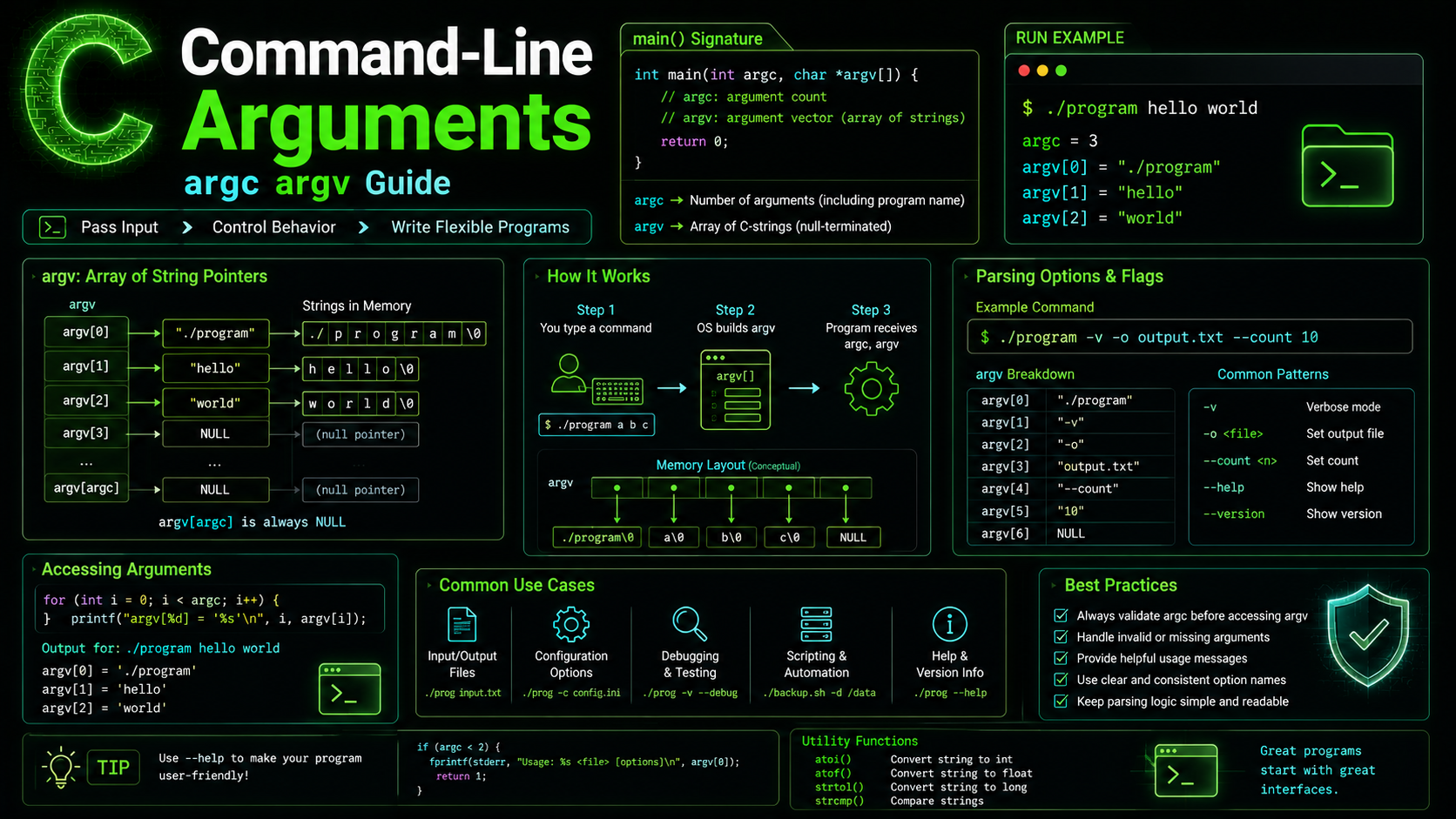
The standard signature for main() with command-line arguments:
int main(int argc, char *argv[]) {
    // argc = argument count (always >= 1)
    // argv = argument vector (array of string pointers)
    // argv[0] = program name
    // argv[1] through argv[argc-1] = user arguments
    // argv[argc] = NULL (guaranteed by the C standard)
}
Think of argv as an array of C Strings (character pointers). Each element points to a null-terminated string. And argc tells you how many elements are in that array.
// Memory layout of argv for: ./greet Alice Bob
//
// argv[0] → "./greet\0"
// argv[1] → "Alice\0"
// argv[2] → "Bob\0"
// argv[3] → NULL
You can also write argv as char **argv — they’re equivalent. The array notation char *argv[] is just more readable, as we discussed in C Pointers.
Accessing Arguments
#include <stdio.h>

int main(int argc, char *argv[]) {
    printf("Program: %s\n", argv[0]);
    printf("Arguments: %d\n", argc - 1);

    for (int i = 1; i < argc; i++) {
        printf("  argv[%d] = \"%s\"\n", i, argv[i]);
    }

    return 0;
}
$ ./program hello "world wide" 42
Program: ./program
Arguments: 3
argv[1] = "hello"
argv[2] = "world wide"
argv[3] = "42"Notice that "world wide" is a single argument because it’s in quotes. The shell handles quoting before your program sees the arguments. Also notice that 42 is a string, not an integer — all arguments come as strings.
Parsing Numbers from Arguments
Since all arguments are strings, you must convert numeric arguments manually:
#include <stdio.h>
#include <stdlib.h>

int main(int argc, char *argv[]) {
    if (argc != 3) {
        fprintf(stderr, "Usage: %s <num1> <num2>\n", argv[0]);
        return 1;
    }

    // atoi() — simple but no error checking
    int a = atoi(argv[1]);
    int b = atoi(argv[2]);
    printf("%d + %d = %d\n", a, b, a + b);

    return 0;
}
For robust parsing, use strtol() instead of atoi() — it detects errors:
#include <stdlib.h>
#include <errno.h>

int safe_parse_int(const char *str, int *out) {
    char *endptr;
    errno = 0;

    long val = strtol(str, &endptr, 10);

    // Check for errors
    if (errno == ERANGE) return -1;        // overflow
    if (endptr == str) return -1;          // no digits found
    if (*endptr != '\0') return -1;        // trailing garbage
    if (val < INT_MIN || val > INT_MAX) return -1;  // out of int range

    *out = (int)val;
    return 0;
}

// Usage
int value;
if (safe_parse_int(argv[1], &value) != 0) {
    fprintf(stderr, "Invalid number: '%s'\n", argv[1]);
    return 1;
}
Handling Flags and Options
Real CLI tools use flags like -v (verbose), -o file (output file), or --help:
#include <stdio.h>
#include <string.h>

int main(int argc, char *argv[]) {
    int verbose = 0;
    const char *output = NULL;
    const char *input = NULL;

    for (int i = 1; i < argc; i++) {
        if (strcmp(argv[i], "-v") == 0 || strcmp(argv[i], "--verbose") == 0) {
            verbose = 1;
        } else if (strcmp(argv[i], "-o") == 0) {
            if (i + 1 < argc) {
                output = argv[++i];  // consume next argument
            } else {
                fprintf(stderr, "Error: -o requires a filename\n");
                return 1;
            }
        } else if (strcmp(argv[i], "--help") == 0) {
            printf("Usage: %s [-v] [-o output] input\n", argv[0]);
            return 0;
        } else if (argv[i][0] == '-') {
            fprintf(stderr, "Unknown option: %s\n", argv[i]);
            return 1;
        } else {
            input = argv[i];  // positional argument
        }
    }

    if (!input) {
        fprintf(stderr, "Error: no input file specified\n");
        return 1;
    }

    if (verbose) printf("Input: %s\n", input);
    if (verbose && output) printf("Output: %s\n", output);

    // ... process input ...
    return 0;
}
Parsing with getopt()
For more complex argument parsing, use getopt() from <unistd.h> (POSIX, not standard C but available on Linux/macOS):
#include <stdio.h>
#include <stdlib.h>
#include <unistd.h>

int main(int argc, char *argv[]) {
    int verbose = 0;
    int count = 1;
    char *output = NULL;

    int opt;
    while ((opt = getopt(argc, argv, "vc:o:h")) != -1) {
        switch (opt) {
            case 'v':
                verbose = 1;
                break;
            case 'c':
                count = atoi(optarg);  // optarg points to the option's value
                break;
            case 'o':
                output = optarg;
                break;
            case 'h':
                printf("Usage: %s [-v] [-c count] [-o output] files...\n", argv[0]);
                return 0;
            default:
                fprintf(stderr, "Try '%s -h' for help\n", argv[0]);
                return 1;
        }
    }

    // optind is the index of the first non-option argument
    if (optind >= argc) {
        fprintf(stderr, "Expected file argument(s)\n");
        return 1;
    }

    // Process remaining arguments (files)
    for (int i = optind; i < argc; i++) {
        printf("Processing: %s (verbose=%d, count=%d)\n",
               argv[i], verbose, count);
    }

    return 0;
}
$ ./tool -v -c 5 -o result.txt file1.txt file2.txt
Processing: file1.txt (verbose=1, count=5)
Processing: file2.txt (verbose=1, count=5)The getopt() option string "vc:o:h" means: -v and -h take no arguments, while -c and -o require an argument (indicated by the colon).
Practical Examples
Word Counter (like wc)
#include <stdio.h>
#include <ctype.h>

void count_file(const char *filename) {
    FILE *fp = (strcmp(filename, "-") == 0) ? stdin : fopen(filename, "r");
    if (!fp) { perror(filename); return; }

    long lines = 0, words = 0, chars = 0;
    int ch, in_word = 0;

    while ((ch = fgetc(fp)) != EOF) {
        chars++;
        if (ch == '\n') lines++;
        if (isspace(ch)) {
            in_word = 0;
        } else if (!in_word) {
            in_word = 1;
            words++;
        }
    }

    printf("%7ld %7ld %7ld %s\n", lines, words, chars, filename);

    if (fp != stdin) fclose(fp);
}

int main(int argc, char *argv[]) {
    if (argc < 2) {
        count_file("-");  // read from stdin
    } else {
        for (int i = 1; i < argc; i++) {
            count_file(argv[i]);
        }
    }
    return 0;
}
File Search Tool (like grep, simplified)
#include <stdio.h>
#include <string.h>
#include <stdlib.h>

void search_file(const char *pattern, const char *filename) {
    FILE *fp = fopen(filename, "r");
    if (!fp) { perror(filename); return; }

    char line[4096];
    int line_num = 0;

    while (fgets(line, sizeof(line), fp)) {
        line_num++;
        if (strstr(line, pattern)) {
            printf("%s:%d: %s", filename, line_num, line);
        }
    }

    fclose(fp);
}

int main(int argc, char *argv[]) {
    if (argc < 3) {
        fprintf(stderr, "Usage: %s <pattern> <file1> [file2...]\n", argv[0]);
        return 1;
    }

    const char *pattern = argv[1];

    for (int i = 2; i < argc; i++) {
        search_file(pattern, argv[i]);
    }

    return 0;
}
Environment Variables: envp
Some systems support a third parameter to main() for environment variables:
// Non-standard but widely supported
int main(int argc, char *argv[], char *envp[]) {
    for (int i = 0; envp[i] != NULL; i++) {
        printf("%s\n", envp[i]);
    }
}

// Standard way — use getenv()
#include <stdlib.h>

const char *home = getenv("HOME");
const char *path = getenv("PATH");
const char *user = getenv("USER");

if (home) {
    printf("Home directory: %s\n", home);
}
Environment variables are useful for configuration that shouldn’t be on the command line (like API keys or database passwords).
Common Mistakes
1. Accessing argv Out of Bounds
// WRONG — crashes if no arguments given
int main(int argc, char *argv[]) {
    printf("File: %s\n", argv[1]);  // argv[1] may not exist!
}

// CORRECT
if (argc < 2) {
    fprintf(stderr, "Usage: %s <file>\n", argv[0]);
    return 1;
}
printf("File: %s\n", argv[1]);
2. Treating argv Strings as Numbers
// WRONG — this compares pointer addresses, not values!
if (argv[1] == "hello") { ... }

// CORRECT — use strcmp() for string comparison
if (strcmp(argv[1], "hello") == 0) { ... }
3. Forgetting argv[0] Is the Program Name
// User arguments start at argv[1], not argv[0]
for (int i = 0; i < argc; i++) {  // includes program name
    process(argv[i]);
}

// Usually you want:
for (int i = 1; i < argc; i++) {  // skip program name
    process(argv[i]);
}
Best Practices
Always validate argc before accessing argv. Accessing argv[1] when argc == 1 is undefined behavior.
Print usage on wrong arguments. Include argv[0] in usage messages so the help text matches however the user invoked the program. Follow conventions from C Input & Output for clean output formatting.
Support –help and -h. Every CLI tool should have a help flag. It’s a universal convention.
Use getopt() for complex options. Manual parsing works for simple cases, but getopt() handles edge cases like combined flags (-vf file) and error reporting.
Use strtol() over atoi(). atoi() returns 0 for invalid input — indistinguishable from the legitimate value 0. strtol() can detect actual errors.
Support stdin with “-“. Many Unix tools accept - as a filename meaning “read from stdin.” This makes your tool composable with pipes, as the Unix philosophy encourages.
Summary
argc counts arguments, argv holds them as strings, and argv[0] is always the program name. Use strcmp() for string flags, strtol() for numeric arguments, and getopt() for complex option parsing. Always validate argc before accessing argv elements. With command-line arguments mastered, you can build real Unix-style tools that compose with pipes, scripts, and other programs. Check out our full C Programming Roadmap for what’s coming next — data structures, function pointers, and more advanced C topics.