C Pointers Explained: The Complete Beginner’s Guide (2026)
Table of Contents
C pointers are the single most important concept you will learn in C programming. They are also the concept that trips up more beginners than anything else. But here is the truth: pointers are not magic. They are just variables that store memory addresses instead of regular values. Once you understand that one idea, everything clicks into place.
In this lesson from our C Roadmap, you will learn what pointers are, how to declare them, how to use them, and how to avoid the classic mistakes that crash programs. We will build your understanding from the ground up with clear diagrams and real code examples.
What Are C Pointers?
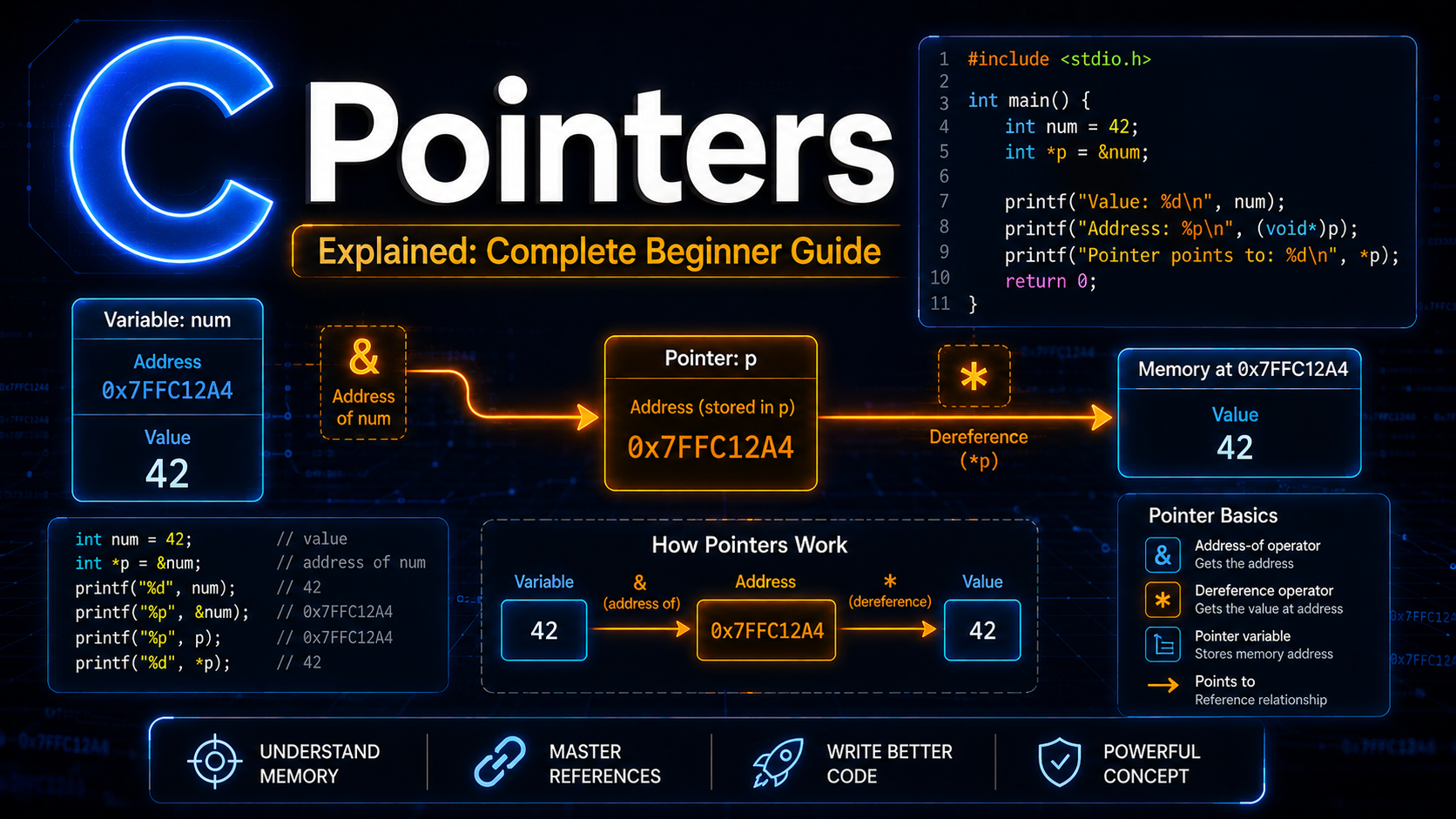
Every variable in C lives somewhere in your computer’s memory. That “somewhere” has a numeric address, just like a house has a street address. A pointer is a variable that stores the memory address of another variable.
Think of it this way. You have a friend named age who lives at house number 0x7ffc1234. A pointer named ptr does not store the age itself. Instead, it stores the house number 0x7ffc1234. When you need the age, you go to that address and look inside.
int age = 25;       // Regular variable: stores the value 25
int *ptr = &age;    // Pointer variable: stores the ADDRESS of age

printf("Value of age: %d\n", age);      // 25
printf("Address of age: %p\n", &age);   // Something like 0x7ffc1234
printf("Value of ptr: %p\n", ptr);      // Same address as above
printf("Value at ptr: %d\n", *ptr);     // 25 (dereferencing)
The output might look like this:
Value of age: 25
Address of age: 0x7ffc9a3b5c4c
Value of ptr: 0x7ffc9a3b5c4c
Value at ptr: 25
Why Do C Pointers Matter?
You might wonder why you need pointers at all. Cannot you just use regular variables? Here are five reasons pointers are essential in C:
1. Modifying variables inside functions. Without pointers, C Functions receive copies of arguments. Pointers let functions modify the original variable. We will explore this deeply in our Pointers & Functions lesson.
2. Dynamic memory allocation. Programs that need memory at runtime (like a growing list) use pointers with malloc() and free().
3. Efficient data passing. Passing a large struct by pointer (8 bytes) is far cheaper than copying the entire struct (potentially hundreds of bytes).
4. Data structures. Linked lists, trees, graphs, and hash tables all rely on pointers to connect nodes.
5. Hardware and system programming. Pointers let you interact directly with memory-mapped hardware registers, which is why C dominates embedded systems and OS development.
Declaring and Initializing C Pointers
The syntax for declaring a pointer uses the asterisk (*) symbol:
int *p;       // Pointer to int
char *c;      // Pointer to char
float *f;     // Pointer to float
double *d;    // Pointer to double
The * in the declaration tells the compiler “this variable will hold the address of an int (or char, float, etc.).” The asterisk can be placed next to the type or the variable name. All three of these are identical:
int *p;    // Most common style
int* p;    // Also valid
int * p;   // Also valid
However, be careful with multiple declarations on one line:
int *a, b;    // a is a pointer, b is a regular int!
int *a, *b;   // Both a and b are pointers
This is why many experienced C programmers prefer int *a style. It makes clear that the * belongs to the variable, not the type.
Always initialize pointers when you declare them. An uninitialized pointer contains a garbage address and accessing it causes undefined behavior:
int *p = NULL;       // Safe: initialized to NULL
int x = 10;
int *q = &x;         // Safe: points to x
The Address-of Operator (&)
The & operator returns the memory address of a variable. You already know this operator from C Input & Output where you used scanf("&x"). Now you understand why: scanf needs the address of the variable so it can write the input value directly into memory.
#include <stdio.h>

int main(void) {
    int x = 42;
    int y = 99;

    printf("Address of x: %p\n", (void *)&x);
    printf("Address of y: %p\n", (void *)&y);
    printf("Difference: %ld bytes\n", (long)(&x - &y));

    return 0;
}
Notice that we cast the address to (void *) when printing with %p. This is technically required by the C standard for correct behavior with printf.
The Dereference Operator (*) in C Pointers
The * operator on a pointer does the opposite of &. It follows the address and gives you the value stored there. This is called dereferencing:
#include <stdio.h>

int main(void) {
    int score = 85;
    int *ptr = &score;

    // Reading through the pointer
    printf("Score: %d\n", *ptr);    // 85

    // Writing through the pointer
    *ptr = 92;
    printf("Score: %d\n", score);   // 92 — the original changed!

    // Incrementing through the pointer
    (*ptr)++;
    printf("Score: %d\n", score);   // 93

    return 0;
}
This is the key insight: when you write through a pointer, you modify the original variable. The pointer gives you indirect access to memory. This is what makes pointers so powerful and so dangerous.
Here is a memory diagram showing what happens:
Before *ptr = 92:
  score [85]  ← address 0x1000
  ptr   [0x1000] → points to score

After *ptr = 92:
  score [92]  ← address 0x1000 (value changed!)
  ptr   [0x1000] → still points to score
C Pointer Types and Why They Matter
Every pointer has a type that matches the variable it points to. The type tells the compiler two critical things:
1. How many bytes to read/write when you dereference the pointer.
2. How far to jump when you do pointer arithmetic (covered in the next lesson).
#include <stdio.h>

int main(void) {
    int i = 0x41424344;     // 4 bytes
    char *cp = (char *)&i;  // Points to first byte

    printf("Full int: 0x%X\n", i);
    printf("First byte: 0x%X\n", *cp);    // Only reads 1 byte
    printf("As char: %c\n", *cp);          // Prints a character

    return 0;
}
If you have a char * pointing to an int, dereferencing it reads only 1 byte instead of 4. This is why pointer types matter. Mismatched types lead to subtle bugs. As you learned in C Variables & Data Types, different types have different sizes.
NULL Pointers in C: Safety First
NULL is a special pointer value that means “this pointer points to nothing.” It is defined in <stdio.h>, <stdlib.h>, and several other headers. Always check for NULL before dereferencing:
#include <stdio.h>
#include <stdlib.h>

int main(void) {
    int *ptr = NULL;

    // WRONG: Dereferencing NULL causes a crash (segfault)
    // printf("%d\n", *ptr);  // NEVER do this

    // RIGHT: Check first
    if (ptr != NULL) {
        printf("Value: %d\n", *ptr);
    } else {
        printf("Pointer is NULL, cannot dereference.\n");
    }

    // Common pattern: allocate and check
    int *arr = malloc(10 * sizeof(int));
    if (arr == NULL) {
        fprintf(stderr, "Memory allocation failed!\n");
        return 1;
    }

    // Use arr safely...
    free(arr);
    arr = NULL;  // Good practice: set to NULL after freeing

    return 0;
}
Setting a pointer to NULL after free() prevents use-after-free bugs, which are among the most dangerous security vulnerabilities in C programs.
void Pointers in C: The Generic Pointer
A void * is a generic pointer that can hold the address of any data type. It is used heavily in standard library functions like malloc(), memcpy(), and qsort():
#include <stdio.h>

void print_value(void *ptr, char type) {
    switch (type) {
        case 'i': printf("%d\n", *(int *)ptr); break;
        case 'f': printf("%.2f\n", *(float *)ptr); break;
        case 'c': printf("%c\n", *(char *)ptr); break;
    }
}

int main(void) {
    int x = 42;
    float f = 3.14f;
    char c = 'A';

    print_value(&x, 'i');    // 42
    print_value(&f, 'f');    // 3.14
    print_value(&c, 'c');    // A

    return 0;
}
The catch with void * is that you cannot dereference it directly. You must cast it to a specific type first. You also cannot do pointer arithmetic on void pointers (because the compiler does not know the element size).
Size of C Pointers
All pointers on a given system are the same size, regardless of what they point to. On a 64-bit system, every pointer is 8 bytes. On a 32-bit system, every pointer is 4 bytes:
#include <stdio.h>

int main(void) {
    printf("sizeof(int *):    %zu\n", sizeof(int *));
    printf("sizeof(char *):   %zu\n", sizeof(char *));
    printf("sizeof(double *): %zu\n", sizeof(double *));
    printf("sizeof(void *):   %zu\n", sizeof(void *));

    return 0;
}
On a typical 64-bit machine, all four will print 8. The pointer type does not affect the pointer’s size. It only affects how the compiler interprets the data at the pointed-to address.
Common C Pointer Mistakes
Here are the most frequent pointer bugs that crash programs:
1. Using uninitialized pointers:
int *p;          // p contains garbage
*p = 10;         // CRASH: writing to random memory
2. Dereferencing NULL:
int *p = NULL;
printf("%d", *p);  // CRASH: segmentation fault
3. Dangling pointers (pointing to freed memory):
int *p = malloc(sizeof(int));
*p = 42;
free(p);
printf("%d", *p);  // UNDEFINED: p points to freed memory
4. Returning address of a local variable:
int *bad_function(void) {
    int local = 10;
    return &local;   // WRONG: local is destroyed when function returns
}
// The returned pointer is dangling
5. Confusing * in declaration vs. dereferencing:
int *p = &x;   // * means "p is a pointer" (declaration)
*p = 10;        // * means "value at address p" (dereference)
// Same symbol, two different meanings!
Understanding Variable Scope & Lifetime helps you avoid mistake #4. Local variables are destroyed when their function returns.
Practice Exercises
Exercise 1: Write a program that creates two integer variables, creates pointers to both, and swaps their values using only the pointers (not the original variable names).
Exercise 2: Write a function void triple(int *n) that triples the value pointed to by n. Call it from main() and verify the original variable changed.
Exercise 3: Create a void * pointer. Point it to an int, print the value. Then point it to a double, print the value. Practice casting.
Solution to Exercise 1
#include <stdio.h>

int main(void) {
    int a = 10, b = 20;
    int *pa = &a, *pb = &b;

    printf("Before: a = %d, b = %d\n", a, b);

    int temp = *pa;
    *pa = *pb;
    *pb = temp;

    printf("After:  a = %d, b = %d\n", a, b);
    return 0;
}
Summary
C pointers store memory addresses, not values. You declare them with *, get addresses with &, and access values with * (dereferencing). Always initialize pointers (to NULL or a valid address), always check for NULL before dereferencing, and never return addresses of local variables. In the next lesson, we will explore pointer arithmetic and how pointers navigate through memory. Continue following our C Roadmap to master every aspect of C programming.