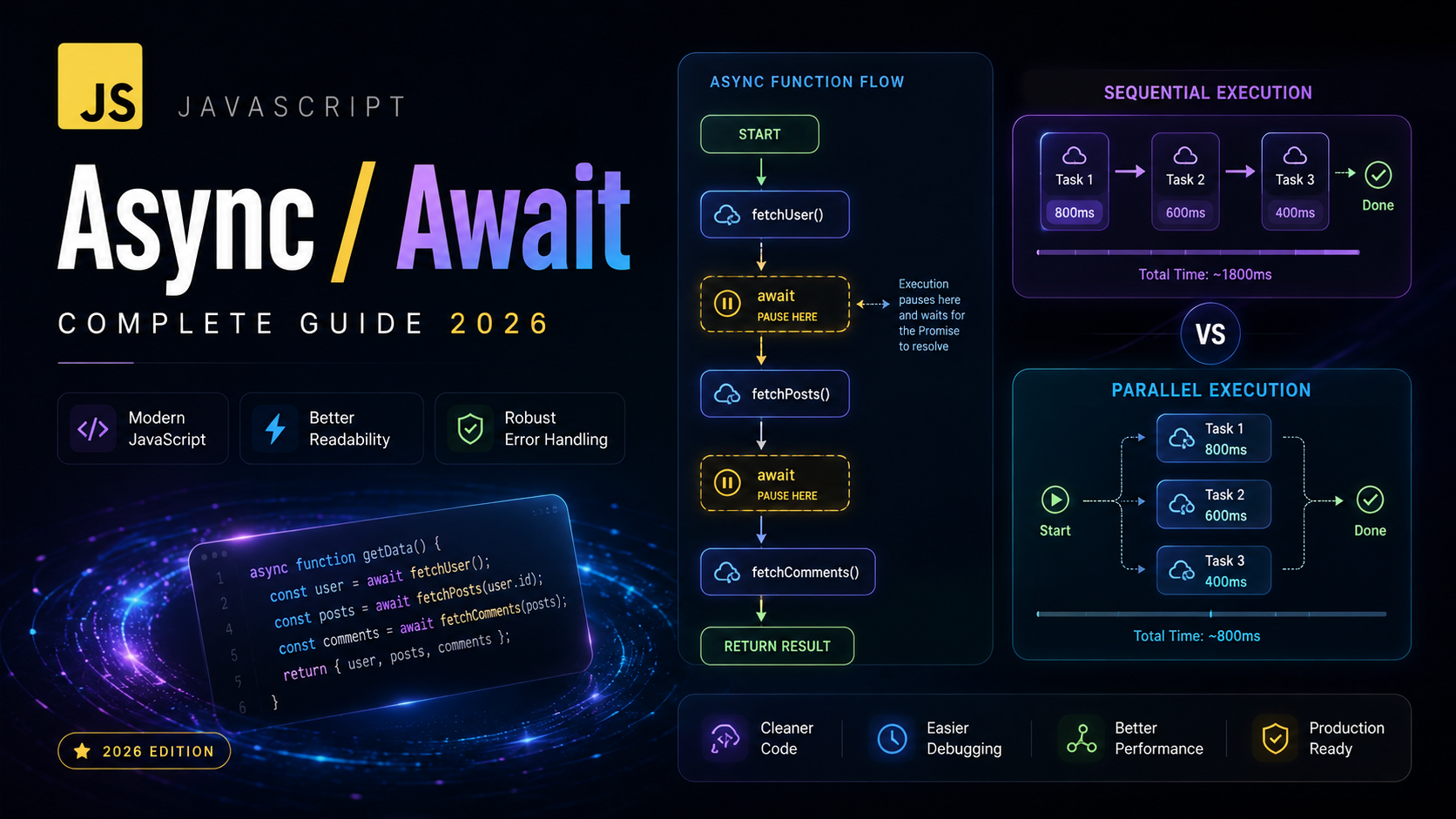
JavaScript Async/Await: Write Cleaner Async Code
JavaScript async/await is the most elegant way to write asynchronous code. Introduced in ES2017, async/await is syntactic sugar built on top of Promises that lets you write async code that looks and reads like synchronous code. If you have mastered callbacks and promises, async/await will feel like a natural evolution.
In this lesson, you will learn how async functions work, how await pauses execution without blocking the event loop, how to handle errors with try/catch, and how to run async operations in parallel. These patterns are essential for working with APIs, databases, and any I/O-heavy JavaScript application.
What Is Async/Await?
Async/await is a language feature that allows you to write asynchronous code in a synchronous style. An async function always returns a promise, and the await keyword pauses the function execution until the awaited promise settles.
// Promise chain approach
function getUserData(userId) {
  return fetch(`/api/users/${userId}`)
    .then(response => response.json())
    .then(user => {
      return fetch(`/api/posts?userId=${user.id}`)
        .then(response => response.json())
        .then(posts => ({ user, posts }));
    });
}

// Async/await approach — same logic, much cleaner
async function getUserData(userId) {
  const response = await fetch(`/api/users/${userId}`);
  const user = await response.json();

  const postsResponse = await fetch(`/api/posts?userId=${user.id}`);
  const posts = await postsResponse.json();

  return { user, posts };
}
Both versions do exactly the same thing. The async/await version reads top-to-bottom like synchronous code, making it dramatically easier to understand and maintain. See the MDN async JavaScript guide for the full picture.
Async Functions
The async keyword before a function declaration makes it an async function. Async functions have two special properties:
- They always return a promise — even if you return a plain value
- They allow you to use the
awaitkeyword inside them
// All of these return a promise
async function getNumber() {
  return 42; // automatically wrapped in Promise.resolve(42)
}

const getNumberArrow = async () => 42;

const obj = {
  async getData() {
    return "data";
  }
};

class ApiClient {
  async fetch(url) {
    const response = await fetch(url);
    return response.json();
  }
}

// The return value is always a promise
getNumber().then(num => console.log(num)); // 42
console.log(getNumber()); // Promise {<fulfilled>: 42}
Async JavaScript functions are just regular functions with a promise-based return type. You can use them anywhere you would use a regular function — as methods, arrow functions, callbacks, or class methods.
The await Keyword
The await keyword can only be used inside an async function (or at the top level of a module). It pauses the function execution until the promise resolves, then returns the resolved value:
async function fetchUserProfile(userId) {
  console.log("Fetching user...");

  // Execution pauses here until the fetch completes
  const response = await fetch(`/api/users/${userId}`);

  console.log("Got response, parsing JSON...");

  // Pauses again until JSON parsing completes
  const user = await response.json();

  console.log("User loaded:", user.name);
  return user;
}

// The function returns a promise
fetchUserProfile(1).then(user => {
  console.log("Done:", user);
});
Critical point: await does NOT block the main thread. It only pauses the async function. Other code, event handlers, and timers continue to run normally. Under the hood, await uses the microtask queue — the same mechanism that powers .then() on promises.
async function demo() {
  console.log("A: Before await");
  await Promise.resolve();
  console.log("B: After await");
}

console.log("1: Before calling demo");
demo();
console.log("2: After calling demo");

// Output:
// 1: Before calling demo
// A: Before await
// 2: After calling demo
// B: After await
Notice that “2” prints before “B” — the await yields control back to the caller, and execution resumes after the current call stack clears.
Error Handling with Try/Catch
With async/await, you handle errors using familiar try/catch blocks instead of .catch() chains. This is one of the biggest advantages — error handling looks just like synchronous code:
async function loadUserDashboard(userId) {
  try {
    const userResponse = await fetch(`/api/users/${userId}`);
    if (!userResponse.ok) {
      throw new Error(`Failed to load user: HTTP ${userResponse.status}`);
    }
    const user = await userResponse.json();

    const postsResponse = await fetch(`/api/posts?userId=${userId}`);
    if (!postsResponse.ok) {
      throw new Error(`Failed to load posts: HTTP ${postsResponse.status}`);
    }
    const posts = await postsResponse.json();

    return { user, posts };
  } catch (error) {
    console.error("Dashboard failed to load:", error.message);
    // Return fallback data or re-throw
    return { user: null, posts: [], error: error.message };
  } finally {
    hideLoadingSpinner();
  }
}
You can also create granular error handling by using multiple try/catch blocks:
async function processOrder(orderId) {
  let order;
  try {
    order = await fetchOrder(orderId);
  } catch (error) {
    throw new Error(`Order not found: ${error.message}`);
  }

  let payment;
  try {
    payment = await processPayment(order);
  } catch (error) {
    await cancelOrder(orderId);
    throw new Error(`Payment failed: ${error.message}`);
  }

  try {
    await sendConfirmation(order, payment);
  } catch (error) {
    // Non-critical — log but don't fail the order
    console.warn("Confirmation email failed:", error.message);
  }

  return { order, payment };
}
For a deeper dive into error handling patterns, see our lesson on error handling. The javascript.info async/await tutorial also covers error handling in detail.
Running Async Operations in Parallel
A common mistake with async/await is making everything sequential when operations could run in parallel. Use Promise.all() with await for parallel execution:
// SLOW: Sequential — each await waits for the previous one
async function getPageDataSlow() {
  const user = await fetchUser();       // 500ms
  const posts = await fetchPosts();     // 300ms
  const comments = await fetchComments(); // 200ms
  // Total: ~1000ms
  return { user, posts, comments };
}

// FAST: Parallel — all requests start at the same time
async function getPageDataFast() {
  const [user, posts, comments] = await Promise.all([
    fetchUser(),       // 500ms
    fetchPosts(),      // 300ms
    fetchComments(),   // 200ms
  ]);
  // Total: ~500ms (limited by slowest request)
  return { user, posts, comments };
}
Use destructuring to cleanly unpack the results from Promise.all. This pattern cuts request time in half for independent operations.
Sequential vs Parallel: Performance Matters
The decision between sequential and parallel execution depends on whether operations have dependencies:
// Sequential: each step depends on the previous result
async function getOrderDetails(orderId) {
  const order = await fetchOrder(orderId);
  const customer = await fetchCustomer(order.customerId); // needs order
  const shipping = await fetchShipping(order.shippingId); // needs order
  return { order, customer, shipping };
}

// Hybrid: start independent operations in parallel
async function getOrderDetailsFast(orderId) {
  const order = await fetchOrder(orderId); // must be first

  // These two are independent — run in parallel
  const [customer, shipping] = await Promise.all([
    fetchCustomer(order.customerId),
    fetchShipping(order.shippingId),
  ]);

  return { order, customer, shipping };
}
The hybrid approach is often the best real-world pattern. Start with what you need, then parallelize everything that can run simultaneously.
Parallel Execution with Error Tolerance
async function loadDashboardWidgets() {
  const results = await Promise.allSettled([
    fetchNotifications(),
    fetchRecentActivity(),
    fetchAnalytics(),
    fetchWeather(),
  ]);

  return {
    notifications: results[0].status === "fulfilled" ? results[0].value : [],
    activity: results[1].status === "fulfilled" ? results[1].value : [],
    analytics: results[2].status === "fulfilled" ? results[2].value : null,
    weather: results[3].status === "fulfilled" ? results[3].value : null,
  };
}
Async Iteration and for-await-of
ES2018 introduced for-await-of for iterating over async iterables. This is useful for processing streams of data:
// Async generator function
async function* fetchPages(baseUrl) {
  let page = 1;
  let hasMore = true;

  while (hasMore) {
    const response = await fetch(`${baseUrl}?page=${page}`);
    const data = await response.json();

    yield data.items;

    hasMore = data.hasNextPage;
    page++;
  }
}

// Consume with for-await-of
async function getAllItems() {
  const allItems = [];

  for await (const items of fetchPages("/api/products")) {
    allItems.push(...items);
    console.log(`Loaded ${allItems.length} items so far...`);
  }

  return allItems;
}
This pattern is excellent for paginated APIs, file streams, or any scenario where data arrives in chunks. Using arrays methods like spread syntax keeps the accumulation clean.
Top-Level Await
ES2022 introduced top-level await, which allows you to use await outside of async functions — but only in ES modules:
// config.js (ES module)
const response = await fetch("/api/config");
export const config = await response.json();

// app.js (ES module)
import { config } from "./config.js";
// config is already loaded and available
console.log(config.apiKey);
Top-level await is especially useful for module initialization, configuration loading, and database connections. Note that it only works in modules (files with type="module"), not in regular scripts. See the V8 top-level await documentation for details.
Real-World Async/Await Patterns
Retry with Exponential Backoff
async function fetchWithRetry(url, options = {}) {
  const { retries = 3, baseDelay = 1000 } = options;

  for (let attempt = 0; attempt <= retries; attempt++) {
    try {
      const response = await fetch(url);
      if (!response.ok) throw new Error(`HTTP ${response.status}`);
      return await response.json();
    } catch (error) {
      if (attempt === retries) throw error;

      const delay = baseDelay * Math.pow(2, attempt);
      console.log(`Attempt ${attempt + 1} failed. Retrying in ${delay}ms...`);
      await new Promise(resolve => setTimeout(resolve, delay));
    }
  }
}

// Usage
const data = await fetchWithRetry("/api/flaky-endpoint", {
  retries: 5,
  baseDelay: 500,
});
Async Queue with Concurrency Limit
async function processWithLimit(items, limit, asyncFn) {
  const results = [];
  const executing = new Set();

  for (const item of items) {
    const promise = asyncFn(item).then(result => {
      executing.delete(promise);
      return result;
    });

    executing.add(promise);
    results.push(promise);

    if (executing.size >= limit) {
      await Promise.race(executing);
    }
  }

  return Promise.all(results);
}

// Upload 100 files, max 5 at a time
const uploadResults = await processWithLimit(
  files,
  5,
  async (file) => {
    const formData = new FormData();
    formData.append("file", file);
    const response = await fetch("/api/upload", {
      method: "POST",
      body: formData,
    });
    return response.json();
  }
);
Caching Async Results
function createAsyncCache(fetchFn, ttlMs = 60000) {
  const cache = new Map();

  return async function(key) {
    const cached = cache.get(key);
    if (cached && Date.now() - cached.timestamp < ttlMs) {
      return cached.value;
    }

    const value = await fetchFn(key);
    cache.set(key, { value, timestamp: Date.now() });
    return value;
  };
}

const getUser = createAsyncCache(
  async (id) => {
    const response = await fetch(`/api/users/${id}`);
    return response.json();
  },
  30000 // 30 second cache
);

const user = await getUser(1); // fetches from API
const same = await getUser(1); // returns cached version
This caching pattern uses closures to maintain the cache map between calls. It is a common pattern for reducing API calls in frontend applications.
Common Mistakes and Pitfalls
1. Forgetting await
// BUG: forgot await — response is a Promise, not a Response
async function loadData() {
  const response = fetch("/api/data"); // missing await!
  const data = response.json(); // TypeError: response.json is not a function
}

// FIX: always await async operations
async function loadData() {
  const response = await fetch("/api/data");
  const data = await response.json();
  return data;
}
2. Using await in a forEach Loop
// BUG: forEach doesn't wait for async callbacks
async function processItems(items) {
  items.forEach(async (item) => {
    await processItem(item); // runs in parallel, not sequential!
  });
  console.log("Done!"); // prints BEFORE items are processed
}

// FIX: use for...of for sequential processing
async function processItems(items) {
  for (const item of items) {
    await processItem(item);
  }
  console.log("Done!"); // prints AFTER all items are processed
}

// FIX: use Promise.all for parallel processing
async function processItems(items) {
  await Promise.all(items.map(item => processItem(item)));
  console.log("Done!");
}
3. Not Handling Errors
// BAD: unhandled rejection if fetch fails
async function getData() {
  const response = await fetch("/api/data");
  return response.json();
}
getData(); // if this rejects, it's unhandled!

// GOOD: handle errors at the call site
getData()
  .then(data => console.log(data))
  .catch(error => console.error(error));

// OR: handle errors inside the function
async function getData() {
  try {
    const response = await fetch("/api/data");
    return await response.json();
  } catch (error) {
    console.error("Failed to fetch data:", error);
    return null;
  }
}
4. Making Independent Operations Sequential
// SLOW: these don't depend on each other
const users = await fetchUsers();
const products = await fetchProducts();
const orders = await fetchOrders();

// FAST: run in parallel
const [users, products, orders] = await Promise.all([
  fetchUsers(),
  fetchProducts(),
  fetchOrders(),
]);
Summary and Key Takeaways
asyncfunctions always return a promise and allow use ofawaitinsideawaitpauses the async function (not the main thread) until a promise settles- Use try/catch/finally for error handling — it works exactly like synchronous code
- Use
Promise.all()with await for parallel execution of independent operations - Use
for...ofwith await for sequential execution — never useforEachwith async for-await-ofhandles async iterables (streams, paginated APIs)- Top-level await works in ES modules for initialization
- Always handle errors — either with try/catch or
.catch()at the call site - Profile your code: unnecessary sequential awaits are a common performance bug
With async/await mastered, you are ready to put it into practice with the Fetch API, which is the standard way to make HTTP requests in modern JavaScript. The MDN async function reference is the definitive source for edge cases and browser compatibility.