JavaScript Event Loop & Call Stack: How Async Really Works
The JavaScript event loop is the secret engine behind every asynchronous operation in your code. Despite being a single-threaded language, JavaScript handles thousands of concurrent operations — timers, network requests, user interactions — all thanks to the event loop and call stack working together. Understanding this mechanism is not optional if you want to write performant, bug-free async code.
In this lesson, you will learn exactly how the JavaScript call stack processes function calls, how the event loop coordinates between the stack and task queues, and why some callbacks execute before others. If you have worked with callbacks before, this lesson explains the machinery behind them.
What Is the Call Stack?
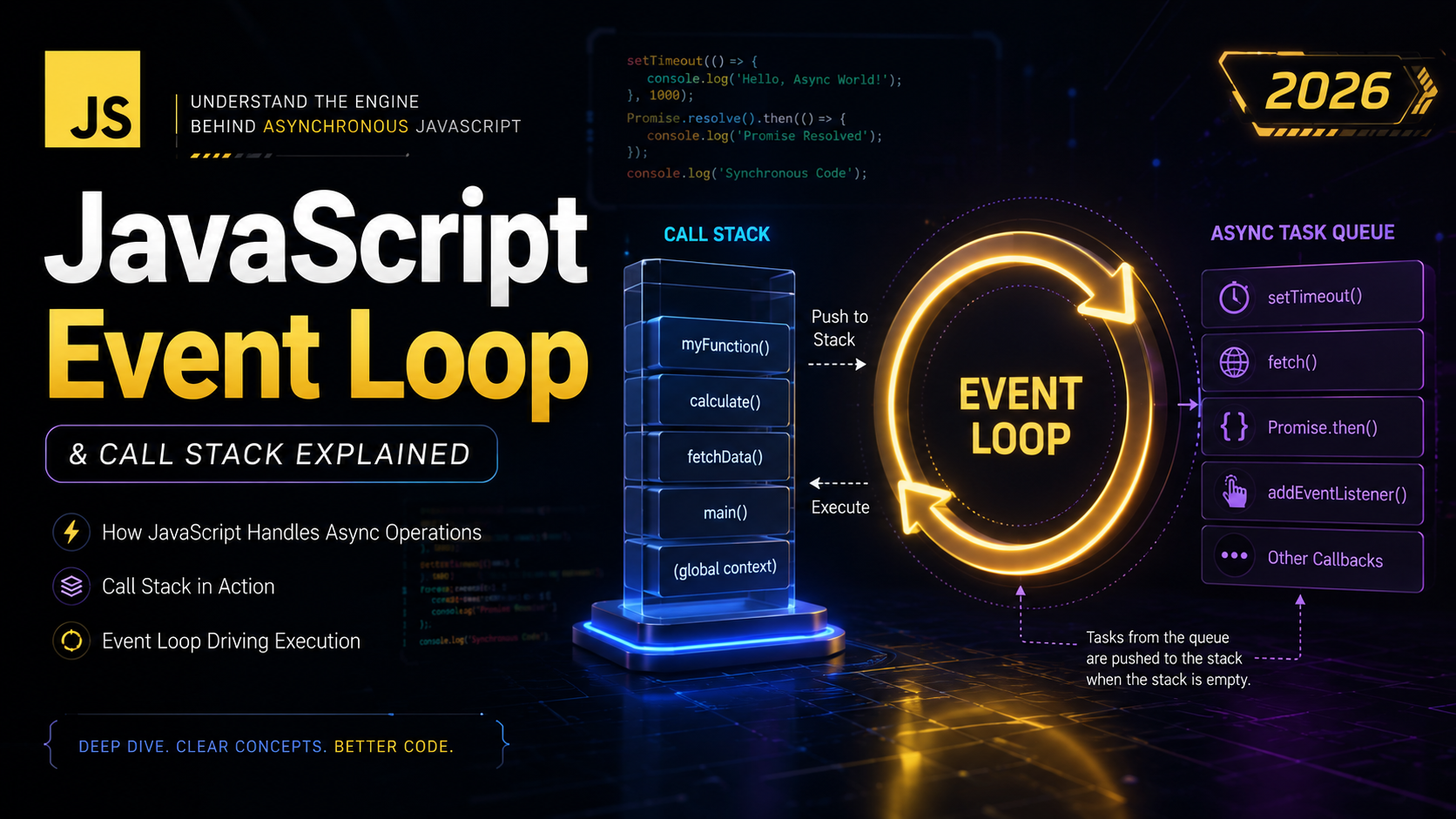
The call stack is a data structure that tracks which function is currently executing and which functions called it. JavaScript uses a single call stack, which means it can only execute one piece of code at a time. Every time you call a function, it gets pushed onto the stack. When the function returns, it gets popped off.
Think of it as a stack of plates — you can only add or remove plates from the top. The most recently called function is always at the top of the stack.
How the Call Stack Works
Let’s trace through a simple example to see the call stack in action:
function multiply(a, b) {
  return a * b;
}

function square(n) {
  return multiply(n, n);
}

function printSquare(n) {
  const result = square(n);
  console.log(result);
}

printSquare(5);
Here’s what happens step by step:
printSquare(5)is called — pushed onto the stacksquare(5)is called insideprintSquare— pushed onto the stackmultiply(5, 5)is called insidesquare— pushed onto the stackmultiplyreturns 25 — popped off the stacksquarereturns 25 — popped off the stackconsole.log(25)runs — pushed on, executes, popped offprintSquarereturns — popped off the stack
At step 3, the call stack looks like this: multiply → square → printSquare → main(). When you see a stack trace in your browser’s developer tools, you are looking at a snapshot of the call stack at the moment an error occurred. Understanding JavaScript functions and how they execute is essential to reading these traces.
Stack Overflow Errors
The call stack has a maximum size. If you push too many frames onto it (usually through infinite recursion), you get a stack overflow:
function recurse() {
  recurse(); // calls itself forever
}

recurse();
// Uncaught RangeError: Maximum call stack size exceeded
Browsers typically allow between 10,000 and 25,000 frames before throwing this error. This is a critical concept when working with recursive algorithms — always ensure your recursion has a proper base case.
What Is the Event Loop?
The JavaScript event loop is a continuously running process that monitors the call stack and the task queues. Its job is simple but crucial: if the call stack is empty, take the next task from the queue and push it onto the stack for execution.
Here’s the simplified algorithm:
// Pseudocode for the event loop
while (true) {
  // 1. Execute all microtasks
  while (microtaskQueue.hasItems()) {
    const task = microtaskQueue.dequeue();
    execute(task);
  }

  // 2. Take ONE macrotask if available
  if (macrotaskQueue.hasItems()) {
    const task = macrotaskQueue.dequeue();
    execute(task);
  }

  // 3. Render updates if needed
  if (needsRender()) {
    render();
  }
}
The event loop is what makes asynchronous JavaScript possible. Without it, every network request, timer, or file operation would freeze the browser until completion. For a detailed specification, see the HTML Living Standard event loop documentation.
Web APIs and the Browser
JavaScript itself does not have built-in timer or network capabilities. These are provided by the browser (or Node.js) through Web APIs. When you call setTimeout, fetch, or add an event listener, you are handing work off to the browser’s C++ infrastructure.
console.log("Start");

setTimeout(function timer() {
  console.log("Timer fired");
}, 2000);

console.log("End");

// Output:
// Start
// End
// Timer fired (after ~2 seconds)
What happens internally:
console.log("Start")— executes immediately on the call stacksetTimeout— the browser starts a 2-second timer (Web API handles this)console.log("End")— executes immediately on the call stack- After 2 seconds, the browser pushes the
timercallback into the task queue - The event loop sees the call stack is empty, picks up the callback, and executes it
This is why the output order is “Start”, “End”, “Timer fired” — not “Start”, “Timer fired”, “End”. The timer callback never runs until the call stack is completely empty. The MDN setTimeout documentation explains additional nuances.
The Task Queue (Callback Queue)
The task queue (also called the callback queue or macrotask queue) holds callbacks from Web APIs that are ready to execute. Examples include:
setTimeoutandsetIntervalcallbacks- DOM events (click, scroll, keypress)
requestAnimationFramecallbacks- I/O operations (in Node.js)
The event loop processes one macrotask per iteration. After executing a macrotask, it checks for any microtasks before moving to the next macrotask or rendering.
The Microtask Queue
The microtask queue is a separate, higher-priority queue. Microtasks include:
- Promise
.then(),.catch(), and.finally()callbacks MutationObservercallbacksqueueMicrotask()callbacks
The critical difference: all microtasks are drained before the next macrotask executes. This means if a microtask queues another microtask, that new microtask runs before any pending macrotasks.
setTimeout(() => console.log("Macrotask"), 0);

Promise.resolve().then(() => console.log("Microtask 1"));
Promise.resolve().then(() => console.log("Microtask 2"));

console.log("Synchronous");

// Output:
// Synchronous
// Microtask 1
// Microtask 2
// Macrotask
Even though setTimeout was registered first, both Promise microtasks execute before it. This ordering is essential to understand for predictable async code. Learn more about the microtask guide on MDN.
Microtasks vs Macrotasks
Understanding the difference between microtasks and macrotasks is one of the most important concepts in advanced JavaScript:
| Feature | Microtasks | Macrotasks |
|---|---|---|
| Priority | Higher — all drained first | Lower — one per loop iteration |
| Examples | Promise.then, queueMicrotask | setTimeout, setInterval, I/O |
| Rendering | Blocks rendering until drained | Rendering can happen between tasks |
| Starvation risk | Can starve macrotasks | Cannot starve microtasks |
// Microtask starvation example — DON'T do this!
function endlessMicrotasks() {
  Promise.resolve().then(() => {
    console.log("Microtask");
    endlessMicrotasks(); // queues another microtask forever
  });
}

endlessMicrotasks();
// The browser will freeze because macrotasks (rendering, events) never get a turn
Event Loop in Action: Step-by-Step
Let’s trace a complex example that combines synchronous code, macrotasks, and microtasks:
console.log("1: Script start");

setTimeout(() => {
  console.log("2: setTimeout");
  Promise.resolve().then(() => {
    console.log("3: Promise inside setTimeout");
  });
}, 0);

Promise.resolve()
  .then(() => {
    console.log("4: Promise 1");
  })
  .then(() => {
    console.log("5: Promise 2");
  });

console.log("6: Script end");
Output:
1: Script start
6: Script end
4: Promise 1
5: Promise 2
2: setTimeout
3: Promise inside setTimeout
Execution trace:
- Lines 1 and 6 run synchronously (call stack)
- Call stack is now empty — event loop drains microtask queue
- “Promise 1” runs (microtask), which chains “Promise 2” (another microtask)
- “Promise 2” runs (microtask queue now empty)
- Event loop picks the next macrotask: the setTimeout callback
- “setTimeout” logs, and a new Promise microtask is queued
- Microtask queue is drained again: “Promise inside setTimeout”
The setTimeout(fn, 0) Myth
A common misconception is that setTimeout(fn, 0) means “execute immediately.” It does not. It means “execute as soon as possible after the current call stack and all microtasks are clear.” In practice, browsers enforce a minimum delay of ~4ms for nested timeouts.
const start = Date.now();

setTimeout(() => {
  console.log(`Actual delay: ${Date.now() - start}ms`);
}, 0);

// Heavy synchronous work
for (let i = 0; i < 100000000; i++) {
  // blocking...
}

console.log(`Sync work took: ${Date.now() - start}ms`);

// Output:
// Sync work took: ~150ms
// Actual delay: ~150ms (NOT 0ms!)
The setTimeout callback had to wait for the loops to finish because the call stack was not empty. This is why you should never rely on setTimeout for precise timing. The javascript.info event loop tutorial has excellent visualizations of this behavior.
Real-World Event Loop Examples
Breaking Up Long Tasks
If you have a computationally expensive task, you can break it into chunks using setTimeout to keep the UI responsive:
function processLargeArray(array, chunkSize = 1000) {
  let index = 0;

  function processChunk() {
    const end = Math.min(index + chunkSize, array.length);

    for (let i = index; i < end; i++) {
      // process array[i]
      array[i] = array[i] * 2;
    }

    index = end;

    if (index < array.length) {
      // Yield to the event loop — let rendering and events happen
      setTimeout(processChunk, 0);
    } else {
      console.log("Processing complete!");
    }
  }

  processChunk();
}
This pattern is particularly useful when doing DOM modification operations on large datasets — without yielding, the browser would freeze.
Debouncing User Input
function debounce(fn, delay) {
  let timeoutId;

  return function (...args) {
    clearTimeout(timeoutId);
    timeoutId = setTimeout(() => {
      fn.apply(this, args);
    }, delay);
  };
}

const searchInput = document.querySelector("#search");
const handleSearch = debounce((e) => {
  console.log("Searching for:", e.target.value);
  // Make API call here
}, 300);

searchInput.addEventListener("input", handleSearch);
The debounce pattern uses the event loop’s setTimeout to ensure the search function only fires after the user stops typing for 300ms. This is common in forms and search interfaces.
Blocking the Event Loop
Since JavaScript is single-threaded, any long-running synchronous code blocks the event loop entirely. During this time, the browser cannot:
- Respond to user clicks or keyboard input
- Render visual updates
- Process network responses
- Execute timer callbacks
// BAD: This blocks the event loop for seconds
function heavyComputation() {
  const data = [];
  for (let i = 0; i < 10000000; i++) {
    data.push(Math.sqrt(i) * Math.random());
  }
  return data;
}

// BETTER: Use Web Workers for CPU-intensive tasks
const worker = new Worker("heavy-worker.js");
worker.postMessage({ iterations: 10000000 });
worker.onmessage = (e) => {
  console.log("Result:", e.data);
};
For a thorough look at Web Workers and threads, check the MDN Web Workers API documentation.
Common Mistakes and Pitfalls
1. Expecting setTimeout to Be Precise
// WRONG assumption: this will fire in exactly 100ms
setTimeout(callback, 100);

// REALITY: it fires in AT LEAST 100ms
// Actual time depends on call stack and task queue state
2. Forgetting That Microtasks Block Rendering
// This will freeze the UI just like synchronous code
async function freezeUI() {
  for (let i = 0; i < 1000000; i++) {
    await Promise.resolve(); // microtask, doesn't yield to rendering
  }
}
3. Not Understanding Execution Order
for (var i = 0; i < 3; i++) {
  setTimeout(() => console.log(i), 0);
}
// Output: 3, 3, 3 (NOT 0, 1, 2)
// By the time callbacks run, the loop has finished and i is 3

// Fix: use let (block scoping) or closures
for (let i = 0; i < 3; i++) {
  setTimeout(() => console.log(i), 0);
}
// Output: 0, 1, 2
This pitfall combines understanding of JavaScript variables, closures, and the event loop. The var version fails because all three callbacks share the same i variable, and the event loop doesn’t run callbacks until the synchronous loop completes.
Summary and Key Takeaways
- The call stack is a LIFO structure that tracks function execution — one function at a time
- The event loop continuously checks: is the call stack empty? If yes, process queued tasks
- Web APIs (provided by the browser) handle timers, network requests, and DOM events off the main thread
- The microtask queue (Promises) has higher priority than the macrotask queue (setTimeout)
- All microtasks drain before the next macrotask executes
setTimeout(fn, 0)does NOT mean immediate — it means “after everything else currently queued”- Long synchronous operations block the event loop and freeze the UI
- Use Web Workers for CPU-intensive work, and
setTimeoutchunking for large DOM operations
The event loop is the foundation for everything async in JavaScript. With this knowledge, you are ready to tackle JavaScript Promises in the next lesson, which are built directly on top of the microtask queue.
For further reading, Philip Roberts’ talk “What the heck is the event loop anyway?” and Jake Archibald’s tasks, microtasks, queues, and schedules article are essential resources.